EasyManua.ls Logo

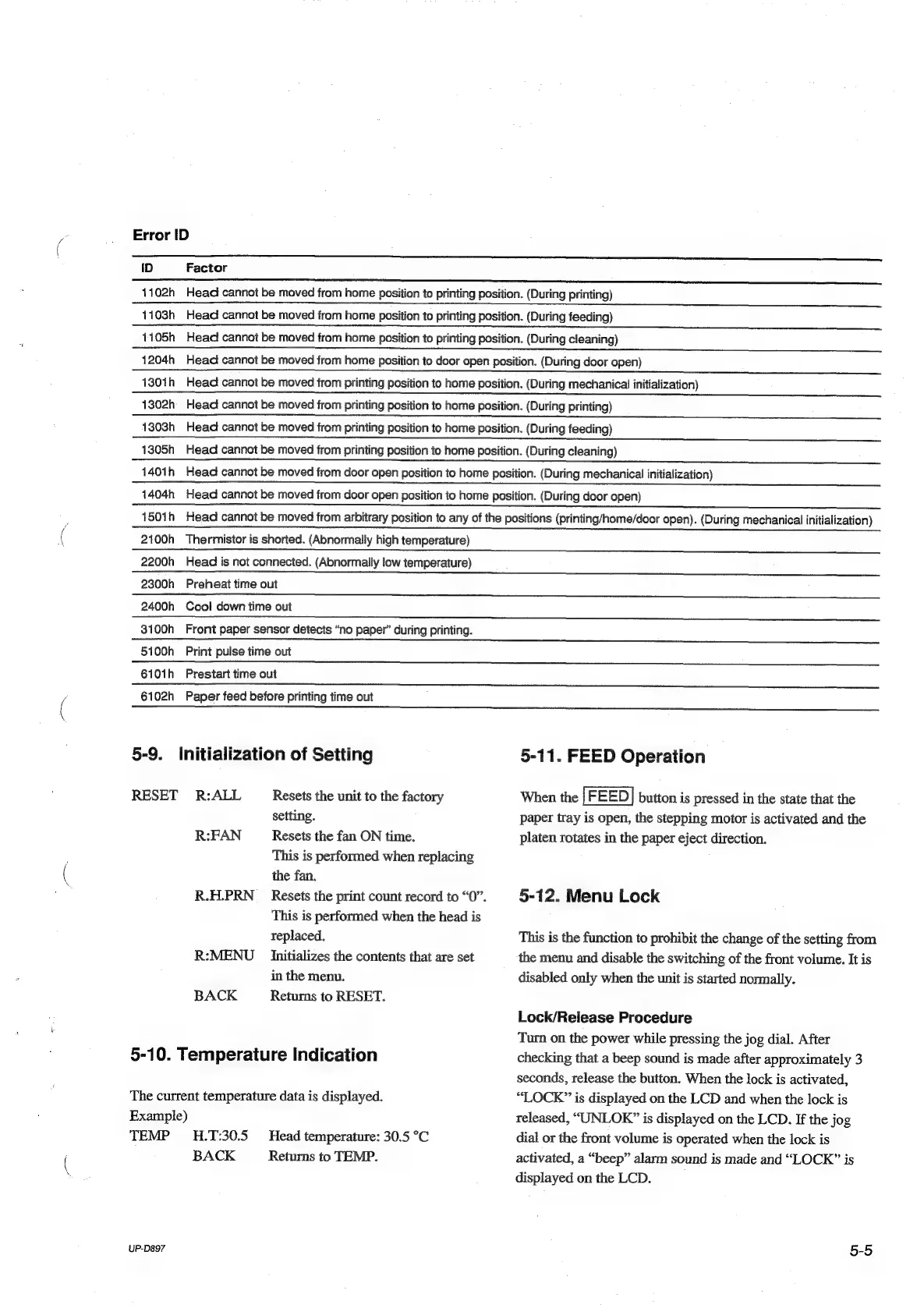
Sony UP-D897 - 5-9. Initialization of Setting; 5-10. Temperature Indication; 5-11. FEED Operation; 5-12. Menu Lock

Sony UP-D897
60 pages
Print Icon
To Next Page IconTo Next Page
To Previous Page IconTo Previous Page
Loading...
a.
Error
[ID
—_——n—
ee
nnn
eee
nee
ID
Factor
eee
1102h
Head
cannot
be
moved
from
home
position
to
printing
position.
(During
printing)
1103h
Head
cannot
be
moved
from
home
position
to
printing
position.
(During
feeding)
1105h
Head
cannot
be
moved
from
home
position
to
printing
position.
(During
cleaning)
1204h
Head
cannot
be
moved
from
home
position
to
door
open
position.
(During
door
open)
1301h
Head
cannot
be
moved
from
printing
position
to
home
position.
(During
mechanical
initialization)
1302h
Head
cannot
be
moved
from
printing
position
to
home
position.
(During
printing)
1303h
Head
cannot
be
moved
from
printing
position
to
home
position.
(During
feeding)
1305h
Head
cannot
be
moved
from
printing
position
to
home
position.
(During
cleaning)
1401h
Head
cannot
be
moved
from
door
open
position
to
home
position.
(During
mechanical
initialization)
1404h
Head
cannot
be
moved
from
door
open
position
to
home
position.
(During
door
open)
150ih
Head
cannot
be
moved
from
arbitrary
position
to
any
of
the
positions
(printing/home/door
open).
(During
mechanical
initialization)
nasi
oc
Pn
St
De
ae
A
rte
aera
Ac
ahr
ed
FI
ath
aah
ich
al
2100h
Thermistor
is
shorted.
(Abnormally
high
temperature)
2200h
Head
is
not
connected.
(Abnormally
low
temperature)
2300h
Preheat
time
out
2400h
Cool
down
time
out
3100h
Front
paper
sensor
detects
“no
paper”
during
printing.
5100h
Print
pulse
time
out
6101h
Prestart
time
out
6102h
Paper
feed
before
printing
time
out
5-9.
Initialization
of
Setting
RESET
R:ALL
Resets
the
unit
to
the
factory
setting.
R:FAN
Resets
the
fan
ON
time.
This
is
performed
when
replacing
the
fan.
R.H.PRN
_
Resets
the
print
count
record
to
“0”.
This
is
performed
when
the
head
is
teplaced.
R:MENU
Initializes
the
contents
that
are
set
in
the
menu.
BACK
Returns
to
RESET.
5-10.
Temperature
Indication
The
current
temperature
data
is
displayed.
Example)
TEMP
4H.T:30.5
Head
temperature:
30.5
°C
BACK
Returns
to
TEMP.
UP-D&97
5-11.
FEED
Operation
When
the
|
FEED]
button
is
pressed
in
the
state
that
the
paper
tray
is
open,
the
stepping
motor
is
activated
and
the
platen
rotates
in
the
paper
eject
direction.
5-12.
Menu
Lock
This
is
the
function
to
prohibit
the
change
of
the
setting
from
the
menu
and
disable
the
switching
of
the
front
volume.
It
is
disabled
only
when
the
unit
is
started
normally.
Lock/Release
Procedure
Turn
on
the
power
while
pressing
the
jog
dial.
After
checking
that
a
beep
sound
is
made
after
approximately
3
seconds,
release
the
button.
When
the
lock
is
activated,
“LOCK”
is
displayed
on
the
LCD
and
when
the
lock
is
released,
“UNLOK”
is
displayed
on
the
LCD.
If
the
jog
dial
or
the
front
volume
is
operated
when
the
lock
is
activated,
a
“beep”
alarm
sound
is
made
and
“LOCK”
is
displayed
on
the
LCD.
5-5

Table of Contents

Other manuals for Sony UP-D897

Related product manuals