EasyManua.ls Logo

Sony UP-D897 - 1-4-3. Thermal Head

Sony UP-D897
60 pages
Print Icon
To Next Page IconTo Next Page
To Previous Page IconTo Previous Page
Loading...
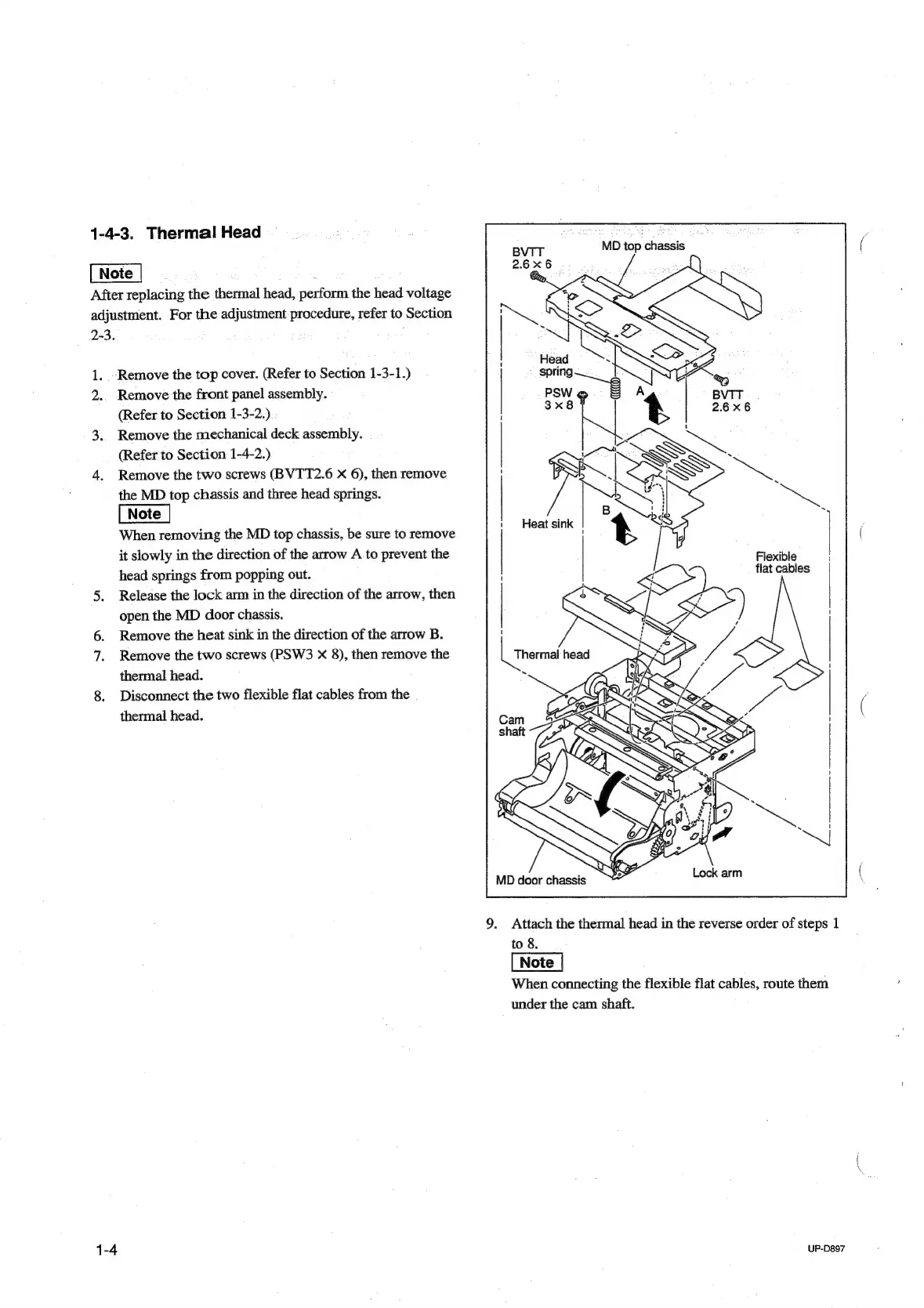
1-4-3.
Thermal
Head
,
After
replacing
the
thermal
head,
perform
the
head
voltage
adjustment.
For
the
adjustment
procedure,
refer
to
Section
2-3.
1.
Remove
the
top
cover.
(Refer
to
Section
1-3-1.)
2..
Remove
the
front
panel
assembly.
(Refer
to
Section
1-3-2.)
3..
Remove
the
mechanical
deck
assembly.
(Refer
to
Section
1-4-2.)
4.
Remove
the
two
screws
(BVTT2.6
x
6),
then
remove
the
MD
top
chassis
and
three
head
springs.
When
removing
the
MD
top
chassis,
be
sure
to
remove
Bees
lb
it
slowly
in
the
direction
of
the
arrow
A
to
prevent
the
head
springs
from
popping
out.
5.
Release
the
lock
arm
in
the
direction
of
the
arrow,
then
open
the
MD
door
chassis.
6.
Remove
the
heat
sink
in
the
direction
of
the
arrow
B.
7.
Remove
the
two
screws
(PSW3
x
8),
then
remove
the
|
thera
head
thermal
head.
.
8.
Disconnect
the
two
flexible
flat
cables
from
the
thermal
head.
Flexible
flat
cables
1
4
1
9.
Attach
the
thermal
head
in
the
reverse
order
of
steps
1
to
8.
When
connecting
the
flexible
flat
cables,
route
them
under
the
cam
shaft.
1-4
UP-D897

Table of Contents

Other manuals for Sony UP-D897

Related product manuals