19
Hand-held microphone (UTX-M40)
1
Press and hold the POWER/MUTE button or
POWER button to turn the power off.
The button used to turn off power varies depending
on the
POWER/MUTE setting.
For details, see “Setting the operation of the audio
muting function (POWER/MUTE)
(UTX-M40 only)”
(page 42).
2
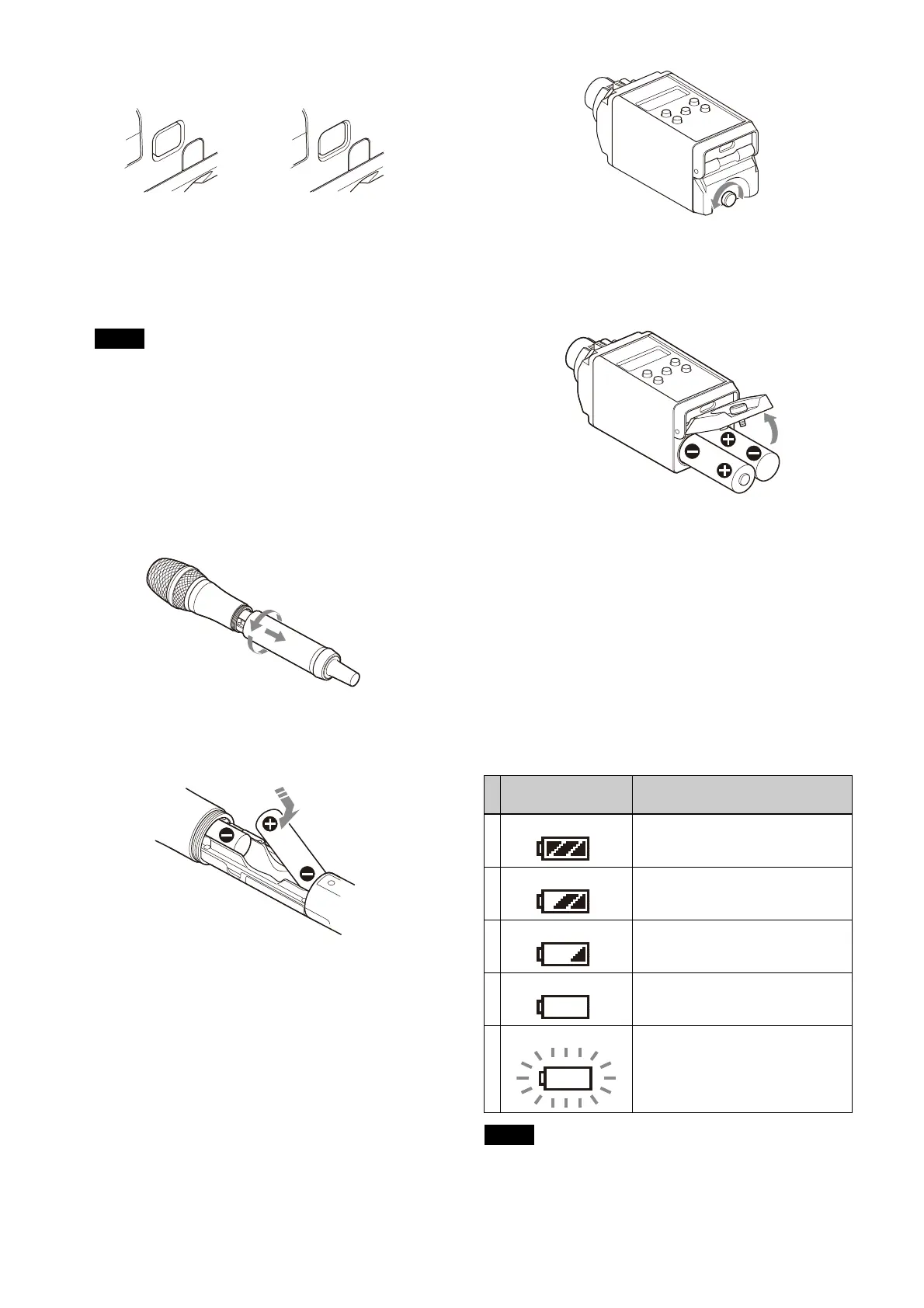
Turn the grip in the direction of the arrow, and pull
the grip down until the battery compartment is
visible.
3
Insert two new AA batteries into the battery
compartment with 3 and # polarities in the correct
orientation.
4
Close the grip, turning it in the reverse direction of
step 2.
Plug-on transmitter (UTX-P40)
1
Press and hold the POWER button to turn the power
off.
2
Turn the battery compartment knob counterclockwise
to open the cover.
3
Insert two new AA batteries into the battery
compartment with 3 and # polarities in the correct
orientation.
4
Close the battery compartment cover and turn the
knob clockwise to lock the cover.
Check that the cover is fully cl
osed before tightening
the knob.
Battery level indicator
Turning the power on will display the battery level on the
display.
Immediately replace both batteries with new batteries if
t
he indicator starts flashing (indication 5 below). If using
new alkaline batteries, use after checking the
recommended time limits.
• When BATTERY TYPE is set to TYPE1,
the battery
level is indicated based on the use of new LR6 (size
AA) alkaline batteries from a specific manufacturer.
Note
Battery level
indicator
Battery status
1 Lights Good
2 Lights Less than about 70% charge
remaining
3 Lights Less than about 40% charge
remaining
4 Lights Less than about 20% charge
remaining
5 Flashes Almost empty
Notes



 To Next Page