12
For details about the muting function, see “Setting the
operation of the audio muting function (POWER/MUTE)
(UTX-M40 only)” (page 42).
F Bat
tery level indicator
Displays the battery level.
For details, see “Battery level indicator” (page 19).
G Me
nu display section
Displays various functions. Press the + or – button to
switc
h functions.
For details, see “Configuration menu” (page 41).
H Gain mode
indicator
Displays the gain mode setting.
For details, see “Setting the audio gain (GAIN MODE)”
(page 41).
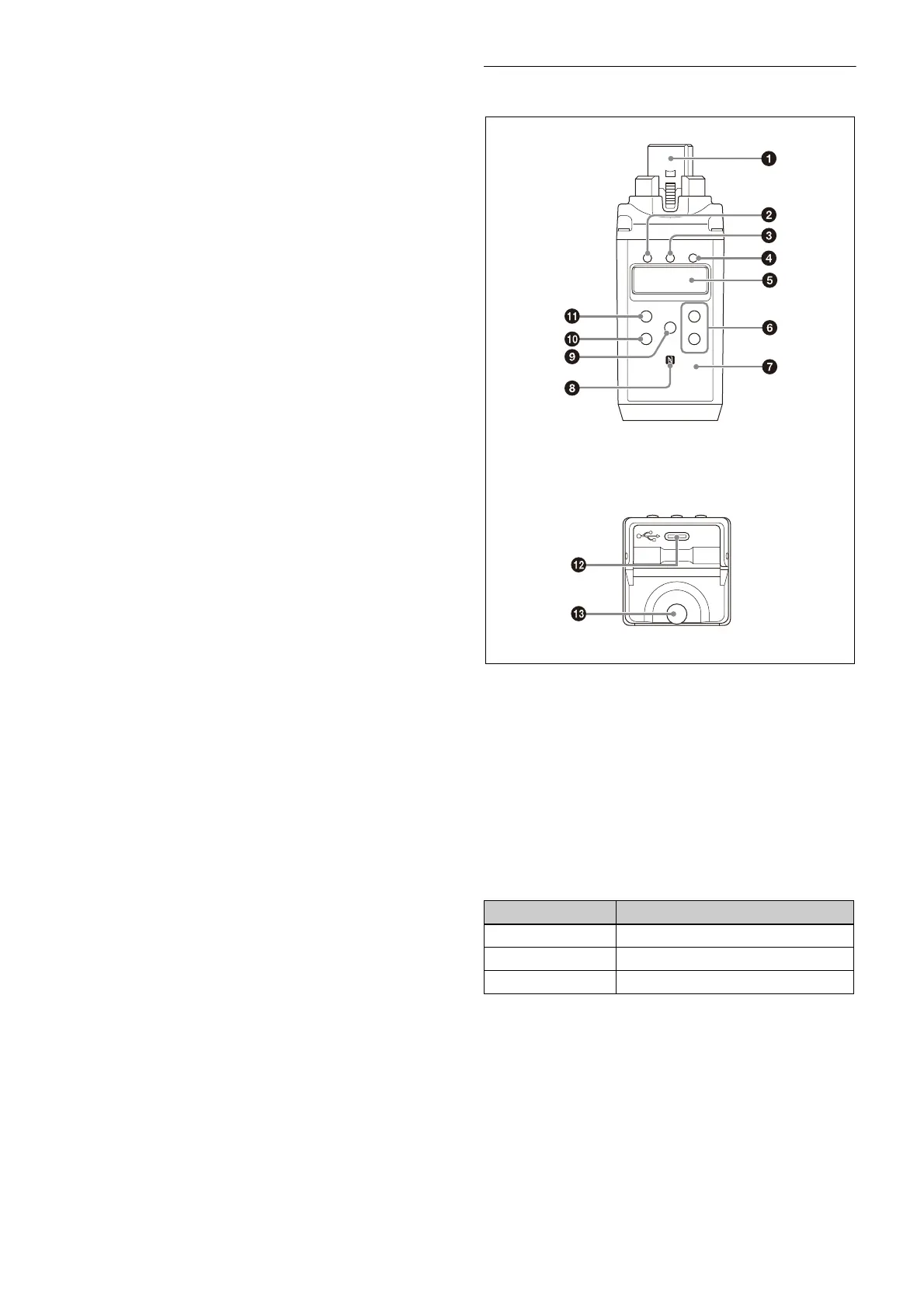
h Infr
ared detector
Receives the frequency and compander mode set on the
tune
r.
i SET bu
tton
Adjusts displayed function settings and enters the
di
splayed value.
Holding down the SET button while turning on the power
turns t
he transmitter on without transmitting a signal
(transmission stopped mode).
j USB connect
or (USB Type-C)
For use by service personnel.
k POWER button
Turns the power on/off.
l +
or – button
Selects functions or values sh
own on the display.
Plug-on transmitter (UTX-P40)
a Audio input connector (XLR type)
Connect to a microphone or the line ou
tput of an audio
mixer or other device.
b +48V (+48
V supply) indicator
Lights up when the unit is set to MIC
input and is
supplying power to the connected microphone.
c POWER indicator
Displays the battery level.
d AUDIO (audio
input level) indicator
Turns on or off according to
the audio input level as
follows.
On (red): A
udio input level is too high. If the sound is
distorted, adjust the attenuation level to decrease the
audio input level (page 41).
On (green): Au
dio input level is appropriate.
Off: There is
no audio input or the input level is too low.
Flashing (orange): Au
dio is muted (i.e., disabled).
Indicator display Status
On (green) Sufficient battery level
Flashing (green) Battery is getting low
Off Supply OFF



 To Next Page