11
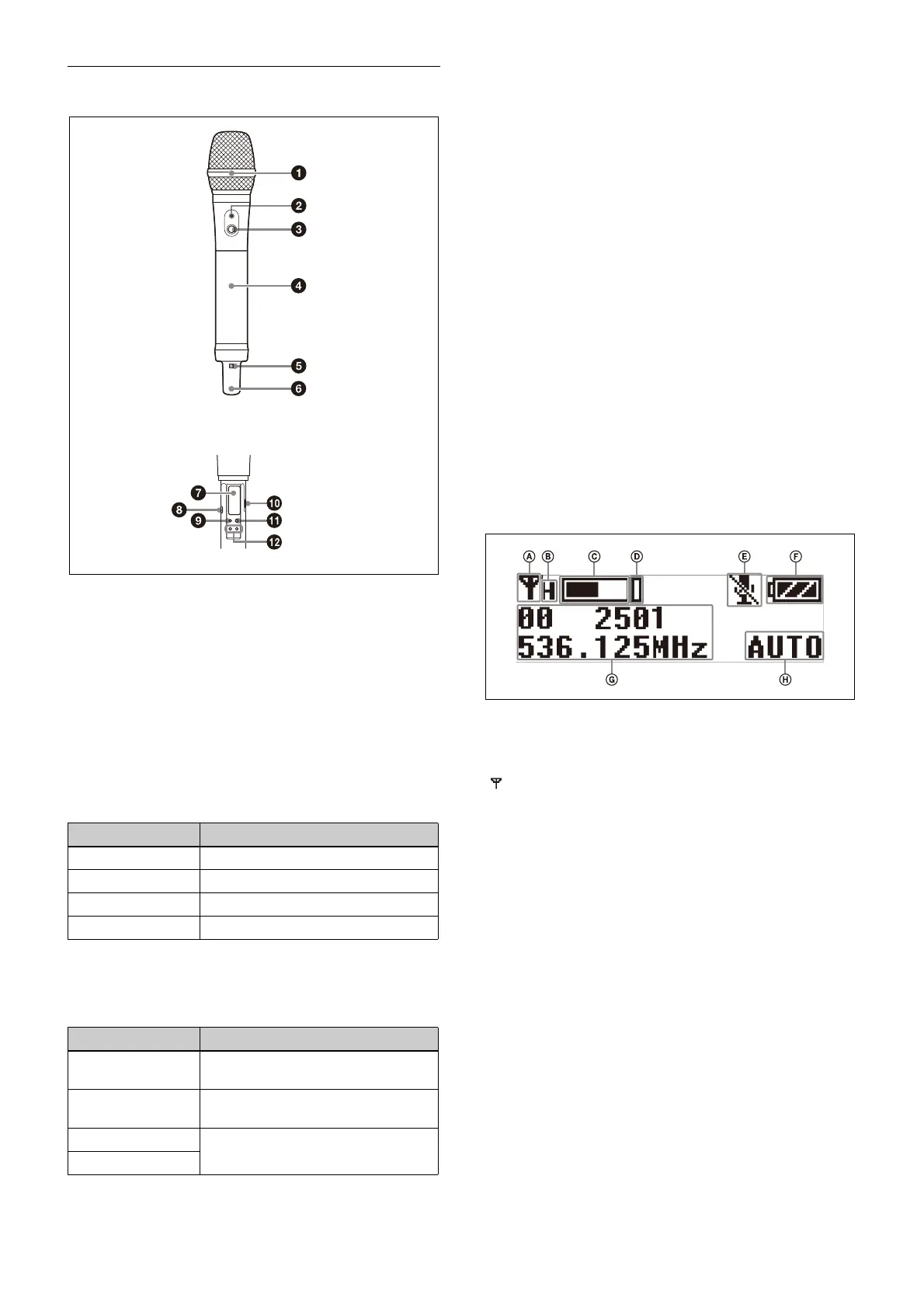
Hand-held microphone (UTX-M40)
a Microphone unit
The standard-equipped microp
hone unit can be
interchanged with another microphone unit having a
diameter of 31.3 mm and a pitch of 1.0 mm.
For details on attaching and removing the microphone
un
it, see “Replacing the microphone unit” (page 22).
b POWER indicator
Displays the battery level and audio muting (i.e., audio
enabled or
disabled) status.
c POWER/MUTE button
Turns the power on/off. You also use this button to turn
the muting
function on/off.
You can disable the power supply operation of the
POWER/MUTE button and change the muting function
on/off control method from the configuration menu.
For details, see “Setting the operation of the audio
muting function (POWER/MU
TE) (UTX-M40 only)”
(page 42).
d B
attery compartment
Accepts two AA batteries (alkali
ne, nickel metal hydride,
or lithium batteries).
For details on how to insert batteries, see “Power
Supply” (page 18).
e N-
Mark
Receives the frequency and comp
ander mode set on the
tuner. It also notifies the tuner about the frequency and
compander mode set on the transmitter.
f A
ntenna section
g D
isplay section
A RF transmission indicator
Displays the current transmission status.
B R
F transmission power indicator
Indicates the current transmission power setting. You can
c
hange the setting with the RF transmission power setting
function.
For details on the RF transmission power
setting
function, see “Setting the transmit output level (RF
POWER)” (page 42).
C Audio input level meter
Displays the audio input level.
D Peak indicato
r
Lights up when the signal is 3 dB below the level at which
distortion
begins as a warning of excessive input level.
E Muting statu
s indicator
Displays an icon when the muting function is on.
Indicator display Status
On (green) Sufficient battery level
Flashing (green) Battery is getting low
Off Supply OFF
Flashing (orange) Audio is muted (i.e., disabled)
Function Operation
Supply ON Press button for one second or
l
onger
Supply OFF Press button until the indicator turns
of
f
Muting ON Press button
Muting OFF
: Transmitting
– : Transmission stopped



 To Next Page