10
• If a lavalier microphone other than the one supplied is
connected, the proper performance may not be
obtained.
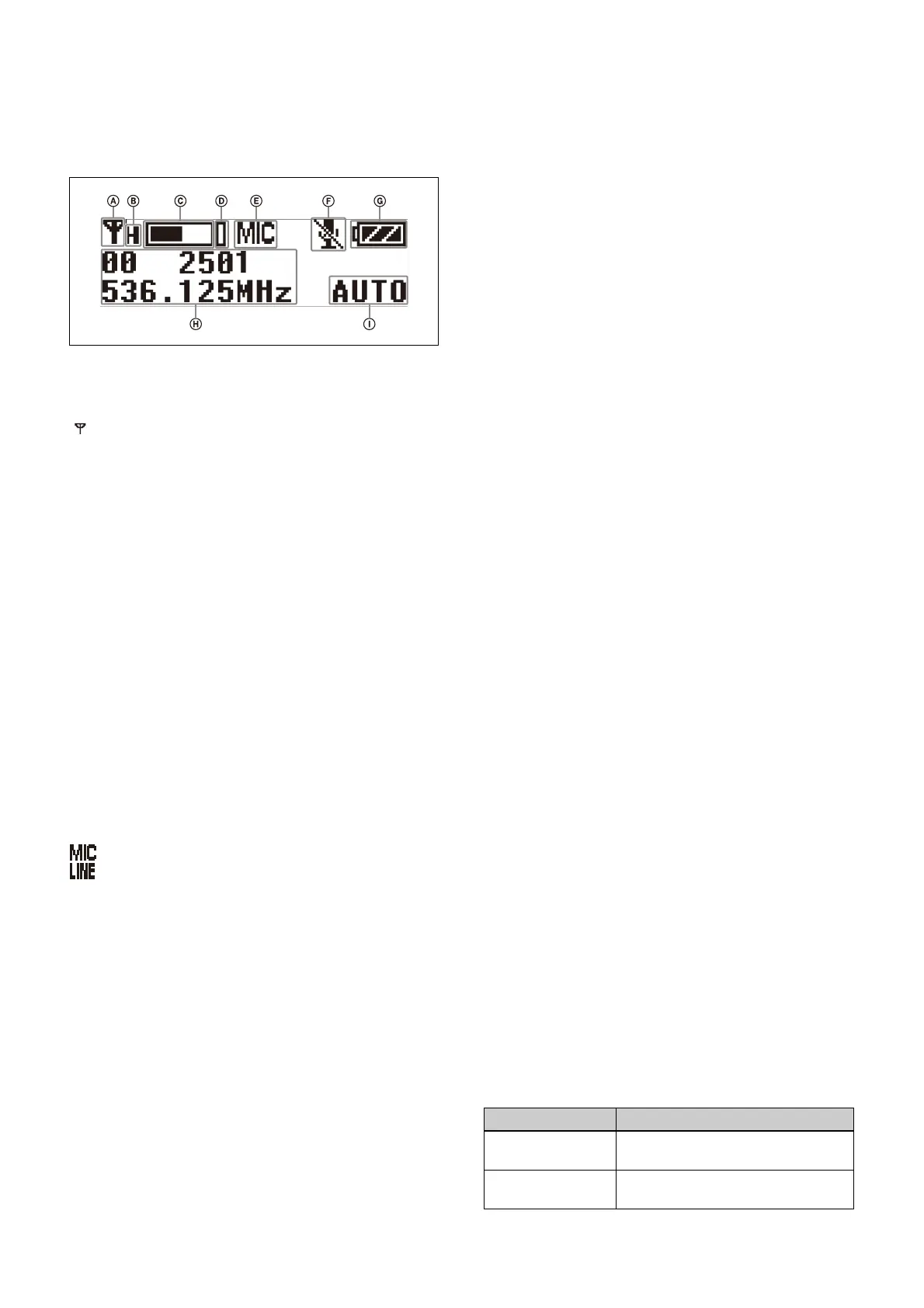
e Displa
y section
A RF transmission
indicator
Displays the current transmission status.
B RF
transmission power indicator
Indicates the current transmissio
n power setting. You can
change the setting with the RF transmission power setting
function.
For details on the RF transmission power setting
func
tion, see “Setting the transmit ou
tput level (RF
POWER)” (page 42).
C Audio inp
ut level meter
Displays the audio input level.
D Pe
ak indicator
Lights up when the signal is 3 dB below the level at which
d
istortion begins as a warning of excessive input level.
E Input level indicator
Displays the input level status.
: M
icrophone input
: Li
ne input
F Muting status indicato
r
Displays an icon when the
muting function is on.
For details about the muting function, see “Setting the
operation of the audio muting function (MUTE
SETTING) (UTX-B40/P40 only)” (page 42).
G Bat
tery level indicator
Displays the battery level. “USB” is displayed when
po
wer is supplied from the USB connector.
For details, see “Battery level indicator” (page 19).
H Me
nu display section
Displays various functions. Press the + or – button to
switc
h functions.
For details, see “Configuration menu” (page 41).
I Gain mo
de indicator
Displays the gain mode setting.
For details, see “Setting the audio gain (GAIN MODE)”
(page 41).
f +
or – button
Selects functions or values shown on the display.
g Infra
red detector
Receives the frequency and comp
ander mode set on the
tuner.
h N-
Mark
Receives the frequency and comp
ander mode set on the
tuner. It also notifies the tuner about the frequency and
compander mode set on the transmitter.
i B
attery compartment
Accepts two AA batteries (alkali
ne, nickel metal hydride,
or lithium batteries).
For details on how to insert batteries, see “Power
Supply” (page 18).
j MUTE button
Turns the muting function on/off. You can change the
mu
ting function on/off control method in the
configuration menu.
For details about switching the mut
ing function on/off,
see “Setting the operation of the audio muting function
(MUTE SETTING) (UTX-B4
0/P40 only)” (page 42).
k SET button
Adjusts displayed function settings and enters the
displayed v
alue.
Holding down the SET button while turning on the power
t
urns the transmitter on without transmitting a signal
(transmission stopped mode).
l USB conn
ector (USB Type-C
®
)
Connect to a commercially available USB portable power
supply.
When a USB portable power supply is connected while
the power is turned on, the unit automatically operates
with power supplied by the USB portable power supply.
m POWER button
Turns the power on/off.
: Transmitting
– : Tran
smission stopped
Function Operation
Supply ON Press button for one second or
lo
nger
Supply OFF Press button until the indicator turns
off



 To Next Page