79
nN
Connecting peripheral devices
Connecting a projector
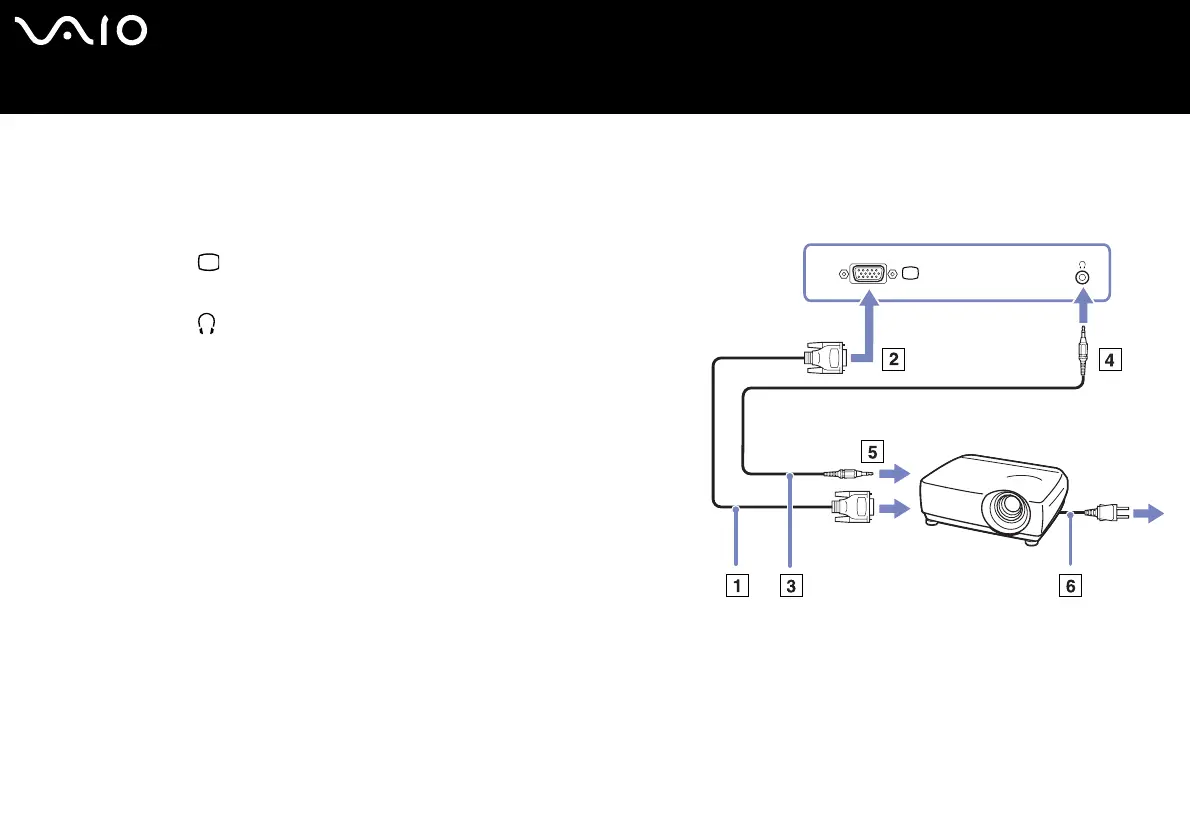
You can connect a projector (such as the Sony LCD projector) directly to your computer or via the docking station.
To connect a projector, proceed as follows:
1 Plug the RGB signal cable (1) into the monitor/VGA connector (2)
identified by the symbol.
2 Plug the audio cable (3) (not supplied) into the earphone connector (4)
identified by the symbol.
3 Plug the RGB signal cable and the audio cable into the connectors of
the projector (5).
4 Connect the power cord (6) of the projector into an AC outlet.
✍ Under certain circumstances, you may not be able to display the
computer LCD screen and an external display or a projector at the
same time.
You can toggle the output between the computer LCD screen and the external monitor by
pressing the key combination <Fn>+<F7>.






 To Next Page