14
Connecting the Projector
• When installing multiple cables, do not bind them and keep the running parallel distance as short
as possible.
• The transmittable distance of the cable is 100 m (approx. 328 feet) maximum. If it exceeds 100 m
(approx. 328 feet), it may cause the image or the sound to break up, or cause a multifunction in
LAN communication. Do not use the HDBaseT transmitter beyond the transmittable distance.
• Inquire about operation or function problems caused by other manufacturer's devices with the
relevant manufacturer.
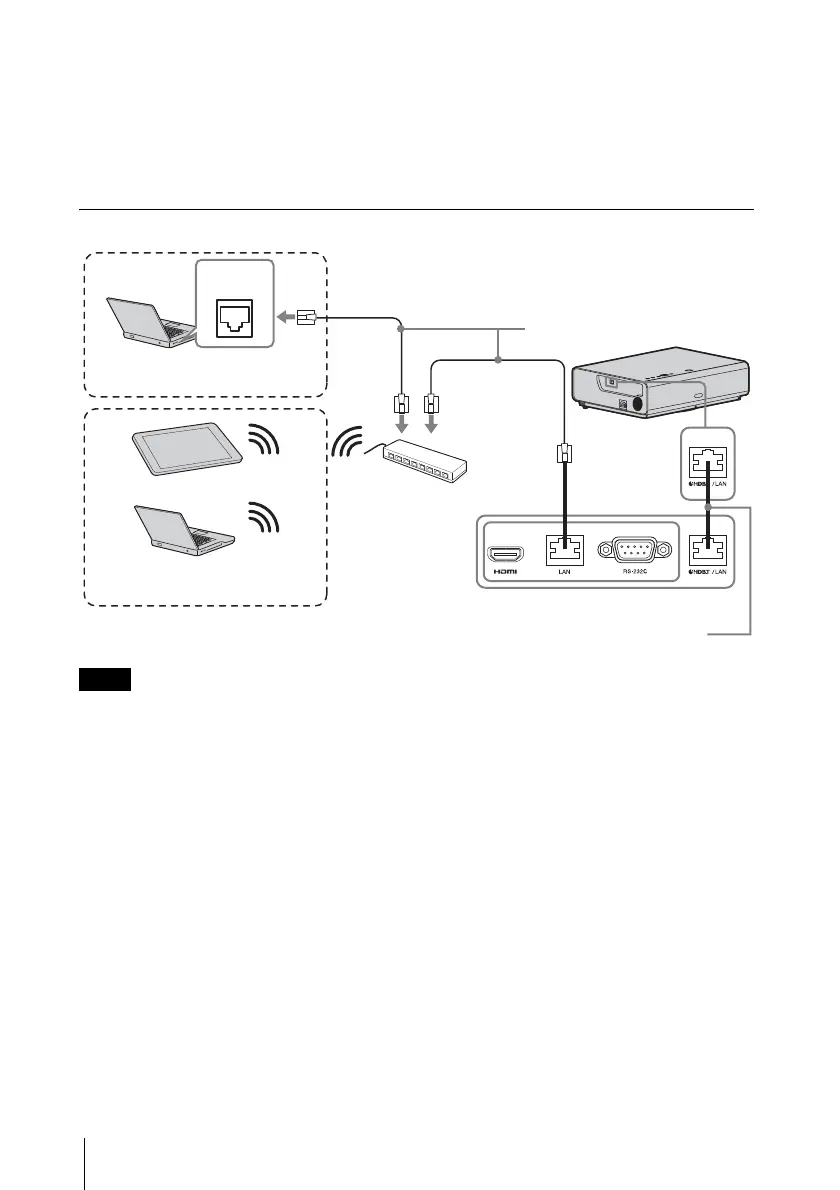
Connecting to the network equipment
Connect this unit and the HDBaseT transmitter without a hub or router between them.
Computer
LAN
connector
Wired connection
LAN cable (straight type)
(not supplied)
Hub, Wireless router
HDBaseT transmitter
Tablet PC/Smartphone
Computer
Wireless connection
LAN cable: STP type (CAT5e or
higher, straight, not supplied)
Note



 To Next Page