50
Using Presentation Function via Network
You can project JPEG images, PDF files, etc.
stored in a tablet PC/smartphone wirelessly
by using a specific application.
*1
For downloading
*2
or detailed method of
using the application, access the following
URL.
http://PWPresenter.pixelworks.com
*1: To use the application, one of the following
conditions is required.
• Connected to network where wireless
connection can be established (page 10).
• Connected to a wireless network via USB
wireless LAN module IFU-WLM3 (not
supplied) that is connected to the
projector (page 11).
*2: Depending on your Internet connection, a
data communication fee may apply.
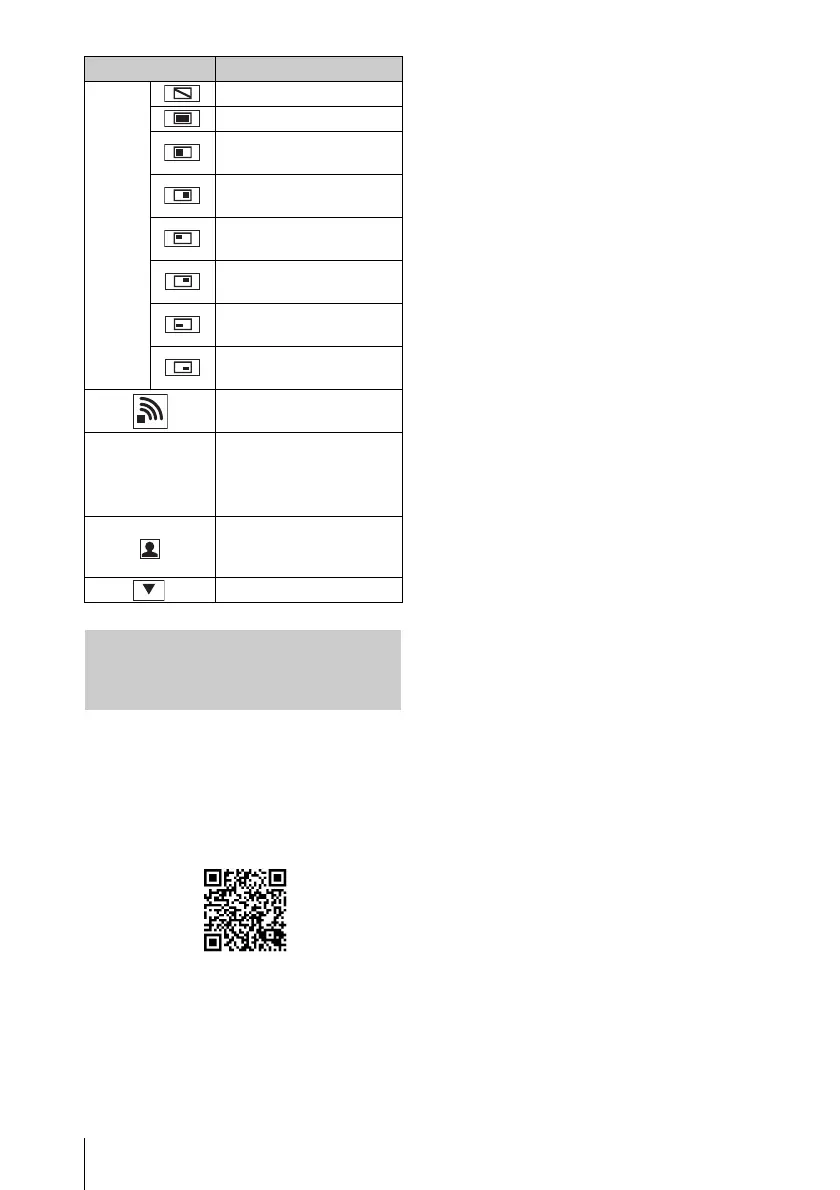
Projection
method
Not projecting an image.
Project in full screen.
Project in the left half of
the screen.
Project in the right half of
the screen.
Project in the upper left
quadrant of the screen.
Project in the upper right
quadrant of the screen.
Project in the lower left
quadrant of the screen.
Project in the lower right
quadrant of the screen.
Display the strength of the
wireless signal.
CODE
Display the Connection
CODE of the projector
that is connected to the
computer.
Display the number of
users connected to the
projector.
Display the users’ status.
Displaying Images or Files
Sent from a Tablet PC/
Smartphone
Items Functions



 To Next Page