40
Using Network Features
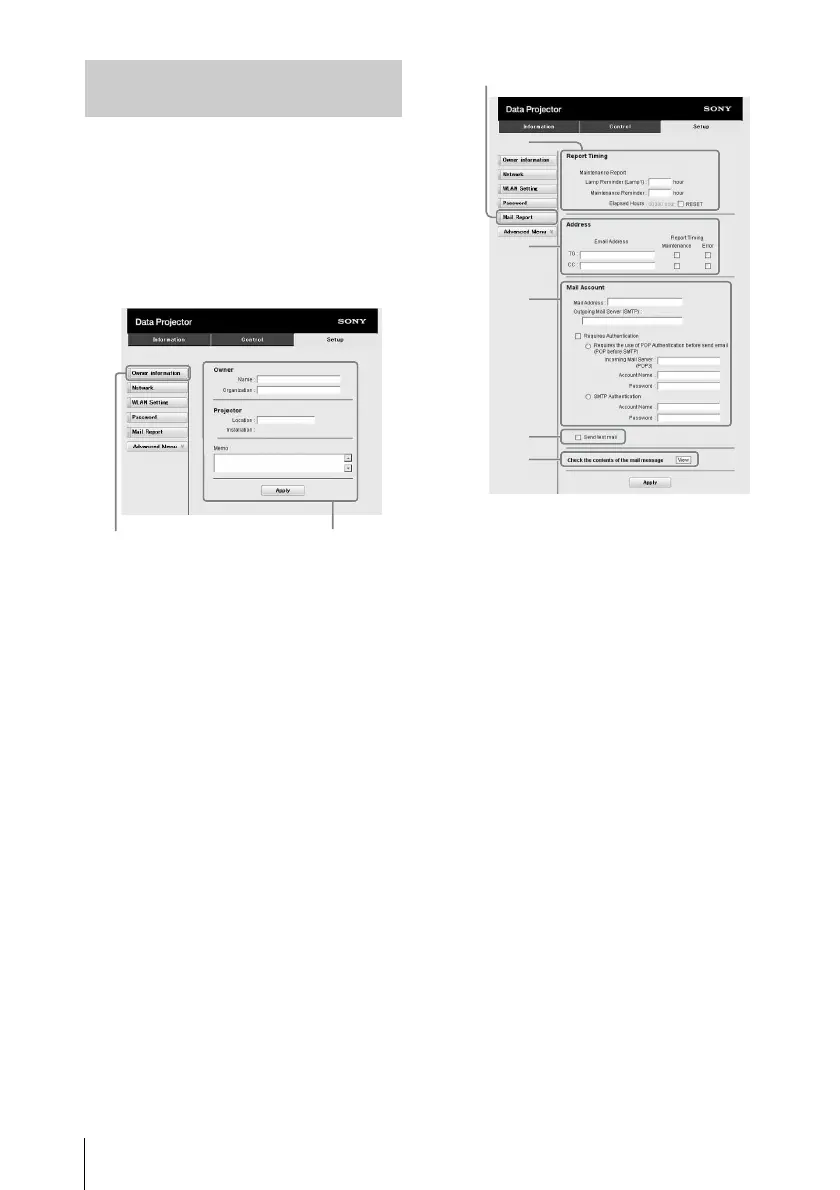
Set the e-mail report function on the Setup
page.
Entered values will not be applied unless
you click on [Apply].
1 Click on [Owner information] to enter
the owner information recorded in the
e-mail report.
2 Set the timing of the e-mail report.
Click on [Mail Report] to open the Mail
Report page.
Lamp Reminder (Lamp1): Set the
timing of the email report for lamp
replacement. To reset Lamp
Reminder, execute “Lamp Timer
Reset” on the projector (page 32).
Maintenance Reminder: Set the timing
of the email report for maintenance. To
reset Maintenance Reminder, check
the RESET check box and then click
on [Apply].
3 Enter the outgoing e-mail address in
the Email Address box then check the
Report Timing check box of the e-mail
report to be sent.
4 Set the mail account for sending e-
mail reports.
Mail Address: Enter the e-mail address.
Outgoing Mail Server (SMTP): Enter
the address of outgoing mail server
(SMTP).
Required Authentication: Check this
check box if authentication is required
for sending e-mail.
Requires the use of POP
Authentication before sending email
(POP before SMTP): Check this
check box to arrange for POP
authentication to be performed before
sending e-mail.
Incoming Mail Server (POP3): Enter
the address of the incoming-mail
server (POP3) to be used for POP
authentication.
Account Name: Enter the mail account
name.
Password: Enter the password.
Using the e-mail report
Function
1
Owner information button
2
3
4
6
5
Mail Report button



 To Next Page