1-8
VPL-HS20
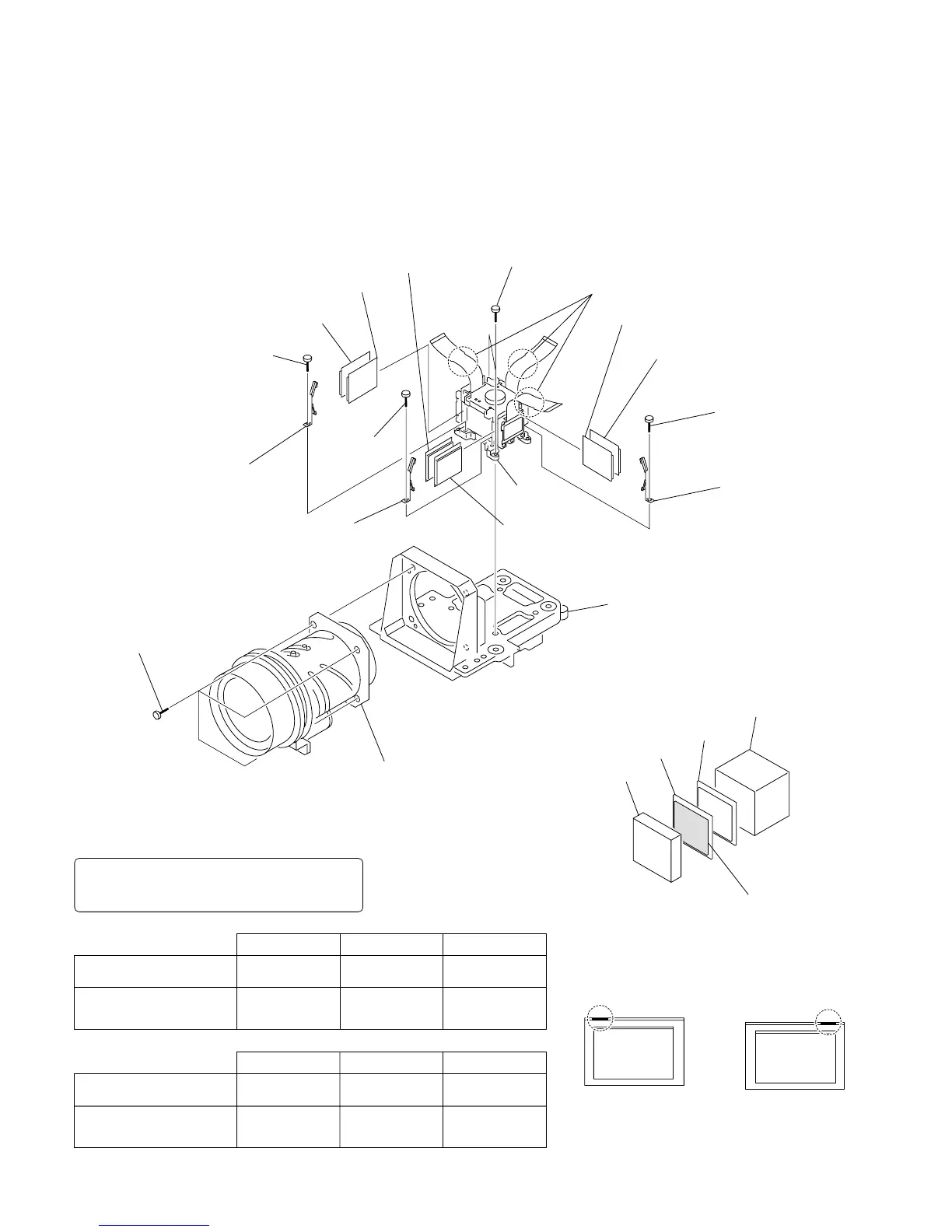
1-3-10. Projection Lens and WV-Film Plate (1), (2)
. Remove the C board. (Refer to 1-3-4.)
. Remove the opt block assembly. (Refer to 1-3-8.)
. Remove the projection lens, prism block assembly. (Refer to 1-3-9.)
2 Screw
(+B 2 x 4)
1 Two Screws
(+B 2.6 x 8)
6 Screw
(+B 2 x 4)
4 WV-film plate (1), (2)
8 WV-film plate (1), (2)
![ WV-film plate (1), (2)
!= Out-polarizer panel
(B) assembly
5 Out-polarizer panel
(G) assembly
!; Projection lens
!] Four screws
(CSW 3 x 10)
3 Out-polarizer
holder
!- Out-polarizer holder
0 Screw
(+B 2 x 4)
!\ Lens holder
9 Out-polarizer panel
(R) assembly
7 Out-polarizer holder
Prims block
Prims
Out-polarizer
panel assembly
R-ch
LCX043ASB
WV-film plate (1)
4-099-471-01
G-ch
LCX043ARB
WV-film plate (2)
4-099-472-11
WV-film plate (1)
4-099-471-21
B-ch
LCX043ASB
WV-film plate
4-099-471
Type of LCD panels
Type of LCD panels
WV-film plate
R-ch
LCX043ARB
WV-film plate (2)
4-099-472-01
G-ch
LCX043ASB
WV-film plate (1)
4-099-471-11
B-ch
LCX043ARB
WV-film plate (2)
4-099-472-21
WV-film plate
WV-film plate
LCD panel
The side on which the film
is attached faces LCD.
Marking side
WV-film plate
4-099-472
Marking side
LCD Panel
Combination 1
LCD Panel
Combination 2
Precautions when replacing the WV-film plate (1)
Top right
Top left
Type of LCD panels
The WV-film plate to be used varies depending on
the type of LCD panels and the respective R/G/B
channels. Use the part specified respectively.
• Precautions when replacing the WV-film plate
Be sure to install the WV-film plate in the
right orientation.
Note: Use the panel in above described combination



 To Next Page