27
USER GUIDEUSER GUIDE
USER GUIDEUSER GUIDE
USER GUIDE
MASTER SECTIONMASTER SECTION
MASTER SECTIONMASTER SECTION
MASTER SECTION
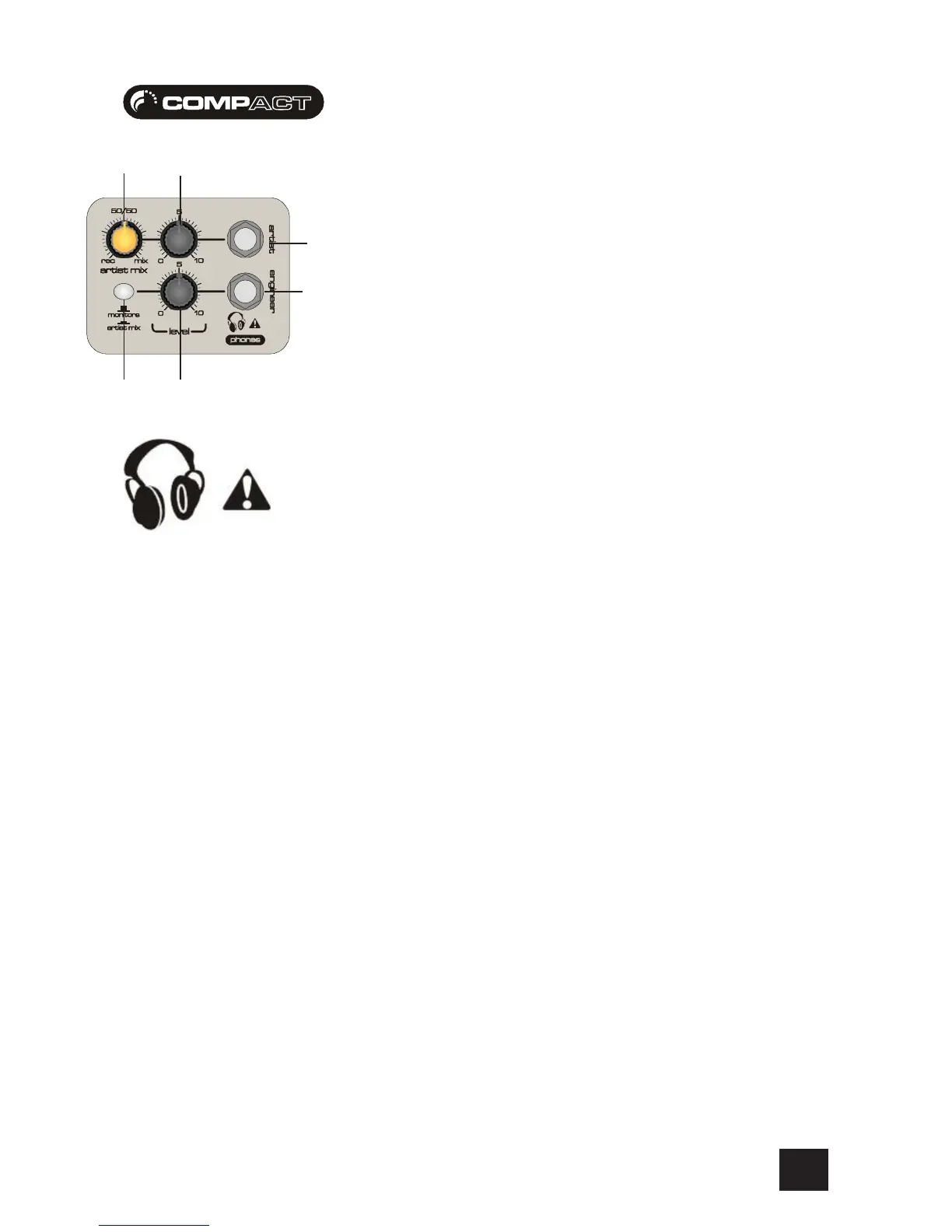
1 ARTIST HEADPHPONES OUTPUT
The Artist Headphones Outputs are on 3-pole ‘A’ gauge jacks and are unbalanced connections
wired as a stereo output. There is a substantial amount of power at these sockets depending on the
type of headphones you use. Remember the higher the impedance of the headphones normally
means the louder they will be. The circuit has been designed for use with consumer and professional
headphones. Ideally headphones should be 200Ω or greater. 8Ω headphones are not
recommended.
2 ARTIST HEADPHONES LEVEL
This control sets the output level to the Artist Headphone outputs. If headphones are plugged into
the PHONES jack, then the knob sets a comfortable headphone listening level without affecting the
Monitor output levels.
3 ARTIST MIX CONTROL
This control allows the artist to hear a personal blend of the playback signal and the recorded
signal. Some vocalists may want to hear a fairly low level version of their voice and hear much
more of the playback so that they can “key” clearly. It can be used to allow the artist a personal mix
which effects neither the monitor outputs nor the engineer headphones.
4 ENGINEER HEADPHONES OUTPUT
The Engineer Headphones Outputs are on 3-pole ‘A’ gauge jacks and are unbalanced connections
wired as a stereo output. There is a substantial amount of power at these sockets depending on the
type of headphones you use. Remember the higher the impedance of the headphones normally
means the louder they will be. The circuit has been designed for use with consumer and professional
headphones. Ideally headphones should be 200Ω or greater. 8Ω headphones are not
recommended.
5 ENGINEER HEADPHONES LEVEL
This control sets the output level to the Artist Headphone outputs. If headphones are plugged into
the PHONES jack, then the knob sets a comfortable headphone listening level without affecting the
Monitor output levels.
6 MONITOR ARTIST PHONES
Press this switch to route the Artist Mix signal to the engineer head phones, over-riding the default
Monitor/Phones signal. This allows the engineer to hear what the artist is hearing (useful for
resolving communication errors between the artist and engineer :-) ), or for the engineer to become
the artist (a common dual personality problem).
6
4
5
3
1
2








 To Next Page