25
USER GUIDEUSER GUIDE
USER GUIDEUSER GUIDE
USER GUIDE
5
7
8
3
4
0
6
STEREO INPUT CHANNELSSTEREO INPUT CHANNELS
STEREO INPUT CHANNELSSTEREO INPUT CHANNELS
STEREO INPUT CHANNELS
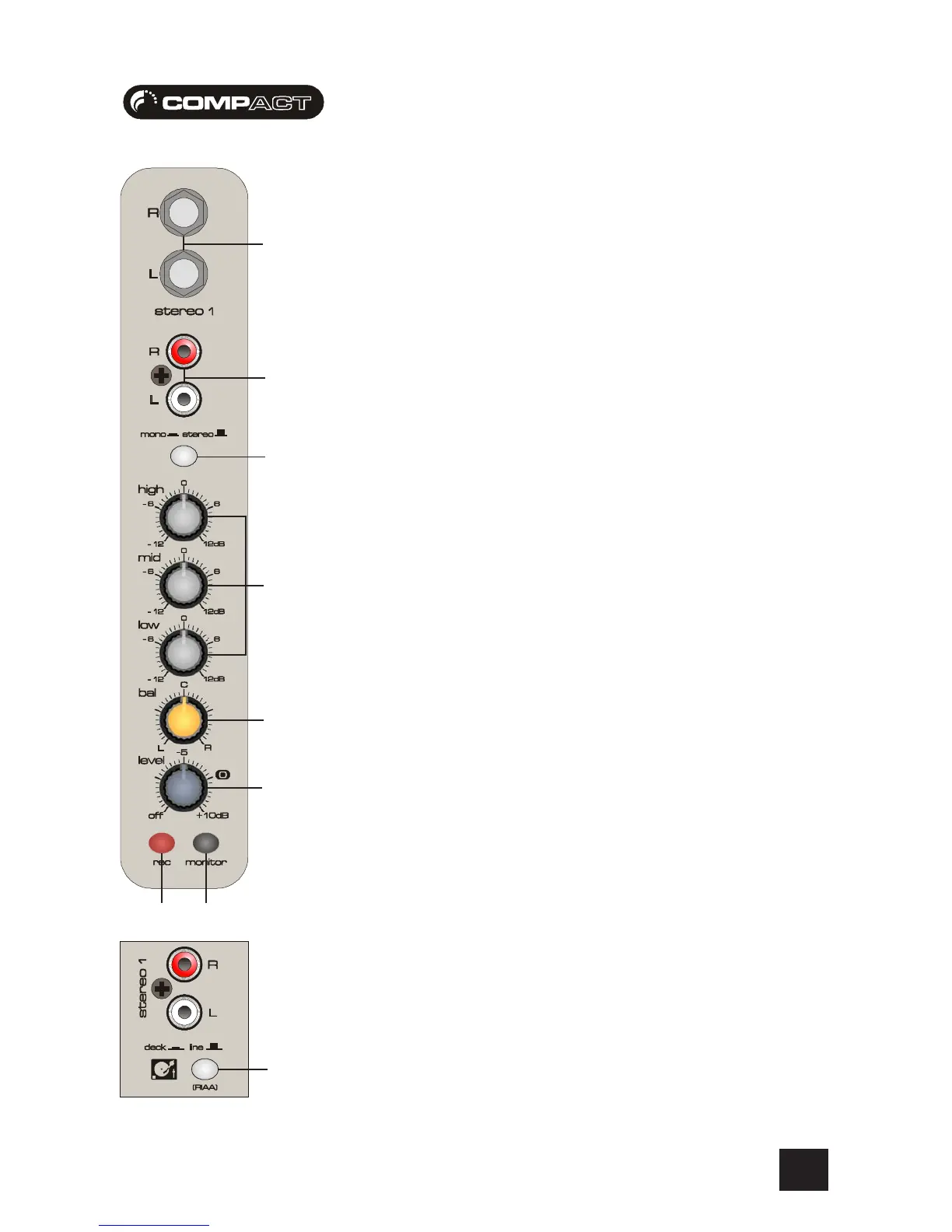
5 INPUTS STEREO 1/2
These inputs accept 2-pole Phono plugs. Use these inputs for sources such as keyboards, drum
machines, synths, CD/DVD Players, tape machines or processing units. The inputs are UNBALANCED
for use with consumer and semi-professional equipment, although you should then keep cable
lengths as short as possible.
6 RIAA EQUALISATION
When Vinyl is recorded an EQ curve is applied to maximise the dynamic range at the cutting stage.
Engaging this switch reverses the EQ curve, returning the signal to its former glory. Use this for
turntable inputs which do not have built-in RIAA equalisation.
NOTE: When using turntables, ensure you connect the turntable earth to the earth stud on the left
hand side of the console (recessed in the side cheek).
7 EQUALISER
HF EQHF EQ
HF EQHF EQ
HF EQ
Turn to the right to boost high (treble) frequencies above 12kHz by up to 12dB, adding crispness
to cymbals, vocals and electronic instruments. Turn to the left to cut by up to 12dB, reducing hiss
or excessive sibilance which can occur with certain types of microphone. Set the knob in the
centre-detented position when not required.
MID EQMID EQ
MID EQMID EQ
MID EQ
This control knob provides 12dB of boost and cut, just like the HF EQ knob, but at the frequency of
600Hz. Listen carefully as you use this control to find how particular characteristics of a vocal
signal can be enhanced or reduced. Set the knob to the centre-detented position when not
required.
LF EQLF EQ
LF EQLF EQ
LF EQ
Turn to the right to boost low (bass) frequencies below 60Hz by up to 12dB, adding warmth to
vocals or extra punch to synths, guitars and drums. Turn to the left to cut low frequencies by up to
12dB for reducing hum, stage rumble or to improve a mushy sound. Set the knob to the centre-
detented position when not required.
8 BALANCE
This control sets the amount of the channel signal feeding the Left and Right MIX buses, allowing
you to balance the source in the stereo image. When the control is turned fully right or left you feed
only that side of the signal to the mix. The zero gain is provided by the control in the centre-
detented position.
Compact10 Stereo Channels 1-4Compact10 Stereo Channels 1-4
Compact10 Stereo Channels 1-4Compact10 Stereo Channels 1-4
Compact10 Stereo Channels 1-4
9 1/4” 3-pole jack inputs are found on the Compact10
Mixing Console
0 NOTE - The stereo inputs can also be used as a MONO channel. You can do this by
pressing the MONO switch, this is found on stereo channels 1-4.
9
2
4
3








 To Next Page