24
USER GUIDEUSER GUIDE
USER GUIDEUSER GUIDE
USER GUIDE
3
4
4
3
1
2
MONO INPUT CHANNELS - CONTINUEDMONO INPUT CHANNELS - CONTINUED
MONO INPUT CHANNELS - CONTINUEDMONO INPUT CHANNELS - CONTINUED
MONO INPUT CHANNELS - CONTINUED
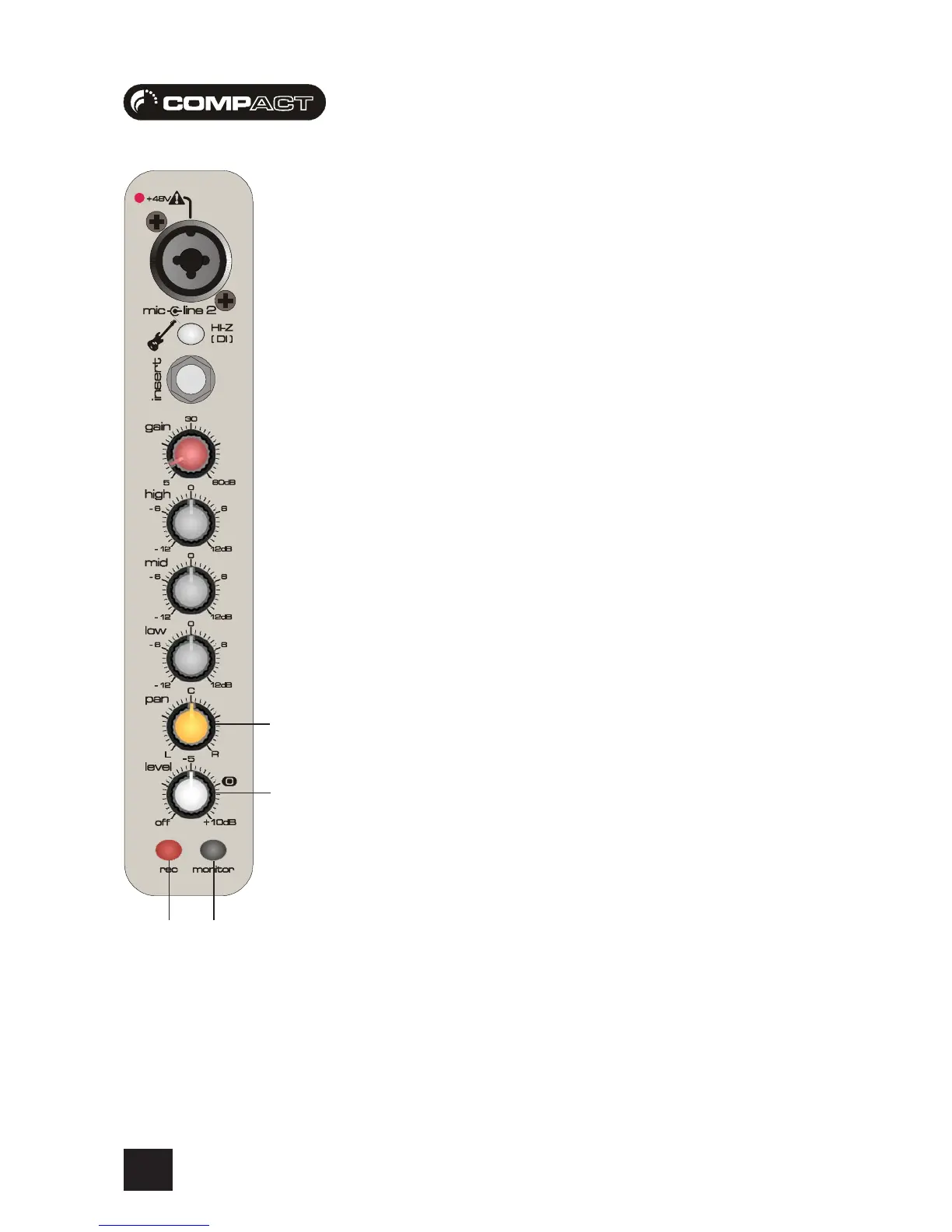
1 PAN
This control sets the amount of the channel signal feeding the Left and Right MIX buses, allowing
you to move the source smoothly across the stereo image. When the control is turned fully left or
right you are able to route the signal with no gain to either left or right outputs individually.
2 CHANNEL LEVEL CONTROL
The rotary level control, with a custom-designed law to give even smoother control of the overall
signal level in the channel strip, allows precise balancing of the various source signals being
mixed to the Master Section. You get most control when the input GAIN is set up correctly, giving
the full rotation of the level control. See the “Initial Setup” section on page 30 for help in setting
a suitable signal level.
3 MONITOR SWITCH
When the latching MONITOR switch is pressed, the pre-fade signal is fed to the mix, for setting up
and making adjustments in isolation from other channels. The monitor signal is a true stereo
signal, it does not get summed to a mono bus as in some other, more generic mixers. This means
when you monitor a channel the positional information is never lost, you always here a signal how
it would appear in the stereo field (the sound stage in front of you reproduced using speakers).
4 RECORD SWITCH
When pressed this sends the channel audio out to the record outputs. These record outputs must
be connected to your soundcard inputs. There are three advantages of having this feature:
1. You will only ever record the channel/s which have the Record switch pressed. With more
complex mixers, a common error is recording additional unrequired instruments, or open channels
adding noise to your recording.
2. The artist will not have to deal with the latency of the recording hardware/software. On other,
more generic mixers it is common to monitor the recording signal from the computer, this means
there is a delay which can be extremely fustrating for all performers, especially drummers, where
timing is critical. Using the “zero-latency” monitoring means that the signal is sent to the headphones
directly
3. It makes the recording procedure simple and fast to learn, and intuitive to use.








 To Next Page