23
USER GUIDEUSER GUIDE
USER GUIDEUSER GUIDE
USER GUIDE
5
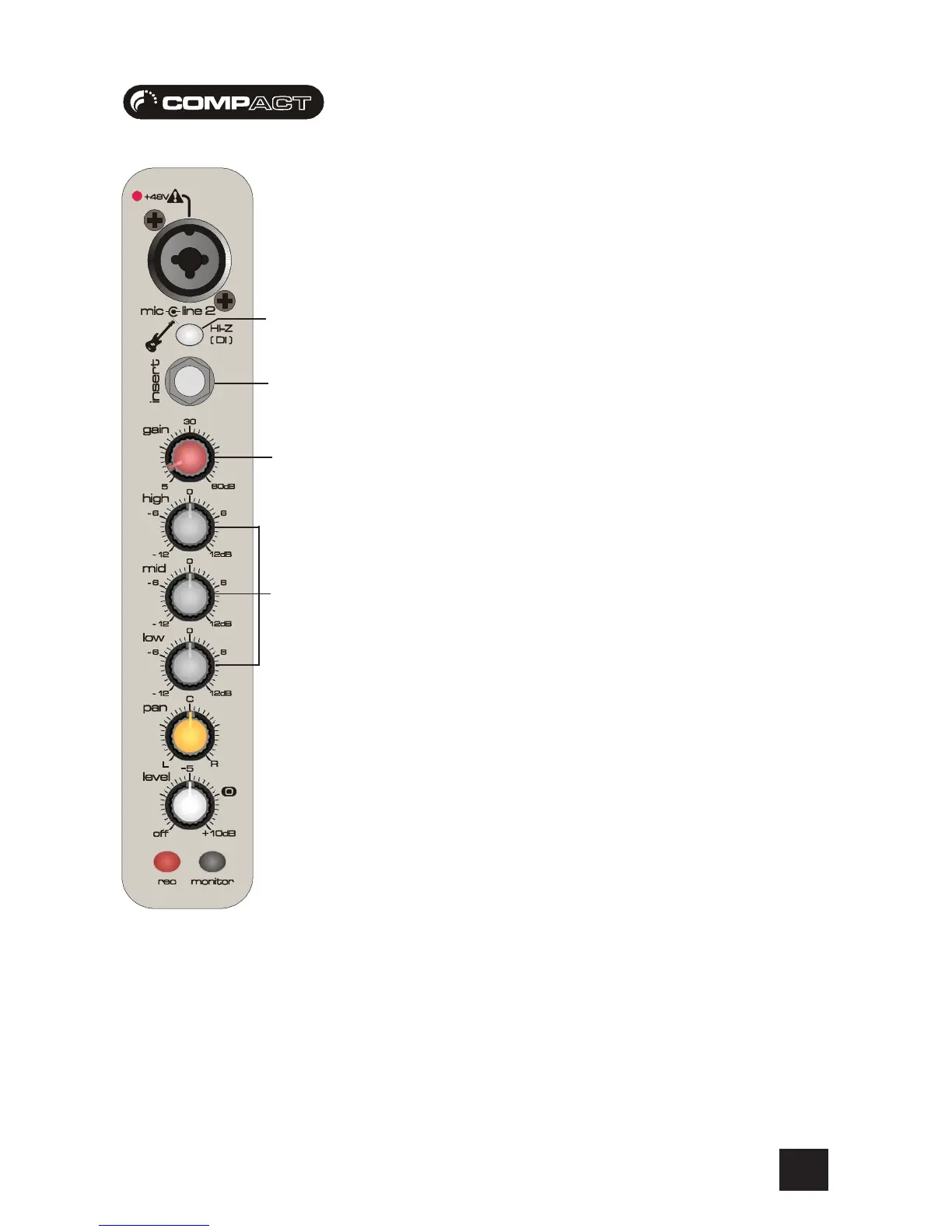
DIRECT INJECTION SWITCH
This switch activates the high impedance mode for the 3-pole ‘A’ gauge jack input. The high
impedance is used to match the signal from a high-impedance source such as bass guitars. When
activating you will notice the guitar sound will become much bolder. Using impedance matching
this way for guitar inputs is known as “Direct Injection” When using as bass guitar without the DI
switch activated, you may notice a reduction on the high frequencies produced.
NOTE 1- The high pass filter switch is featured on channel 1 of the Compact4, and channels 1&2
on the Compact10.The direct injection switch is featured on channel 2 of the Compact4, and
channels 3&4 on the Compact10
6 INSERT POINT
The unbalanced, pre-EQ insert point is a break in the channel signal path, allowing limiters,
compressors, special EQ or other signal processing units to be added in the signal path. The Insert
is a 3-pole ‘A’ gauge jack socket which is normally bypassed. When a jack is inserted, the signal
path is broken, just before the EQ section. The Send may be tapped off as an alternative pre-fade,
pre-EQ direct output if required, using a lead with tip and ring shorted together so that the signal
path is not interrupted (see pages 18/19).
7 GAIN CONTROL
This knob sets how much of the source signal is sent to the rest of the mixer. Too high, and the
signal will distort as it overloads the channel. Too low, and the level of any background hiss will
be more noticeable and you may not be able to get enough signal level to the output of the mixer.
Note that some sound equipment, particularly that intended for domestic use, operates at a lower
level (-10dBV) than professional equipment and will therefore need a higher gain setting to give
the same output level.
8 EQUALISER
The Equaliser (EQ) allows fine manipulation of the sound, particularly to improve the sound in live
PA applications where the original signal is often far from ideal and where slight boosting or cutting
of particular voice frequencies can really make a difference to clarity. There are three sections
giving the sort of control usually only found on much larger mixers. The EQ knobs can have a
dramatic effect, so use them sparingly and listen carefully as you change any settings so that you
get to know how they affect the sound.
HF EQHF EQ
HF EQHF EQ
HF EQ
Turn to the right to boost high (treble) frequencies above 12kHz by up to 12dB, adding crispness
to cymbals, vocals and electronic instruments. Turn to the left to cut by up to 12dB, reducing hiss
or excessive sibilance which can occur with certain types of microphone. Set the knob in the
centre-detented position when not required.
MID EQMID EQ
MID EQMID EQ
MID EQ
This control knob provides 12dB of boost and cut, just like the HF EQ knob, but at the frequency of
600Hz. The frequency has been chosen to represent a balance covering the range of most vocals.
Listen carefully as you use this control to find how particular characteristics of a vocal signal can be
enhanced or reduced. Set the knob to the centre-detented position when not required.
LF EQLF EQ
LF EQLF EQ
LF EQ
Turn to the right to boost low (bass) frequencies below 60Hz by up to 12dB, adding warmth to
vocals or extra punch to synths, guitars and drums. Turn to the left to cut low frequencies by up to
12dB for reducing hum, stage rumble or to improve a mushy sound. Set the knob to the centre-
detented position when not required.
5
7
8
6








 To Next Page