14
Bluetooth Operaons:
-Pairing and Connecng
Before using a Bluetooth phone with this unit, the phone must be paired and
connected. The Bluetooth signal of the unit will broadcast when the power is on.
This digital video player will displayed as "SOUNDSTREAM" on your phone.
When prompted, enter the pass code "0000" on your phone. Once paired, the
Bluetooth phone should automacally connect this unit whenever the unit is in range.
- Make a call
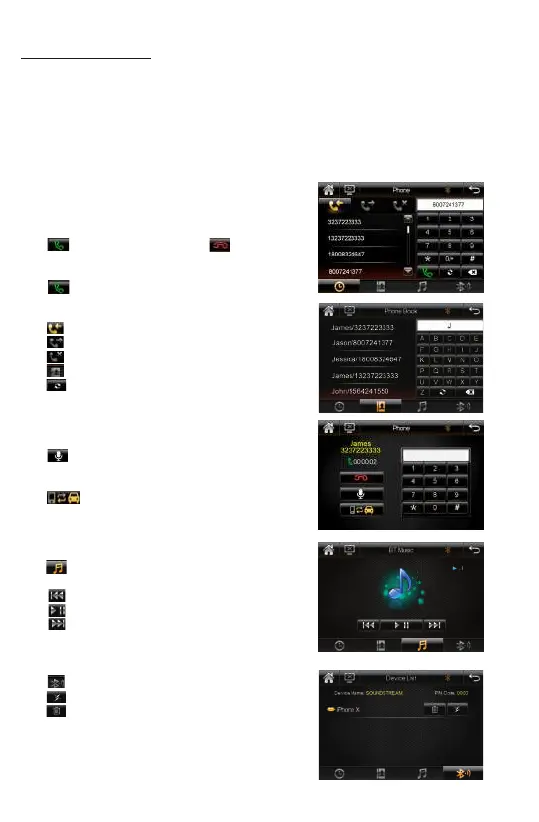
Input the phone number by using the keypad in
Bluetooth mode.
- Making and Ending a Call
Tap to make a call, and tap to end a call.
- Redial last dialed number
Tap to redial the last dialed phone number.
- Viewing Recent Call List
Tap icon to view the income calls.
Tap icon to view the outgoing calls.
Tap icon to view the missed calls.
Tap icon to view the contacts(phonebook).
Tap icon to download the contacts from
phone.
- Mute On/off during talking
Tap icon to toggle silence on/off during calling.
- Transferring Audio
Tap icon to transfer audio between this car
bluetooth hands-free system and mobile phone.
- Streaming Audio
Tap icon on bluetooth mode to enter the
music control playback interface.
Tap icon to skip to the previous track.
Tap icon to play or pause the music.
Tap icon to advance to the next track.
- Device List
Tap icon to view device list of phone name.
Tap to disconnect the connected phone.
Tap to remove the connected phone, user have
to reestablish bluetooth pairing and connecng
between this bluetooth hands-free system and
mobile phone.













 To Next Page