4
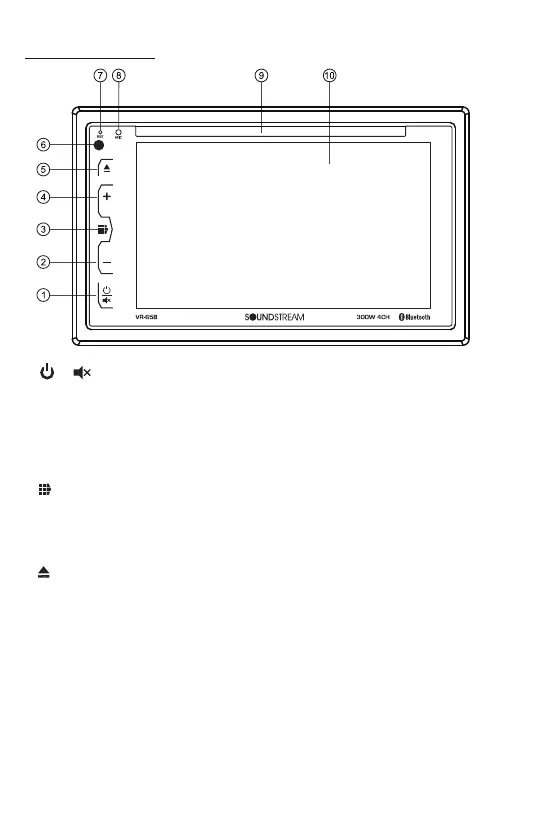
Control Panel Buons:
1. / Buon
• In power off mode, press it to turn on the unit.
Press and hold for 2 seconds to turn the unit off .
• Press the buon briefly to toggle Mute on or off.
2. Volume Decrease (-) Buon
Press VOL decrease buon (-) to decrease the volume.
3. (Main Menu) Buon
Press this menu buon to go into home page.
4. Volume Increase (+) Buon
Press VOL increase buon (+) to increase the volume.
5. (EJECT) BUTTON
Insert the disc, label side facing up, unl the mechanism senses its presence
and draws the disc in. Press it to eject the disc.
6. IR REMOTE SENSOR
7. RESET SYSTEM
The RESET buon is used to reset all paramenters to factory default sengs.
This funcon may be used when the LCD does not display normally or sound is
distorted, or when any of controls are disabled.
Gently press the RESET buon to reset the system with a thin object with a
pointed end.
8. Handsfree Microphone
Uses the bluetooth handsfree system to receive your voice when calling.













 To Next Page