Setup Operaons:
• Subwoofer On/Off: Enables or Disables the subwoofer output.
• Key Lights: To preset the color of buon illuminaon: Red, Green, Yellow, Blue,
Purple, Cyan, White, Auto(color automacally change one by one).
• Reversing Mute: Enables or Disables reversing mute funcon.
When enable this funcon, when user start up the reverse gear of vehicle, the
unit will silence the audio output of this unit automacally.
• Panel:
- Brightness: Allows user to adjust the dimmer: 0,~, 32.
- Touch Correcon: Touch this item to enter touchscreen calibraon mode,
Tap the cursor “+” connuously unll it move to next posion. Follow the cursor
to finish the calibraon of touch screen.
• Radio Area: To choose the radio area: Europe, USA, South America, Russia, Australia,
Middle East, China, Japan.
• Wallpaper: To change the wallpaper.
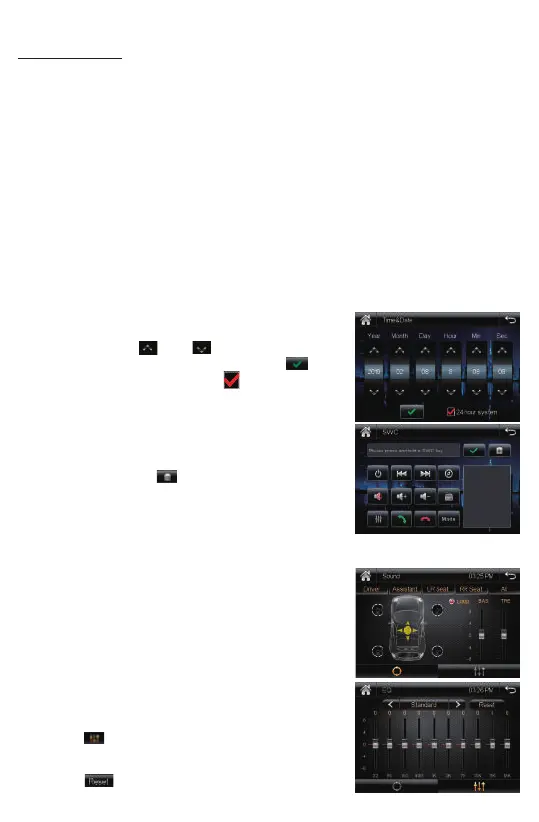
• Time & Date:
Tap the “Time&Date” to select this item in system
interface to enter the me and Date adjusng
interface, tap the and buon to adjust Year,
Month, Day, Hour, Minute, Second. Tap the buon
to confirm adjustments. Tap the buon to preset
24-Hours format as sytem clock me format.
• SWC(Steering Wheel Control)
Tap “SWC” to enter the study operaon menu.
First, make sure the SWC connecng wires have been
connected to this unit.
Before study, tap the icon to clear all previous
sengs.
Press and hold a steering wheel buon, at the same
me, tap the funcon buon on touch screen that
you want to set on to the steering wheel.
• About(System informaon)
Tap this item to view the soware version.
B. AUDIO(Sound Effect):
• Sound Presets: Tap this item to enter the sound preset
interface. Tap the “Driver”, “Assistant”, “LR Seat”,
“RR Seat”, “All” buon to quick preset audio effect for
Driver, front seat passenger, le back passenger ,
right back passenger and all passengers in car.
Tap LOUD buon to enables or disables loudness.
Drag the slider up or down to adjust the bass and
treble volume level.
• EQ Presets:
Tap the icon to enter the EQ preset interface.
User can preset audio EQ: Standard -> Classic -> Rock
-> Pop -> Jazz -> Electric -> User.
Tap the icon to clear all previous EQ sengs.
8













 To Next Page