Setup Operaons:
Main Menu:
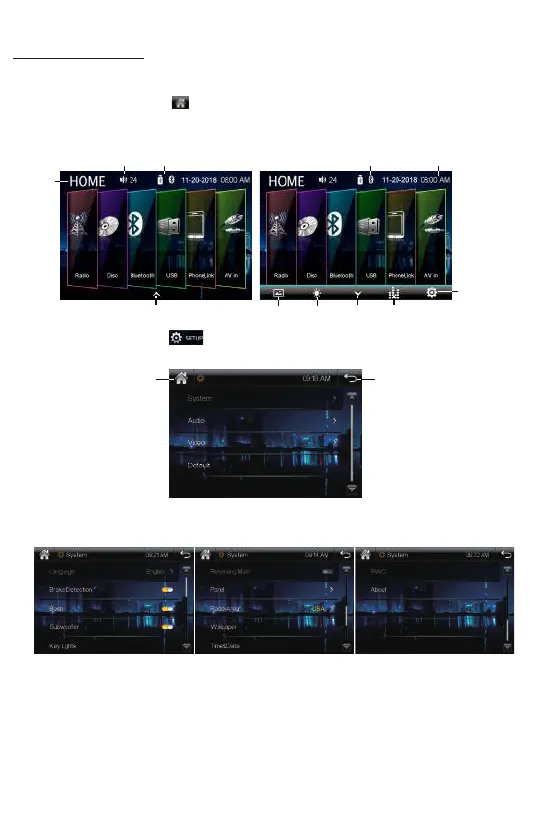
In each mode, touch the icon to enter the main menu as below image.
In the main menu screen, tap the desired icon to enter each of the following
sengs : Radio, Disc(CD/VCD/DVD), Bluetooth, USB, PhoneLink, AV in.
In main menu, touch the icon to enter the setup menu, as below image.
Then user can set up or adjust the general sengs for this digital video player.
A. System:
OSD Language, Brake Detecon On/Off, Beep On/Off, Subwoofer On/Off,
Key Lights, Reversing Mute, Panel, Radio Area, Wallpaper, Time&Date, SWC, About.
• OSD Language: English, Chinese, Arabic, Hebrew, Turkish, Russian, Persian,Thai,
German, French, Portuguese, Spanish, Italian, Indonesian, Bulgarian.
• Brake Detecon: Enables or Disables the brake detecon.
This is a safety feature to prevent driver distracon. For safety, we recommend
user to enable this brake detecon funcon. When enable this funcon, user were
forbidden to watch video from this unit while this system is not detect the brake
signal of the parking brake.
• Beep On/Off: Enables or Disables beep buzzer signal to confirm use.
7
Screen
Backlight
Wallpaper
Acve Bluetooth
when blue color
Return
Home Page
Time&Date
Home
Page
Volume Acve Media
Setup
Sound effect
To show the toolbar To hide
the toolbar













 To Next Page