DVD
SET
UP MENU
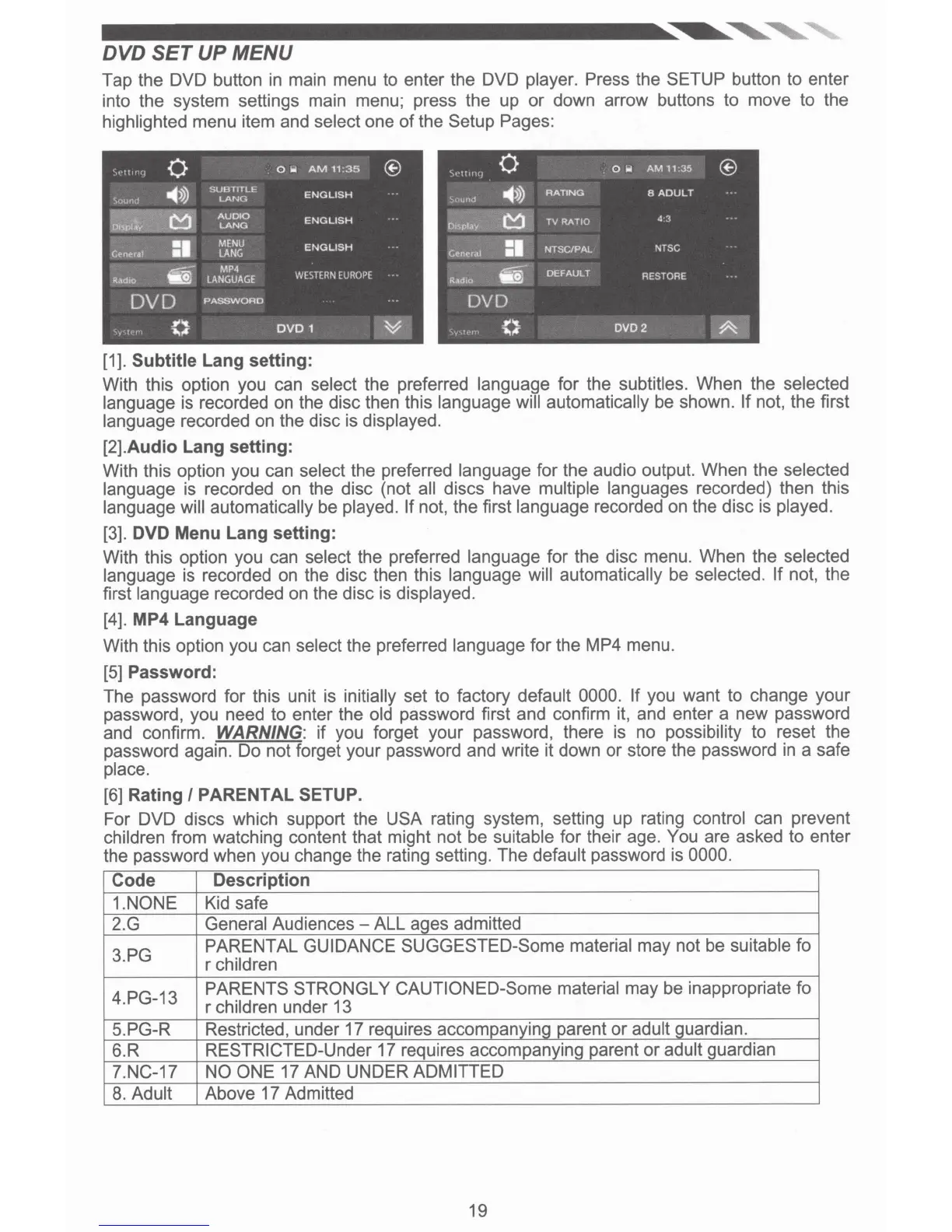
Tap the DVD button
in
main menu to enter the DVD
player. Press
the
SETUP
button to enter
into the system settings main menu; press the up
or
down arrow buttons to move to the
highlighted
menu item and
select
one
of
the
Setup Pages:
•••!!,rJq
0
ow
AM
11
:35
®
\o•t!lrl\j
0
ow
AM
11:35
®
-45>)
SUBTTTLE
~.:.ound
LANG
ENGLISH
)t>IHld
-4>»
RATING
8
ADULT
Ji~1Y,<
'
i51
'
AUDIO
ENGLISH
LANG
Display
C1
TV
RATIO
4 3
Gttneral
=·
MENU
ENGLISH
LANG
G•neral
=·
NTSC/PAL
NTSC
t1fi
MP4
Radio
LANGUAGE
WESTERN
EUROPE
Radio
fii""
DEFAULT
RESTORE
DVD
PASSWORD
DVD
,.
....
ovo
1
~
.
,,,.
...
...
,.
....
DVD2
~
......
[1].
Subtitle
Lang
setting:
With this option you can
select
the preferred language for the
subtitles.
When the
selected
language
is recorded on the disc then this
language will automatically
be shown.
If not, the first
language recorded on the disc is displayed.
[2].Audio
Lang
setting:
With this option you can
select
the preferred
language
for the audio output. When the selected
language
is recorded on the disc (not all
discs have
multiple languages
recorded) then this
language will automatically be
played. If
not, the first
language
recorded
on
the disc is
played.
[3]. DVD
Menu
Lang
setting:
With this option you can
select
the preferred
language
for the disc menu. When the
selected
language
is recorded on the disc then this
language will automatically
be
selected.
If
not, the
first
language recorded on the disc is
displayed.
[4]. MP4
Language
With this option you can
select
the preferred
language
for the
MP4
menu.
[5]
Password:
The password for this unit is
initially
set to factory
default 0000. If
you want to change your
password, you need to enter the
old
password first and confirm it, and enter a new password
and confirm.
WARNING:
if you forget your password, there is no
possibility
to reset the
password again. Do not forget your password and write it down
or
store the password in a safe
place.
[6]
Rating
I PARENTAL SETUP.
For DVD discs which support the
USA
rating system, setting up rating
control
can prevent
children
from watching content that might not be
suitable
for their age. You
are asked to enter
the password when you change the rating setting. The
default
password is
0000.
Code
Description
1.NONE
Kid safe
2.G
General
Audiences - ALL ages admitted
3.PG
PARENTAL GUIDANCE SUGGESTED-Some material
may not be suitable
fo
r
children
4.PG-13
PARENTS STRONGLY CAUTIONED-Some material
may be inappropriate fo
r
children
under 13
5.PG-R Restricted, under 17 requires accompanying parent
or
adult
guardian.
6.R
RESTRICTED-Under
17 requires accompanying parent or adult
guardian
7.NC-17
NO ONE 17 AND UNDER ADMITTED
8.
Adult
Above 17 Admitted
19













 To Next Page