91369 Service Manual 5-11
Troubleshooting
Clearing the Error Log
Press E, then press c to clear the error codes automatically the next time the monitor application executes.
Diagnostics Failure Messages and Error Codes
If the monitor fails power-ON diagnostics or extended diagnostics, do the following:
1 Verify the failure by powering the monitor OFF and ON again or by running the extended diagnostics as
described in
Extended Diagnostics on page 5-6 and Diagnostic Menus on page 5-7.
2 Take troubleshooting action or replace the field-replaceable units (FRU) based on the following diagnostics
failure messages once the failure has been verified.
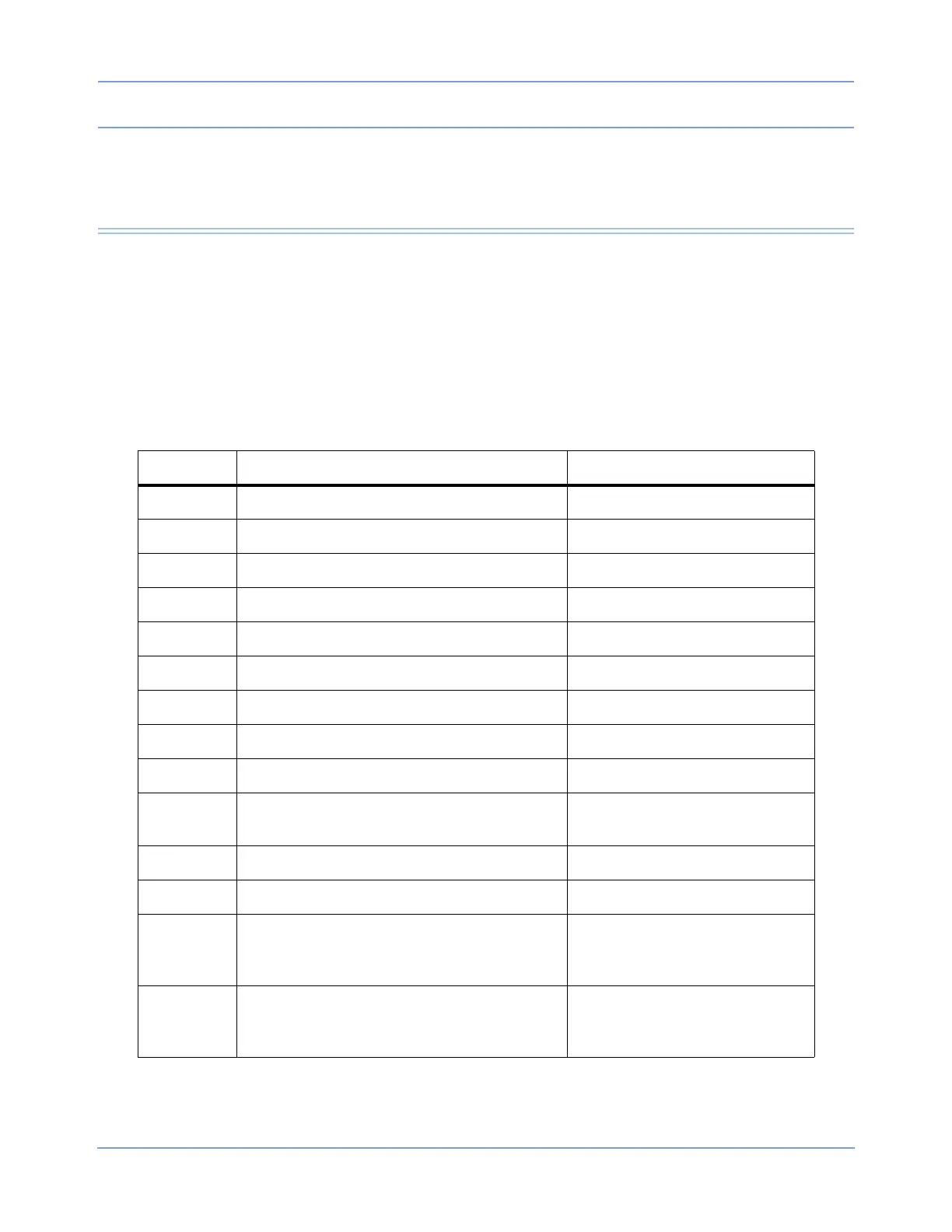
Table 1: Diagnostic Failure Messages
Error Code Diagnostics Failure Message Suggested Action
01030000 Diagnostics passed No action required.
01030001 Diagnostic(s) failed; degraded performance Replace CPU PCBA.
01030002 Critical failure Replace CPU PCBA.
01030003 Cannot diagnose at this boot stage No information available.
01030100 Diagnostics Port test failed Replace CPU PCBA.
01030200 8260 test failed Replace CPU PCBA.
01030201 8260 SCC transmit failed Replace CPU PCBA.
01030202 8260 SCC configuration not recognized Replace CPU PCBA.
01030300 DRAM test failed Replace CPU PCBA.
01030301 DRAM test cannot allocate memory
Reboot and retest. If problem
persists, replace CPU PCBA.
01030400 GDS RAM test failed Replace CPU PCBA.
01030500 FLASH ROM test failed Replace CPU PCBA.
01030501 FLASH ROM boot larger than Flash
Reburn boot kernel software into
flash memory and retest. If failure
persists, replace CPU PCBA.
01030502 FLASH ROM app larger than Flash
Reburn application software into
flash memory and retest. If failure
persists, replace CPU PCBA.



 To Next Page