Setup
91369 Service Manual 2-14
2 Select an input cell’s text and type any combination of letters, characters, or spaces.
To add an item to a list:
• Select the input cell and type the new information.
To delete an item from a list:
1 Select the item.
2 Touch Del.
3 Enter at least one space (an error message is displayed if no spaces are entered).
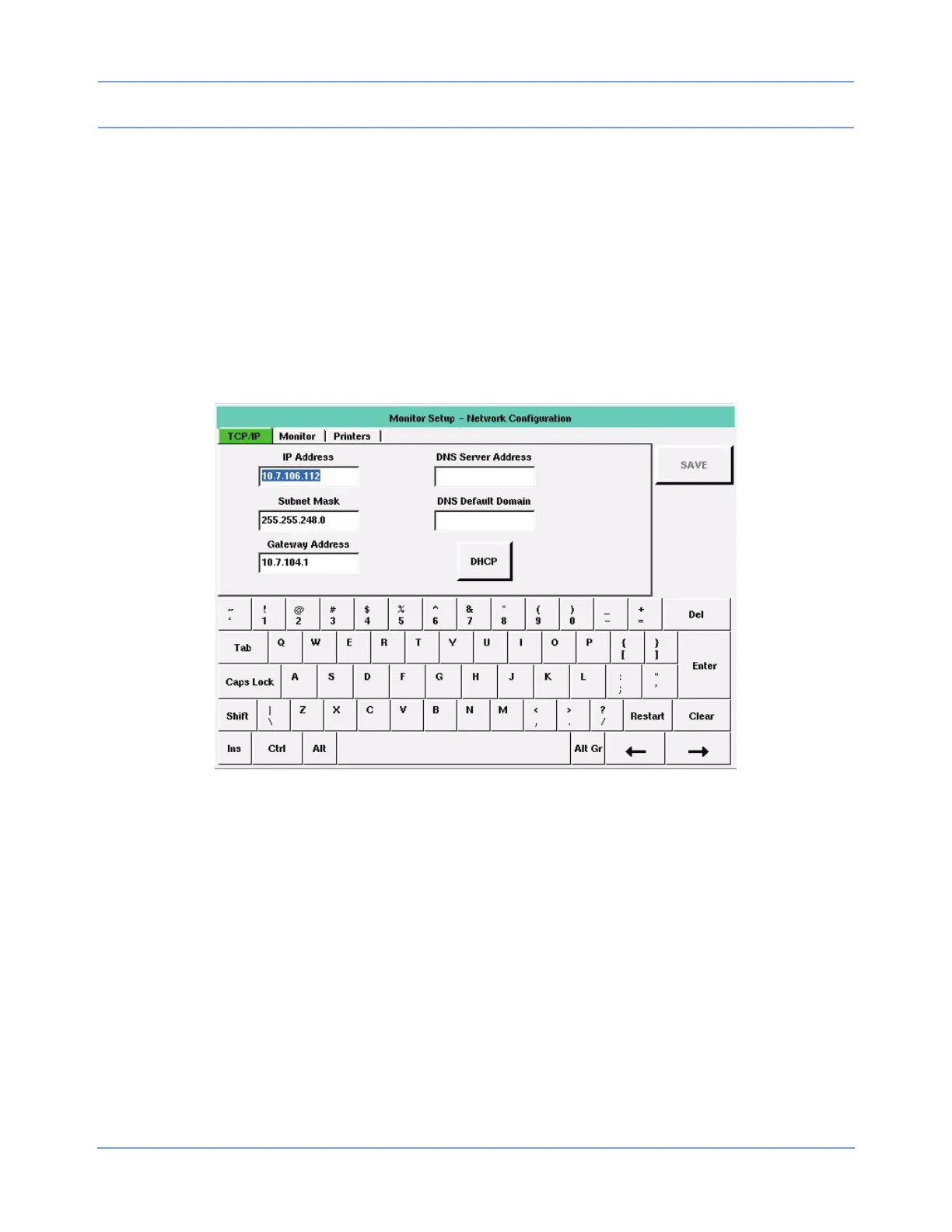
TCP/IP Tab
Figure 2-10: TCP/IP tab
The TCP/IP tab enables you to define the monitor’s attributes for networking.
IP Address — Enables you to specify the monitor’s IP address. The default is 164.90.254.10. Either a static IP
address must be specified, or DHCP networking must be enabled.
Subnet Mask — Enables you to identify which parts of the IP address are to be used for TCP/IP subnet
determination. The TCP/IP network’s subnet mask is not related to the Spacelabs Healthcare network’s subnet
name. The standard and factory-default subnet mask is 255.255.255.0. Either a subnet mask must be
specified, or DHCP networking must be enabled.
Gateway Address — Enables you to specify the IP address of the TCP/IP gateway (bridge or router) though
which communication to other devices should flow. The default is blank.
DHCP — (Dynamic Host Configuration Protocol) Used to configure and enable DHCP network configuration.
When DHCP is enabled, IP Address, Subnet Mask, and Gateway Address are automatically filled in. To use
this service, a DHCP server must be available on the network to respond to DHCP requests.


 To Next Page