70
7-5-2. Main Control Panel
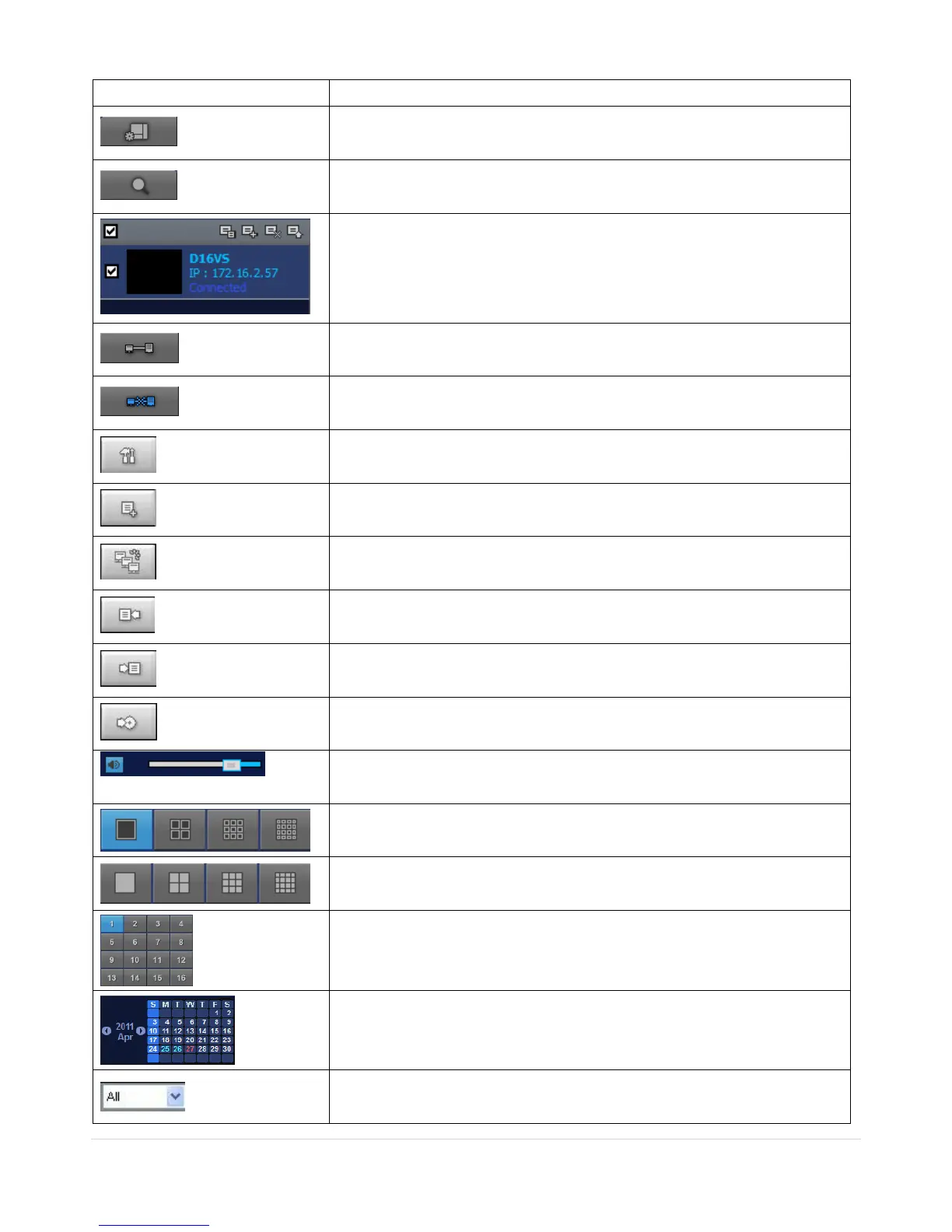
Click this icon to run a playback window to search and play videos that
are recorded in the local PC.
Click this icon to run a playback window to search and play videos that
are recorded in the remote DVR.
Display the site information and the connection status.
Click this icon to connect the selected site/sites.
Click this icon to disconnect the selected site/sites.
Click this icon to setup configuration of SpecoTech Multi Client.
Click this icon to capture a still image.
Opens list of events logged by the SpecoTech Multi Client.
Click this icon to set the beginning time for backup of the recorded
video in AVI format.
Click this icon to set the ending time for backup of the recorded video
in AVI format.
Click this icon to backup the recorded video in AVI format.
Use the volume control bar to set the audio level.
To select the numbers of DVR/DVRs (1 DVR, 4 DVRs, 9 DVRs, 16
DVRs) on main display screen.
To select the numbers of display channel/channels (Single, quad, 9
channels, and 16 channels) of highlighted site.
To select the channel to playback.
The calendar shows dates with recorded video in color.
To display the recorded data of selected channel or all channels on a
time line scale.



 To Next Page