27
4. Setup NS Series
The following sections detail the initial setup of NS series.
Menu screen will close if user input is not received within 5 minutes.
4-0. Setup – Main Live Screen
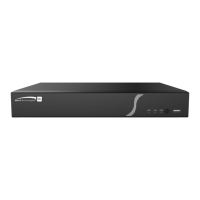
To enter the setup menu, right click on the mouse and select setup from the submenu or press the setup
button on the remote control.
Table 4.0.1. Live Screen and Quick Operation Window
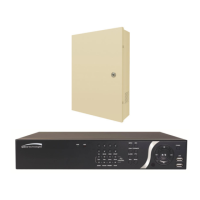
When the NS prompts the Login window, enter the Password using the virtual keyboard, or the front panel,
or the remote control. For Admin, user has to enter a password set at initial booting. It is highly
recommended to assign a new password to protect the system. User can assign a new password in
Security setup menu.


 To Next Page