72
2.4.2.5 DLNA
DLNA (Digital Living Network Alliance) lets you share audio, image and video. Your WiFi
Router lets DLNA-supported devices access multimedia files from the USB disk connected to
your WiFi Router.
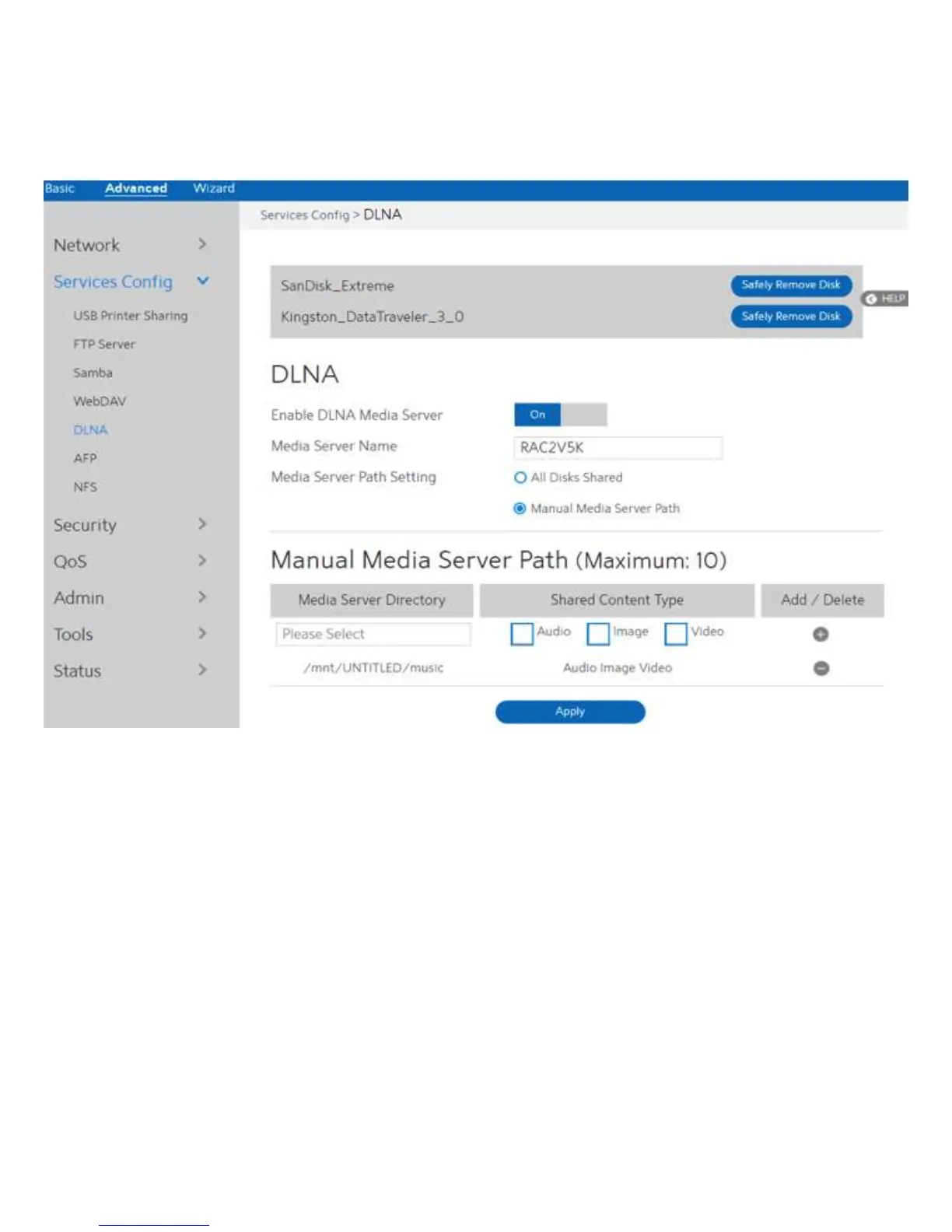
To set up DLNA:
1. From the navigation panel, go to Advanced > Services > DLNA Server.
2. Enable DLNA Media Server: Switch DLNA media on or off.
3. Media Server Name: The DLNA server's name, which will be displayed by the media
player, such as VLC or windows media player.
4. Media Server Path Setting: The methods of setting the folders' path which will be shared.
There are two methods to be chose, "All Disks Shared" means
share all of the mounted disks' all media; "Manual Media
Server Path" means set the folders to be shared manually,
When Manual is selected you must enter additional
information in " Manual Media Server Path".
5. Manual Media Server Path: Set the folders to be shared and the media type that will be
shared by the DLNA server.
6. Media Server Directory: The folders that will be shared by the DLNA.

 To Next Page
 Loading...