IM-P706-03 CTLS Issue 1
34
SP7-20 Smart Positioner
4.5 Sample parameters
Change the zero position of the LCD display from clockwise (CLOCKW) to counter-clockwise limit stop
(CTCLOCKW)
Initial situation: the positioner is in bus operation on the operating level.
1. Switching to the configuration level:
-
Press and hold down ARROW UP and ARROW DOWN simultaneously, additionally quickly press
and release ENTER,
-
Wait for the countdown to go from 3 to 0,
-
Release ARROW UP and ARROW DOWN.
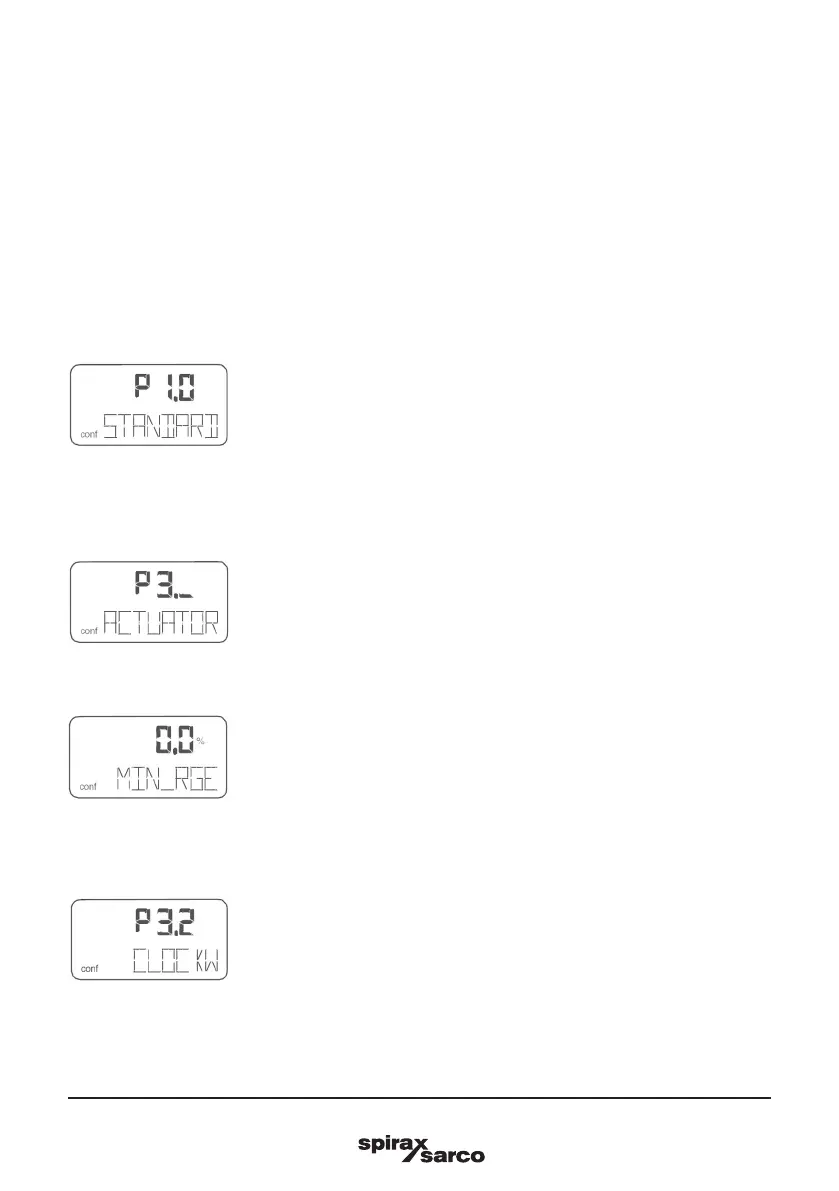
The following is now shown in the display:
2. Switching to parameter group 3._:
-
Press and hold down MODE and ENTER simultaneously, additionally quickly press and release
ARROW UP 2×,
The following is now shown in the display:
-
ReleaseMODE and ENTER .
The following is now shown in the display:
3. Selecting parameter 3.2:
-
Press and hold downMODE, additionally quickly press and release ARROW UP 2×,
The following is now shown in the display:
Release MODE.



 To Next Page