6.12
USB Type-C
®
FS port
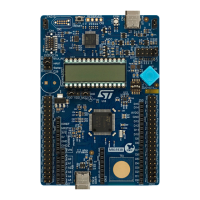
The STM32U083C-DK Discovery kit supports USB full-speed (FS) communication. The USB connector (CN14) is
a USB Type-C
®
connector. The USB connector (CN14) can power the Discovery board at a 5 V DC voltage with a
500 mA current limitation. The VBUS2 voltage is connected to U17 for V
BUS
overvoltage protection.
The STM32U083C-DK Discovery kit supports USB Type-C
®
sink only. When a USB Host connection to the
USB Type-C
®
connector (CN14) of the STM32U083C-DK Discovery kit is detected, it starts behaving as a USB
Device. Depending on the powering capability of the USB Host, the board can take power from the V
BUS
terminal
of CN14. In the board schematic diagrams, the corresponding power voltage line is called 5V_USB.
Section 6.4.1 provides information on how to use the powering option.
The PB6 pin is used as V
BUS
sensing detection when the USB Device is bus-powered or self-powered. When
VDD is 3.3 V, SB24 is ON. When VDD is 1.8 V, SB24 is OFF as the resistor divider value for V
BUS
detection.
The hardware configuration for the USB FS interface is shown in Table 12.
Table 12. USB Type-C
®
FS GPIO configuration
GPIO
Hardware
Setting
(1)
Configuration
PA11 SB8
OFF PA11 is used as the USB_FS_N diff pair interface.
ON
PA11 is connected in parallel to the extension connector (CN10).
The USB interface can be disturbed.
PA12 SB7
OFF PA12 is used as the USB_FS_P diff pair interface.
ON
PA12 is connected in parallel to the extension connector (CN10).
The USB interface can be disturbed.
1. The default configuration is shown in bold.
6.13
Touchkey button
The STM32U083C-DK Discovery kit supports a touchkey button based on either RC charging or charge‑transfer
technique. This one is enabled by default.
The touchkey button is connected to one of the TSC ports of STM32U083MC with the related charge capacitor.
An active shield is designed in layer 2 of the main PCB, under the button footprint. It allows the reduction of
disturbances from other circuits to prevent false touch detections.
The active shield is connected to another TSC interface of STM32U083MC through the R56 serial resistor. The
related charge capacitor is connected to the same TSC interface.
The solder bridge and jumper configuration related to the touchkey function enables or disables its operation.
However, most of them serve to optimize the
touchkey performance, by isolating copper tracks to avoid
disturbances due to their antenna effect.
For more information about the TSC interface and the tuning explanation for this interface, refer to the application
note Getting started with touch sensing control on STM32 microcontrollers (AN5105) and the STM32U0xx product
datasheets.
UM3292
Hardware layout and configuration
UM3292 - Rev 1
page 19/33


 To Next Page