
 To Next Page

L
Lindsay BurkeAug 16, 2025
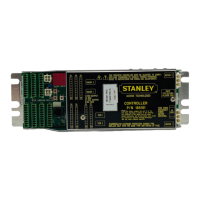
What does it mean if the Stanley MC521 Pro StanguardTM Input/Output is dark?
- JJennifer BowersAug 16, 2025
If the Stanley Controller StanguardTM Input/Output is dark, it means it is triggered or detecting something.

What does it mean if the Stanley MC521 Pro StanguardTM Input/Output is dark?
If the Stanley Controller StanguardTM Input/Output is dark, it means it is triggered or detecting something.
What does it mean if the Stanley MC521 Pro Holding Beam Input & Outside Sensor is dark?
If the Stanley Controller Holding Beam Input & Outside Sensor (connected internally) is dark, it means it is detecting something.
What does it mean if the Stanley Controller Push Plate Input & Inside Sensor Input is dark?
If the Stanley Controller Push Plate Input & Inside Sensor Input (connected internally) is dark, it means it is detecting something.
What does it mean if the Stanley MC521 Pro Controller Outside Sensor & Holding Beam Input is dark?
If the Stanley Controller Outside Sensor & Holding Beam Input (connected internally) is dark, it means it is detecting something.
What does it mean if the Stanley MC521 Pro Controller Inside Sensor Input & Push Plate Input is dark?
If the Stanley Controller Inside Sensor Input & Push Plate Input (connected internally) is dark, it means it is detecting something.
What does it mean if the Stanley Controller Photo Beam Pro Test Output is dark?
If the Stanley Controller Photo Beam Pro Test Output is dark, it means it is testing.
What does it mean if the Stanley MC521 Pro Closed-Door Position Switch Input is dark?
If the Stanley Controller Closed-Door Position Switch Input is dark, it means the door is closed.
What does it mean if the Stanley MC521 Pro Side Screen Sensor Input is dark?
If the Stanley Controller Side Screen Sensor Input is dark, it means it is detecting something.
What does it mean if the Stanley MC521 Pro Breakout Input is dark?
If the Stanley Controller Breakout Input is dark, it means there is no breakout.
How to understand the Solenoid Lock Output on the Stanley MC521 Pro Controller?
For the Stanley Controller Solenoid Lock Output, dark indicates either unlocked or locked status.
Describes the manual's purpose and scope for MC521 PRO controller and its applications.
Notes safety and compliance requirements, including time delays and standards adherence.
Lists and briefly explains various operational features of the MC521 PRO controller.
Covers evaluating power needs and connecting main power and ground wiring to the header.
Details wiring for breakout status signals for Magic-Swing and Magic-Force operators.
Covers handling, switches, activation, and various sensor types for door operation.
Covers initial setup and tuning procedures using a handheld device and software.
Explains manual setup and tuning procedures using the controller's pushbuttons.
Details post-tuning adjustments and checks for proper door operation and compliance.
Contains detailed wiring diagrams for various configurations, operators, and sensors.
 General
| Model | MC521 Pro |
|---|---|
| Category | Controller |
| Connectivity | Bluetooth |
| Color | Black |
| Charging Time | 2 hours |