and guide, which are designed expressly to guide continuous paper
(sprocket-feed) through the printer.
n Attaching the paper separator and paper guide
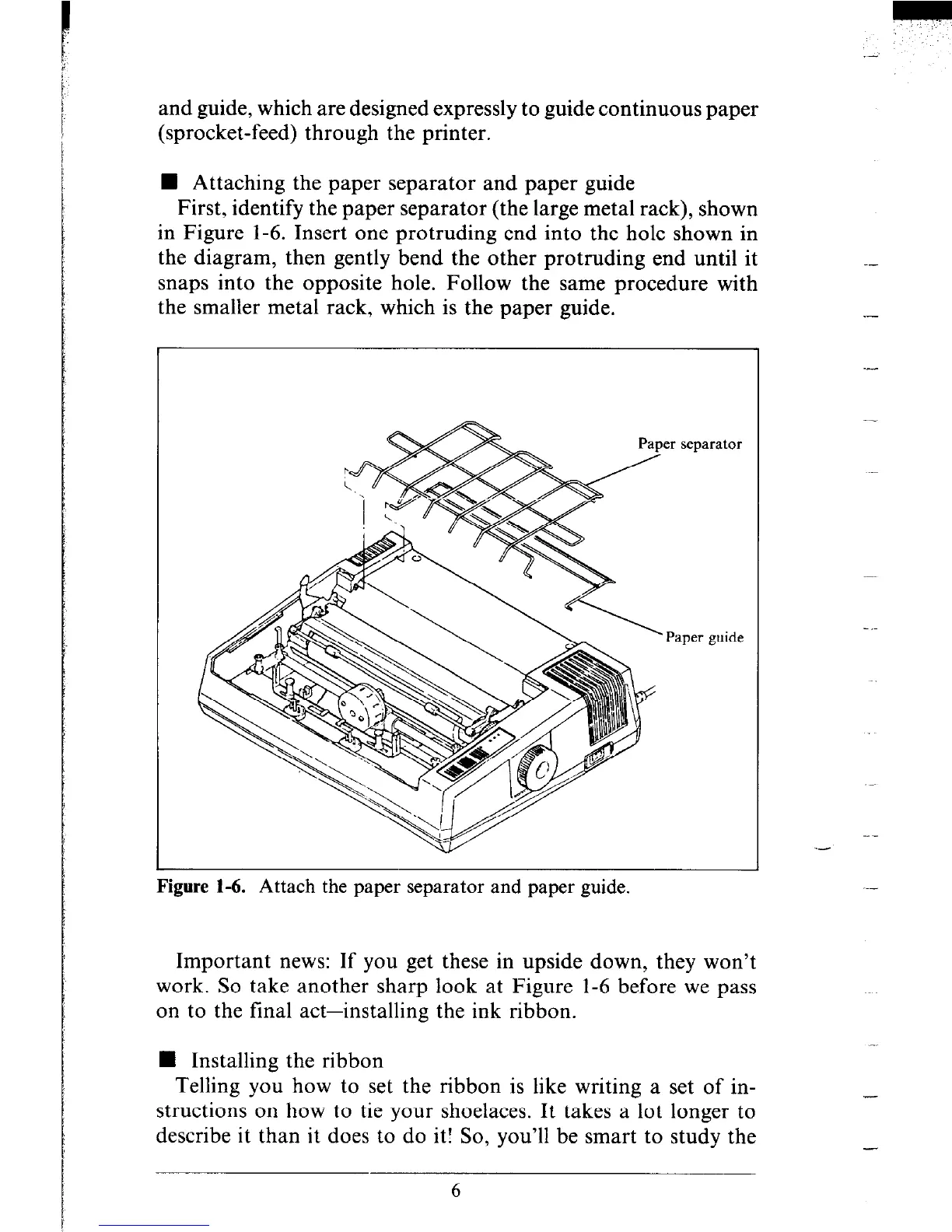
First, identify the paper separator (the large metal rack), shown
in Figure l-6. Insert one protruding end into the hole shown in
the diagram, then gently bend the other protruding end until it
snaps into the opposite hole. Follow the same procedure with
the smaller metal rack, which is the paper guide.
er separator
Paper guide
Figure 1-6. Attach the paper separator and paper guide.
Important news: If you get these in upside down, they won’t
work. So take another sharp look at Figure l-6 before we pass
on to the final act-installing the ink ribbon.
n Installing the ribbon
Telling you how to set the ribbon is like writing a set of in-
structions on how to tie your shoelaces. It takes a lot longer to
describe it than it does to do it! So, you’ll be smart to study the
--
.-
-
-











 To Next Page