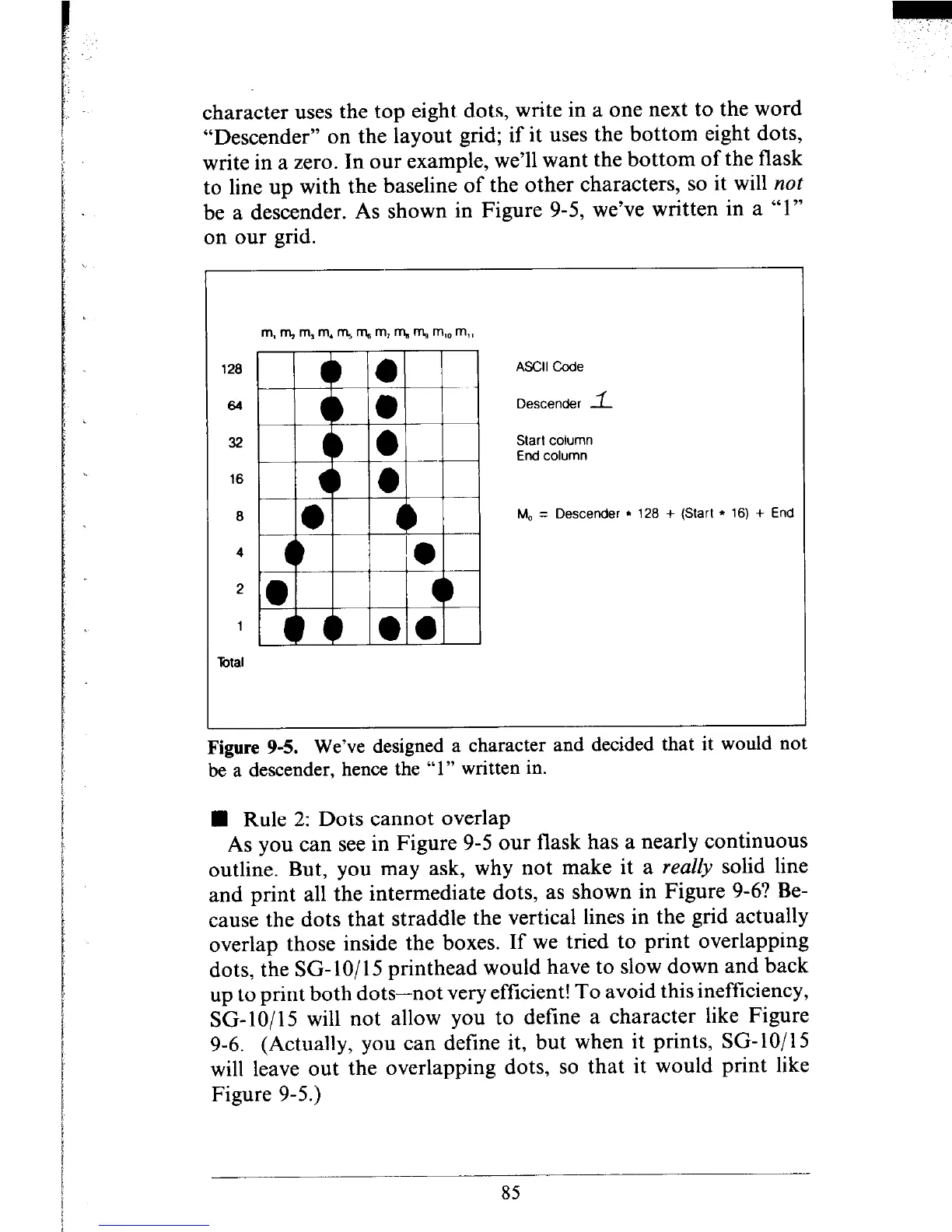
character uses the top eight dots, write in a one next to the word
“Descender” on the layout grid; if it uses the bottom eight dots,
write in a zero. In our example, we’ll want the bottom of the flask
to line up with the baseline of the other characters, so it will not
be a descender. As shown in Figure 9-5, we’ve written in a “1”
on our grid.
120
64
32
16
ASCII Code
Descender 1
Start column
End column
M, = Descender l 126 + (Start l 16) + End
2
1
?&al
Figure 9-5. We’ve designed a character and decided that It would not
be a descender, hence the “1” written in.
n Rule 2: Dots cannot overlap
As you can see in Figure 9-5 our flask has a nearly continuous
outline. But, you may ask, why not make it a reaZly solid line
and print all the intermediate dots, as shown in Figure 9-6? Be-
cause the dots that straddle the vertical lines in the grid actually
overlap those inside the boxes. If we tried to print overlapping
dots, the SG- lo/l5 printhead would have to slow down and back
up to print both dots-not very efficient! To avoid this inefficiency,
SG-lo/15 will not allow you to define a character like Figure
9-6. (Actually, you can define it, but when it prints, SG-lo/15
will leave out the overlapping dots, so that it would print like
Figure 9-5.)
85











 To Next Page