EasyManua.ls Logo

Static Power iSTS W - Display Screen

Default Icon
30 pages
Print Icon
To Next Page IconTo Next Page
To Previous Page IconTo Previous Page
Loading...
4
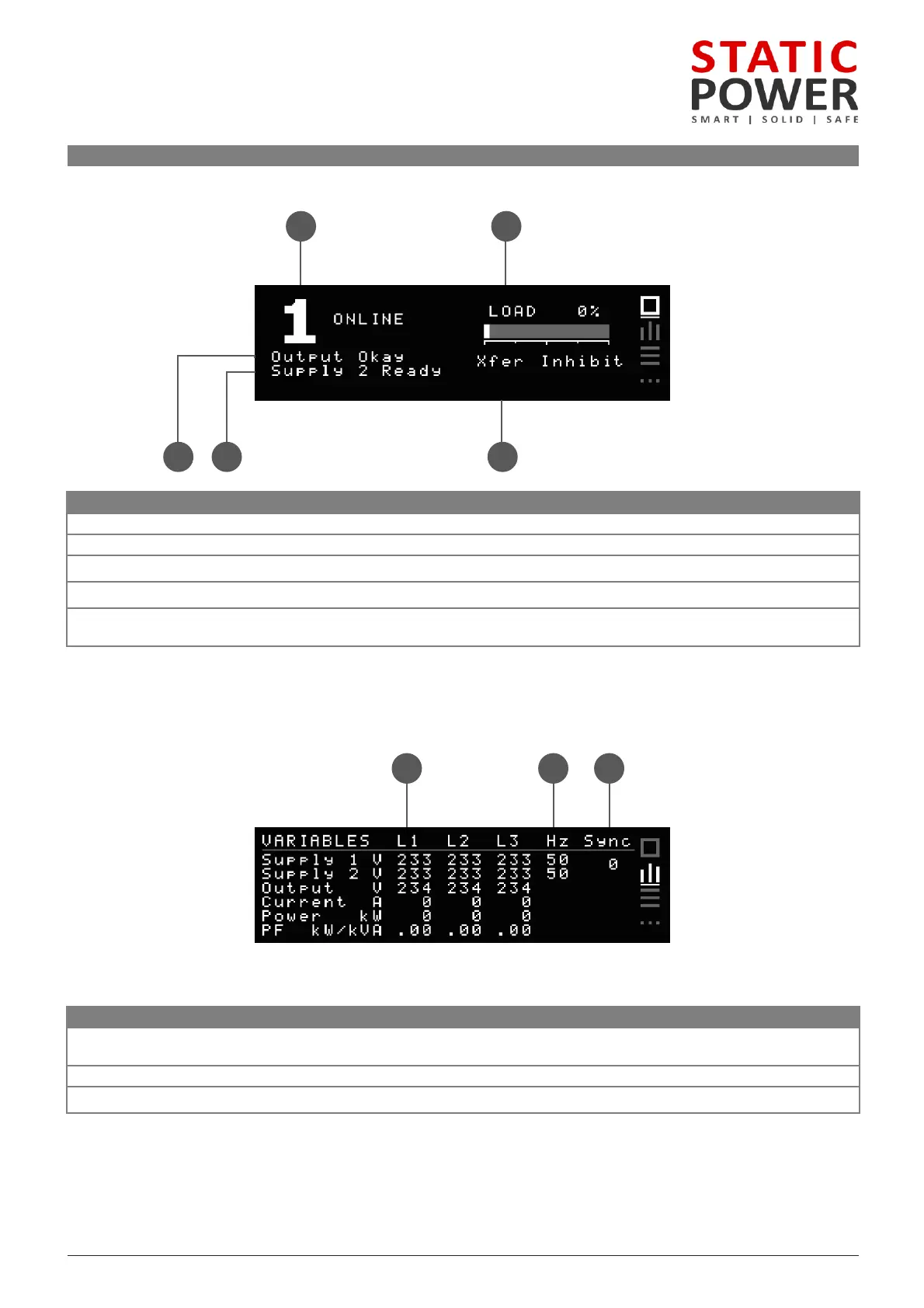
.2 Display Screen
HOME
SCREEN
iSTS W
User Manual
Page 11
1 2
543
Name
Description
1
Preferred Supply Status
Shows the preferred supply and the status of the source connected to the load
2
Load Indicator
Bar and percentage represent the current capacity of the STS that is being used
3
Output Status
Indicates the status of the output
4
Inactive Supply Status
Indicates the status of the supply that is not connected to the load
5
Priority Alarm
The message displayed will be the most important alarm (refer to Event Codes in the Fault Diagnosis
section)
VARIABLE
SCREEN
1 2 3
Name
Description
1
Line Stats
Lists the Voltage, Current, Power and Power Factor for Supply 1, Supply 2 and Output across each phase
line (Single phase units will only show L1)
2
Frequency
Shows the frequency of the input supplies
3
Sync
This is the difference between the frequencies of Supply 1 and 2 in degrees