Software
UR44 Operation Manual 19
7 RATIO
Adjusts the ratio of the compressor.
Range: 1.00 – ∞
8 KNEE
Selects the knee type of the compressor.
9 SIDE CHAIN Q
Adjusts the band width of the side chain filter.
Range: 0.50 – 16.00
) SIDE CHAIN F
Adjusts the center frequency of the side chain filter.
Range: 20.0 Hz – 20.0 kHz
! SIDE CHAIN G
Adjusts the gain of the side chain filter.
Range: -18.0 dB – +18.0 dB
@ COMPRESSOR On/Off
Turns the compressor on (lit) and off (dark).
# Compressor Curve
This graph indicates the approximate compressor
response. The vertical axis indicates the output signal
level, and the horizontal axis indicates the input signal
level.
$ Gain Reduction Meter
Indicates the gain reduction.
% DRIVE
Adjusts the degree to which the compressor is
applied. The higher the value, the greater the effect.
Range: 0.00 – 10.00
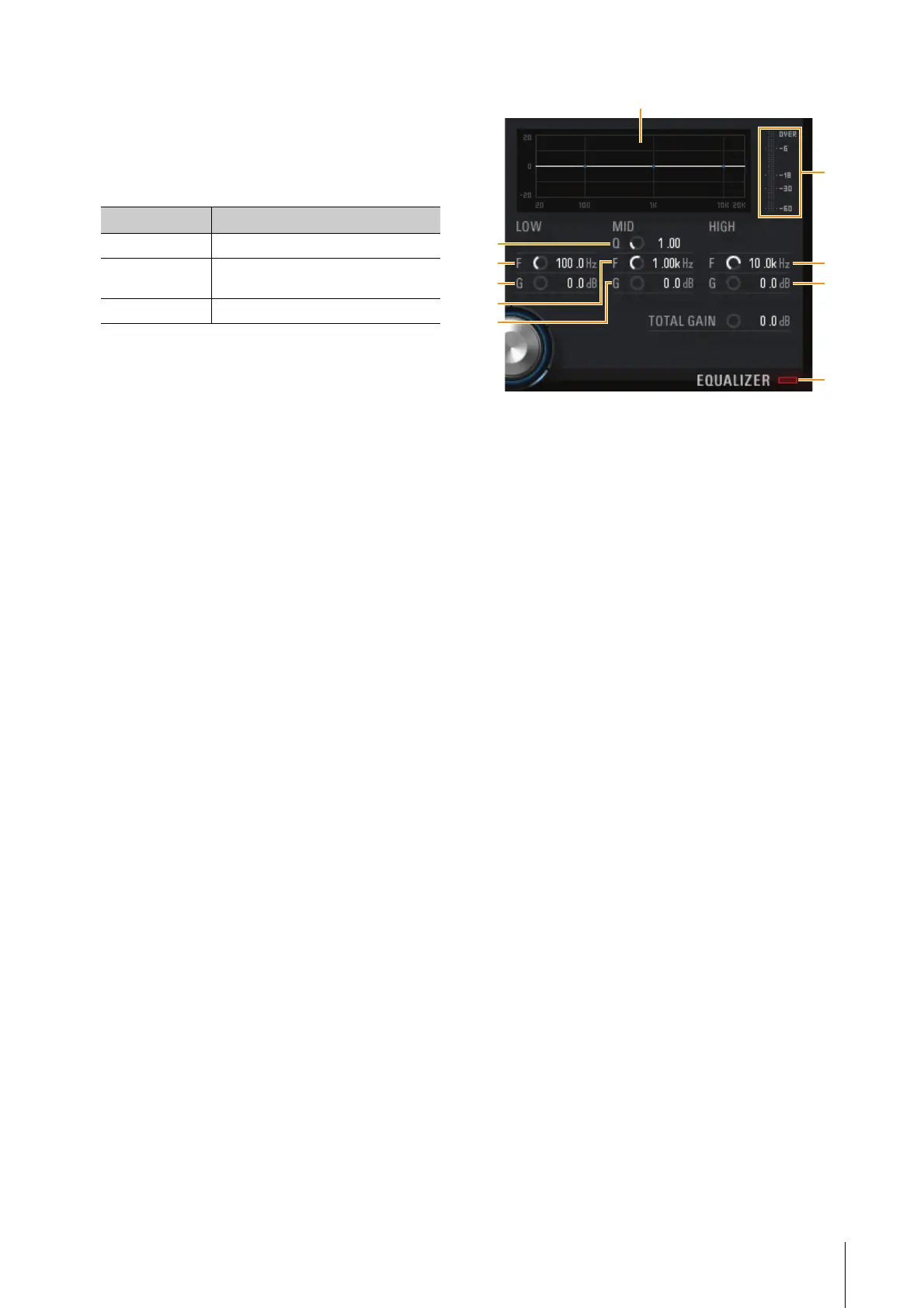
Equalizer
^ Equalizer Curve
This graph indicates the characteristics of the 3-band
equalizer. The vertical axis indicates the gain, and the
horizontal axis indicates the frequency. You can adjust
LOW, MID, and HIGH by dragging each handle in the
graph.
& LOW F
Adjusts the center frequency of the low band.
Range: 20.0 Hz – 1.00 kHz
* LOW G
Adjusts the gain of the low band.
Range: -18.0 dB – +18.0 dB
( MID Q
Adjusts the band width of the middle band.
Range: 0.50 – 16.00
A MID F
Adjusts the center frequency of the middle band.
Range: 20.0 Hz – 20.0 kHz
B MID G
Adjusts the gain of the middle band.
Range: -18.0 dB – +18.0 dB
C HIGH F
Adjusts the center frequency of the high band.
Range: 500.0 Hz – 20.0 kHz
D HIGH G
Adjusts the gain of the high band.
Range: -18.0 dB – +18.0 dB
E EQUALIZER On/Off
Turns the equalizer on (lit) and off (dark).
Options Description
SOFT Produces the most gradual change.
MEDIUM Results in a setting midway between
SOFT and HARD.
HARD Produces the sharpest change.
&
*
(
A
B
$
^
C
D
E



 To Next Page