Software
UR44 Operation Manual 16
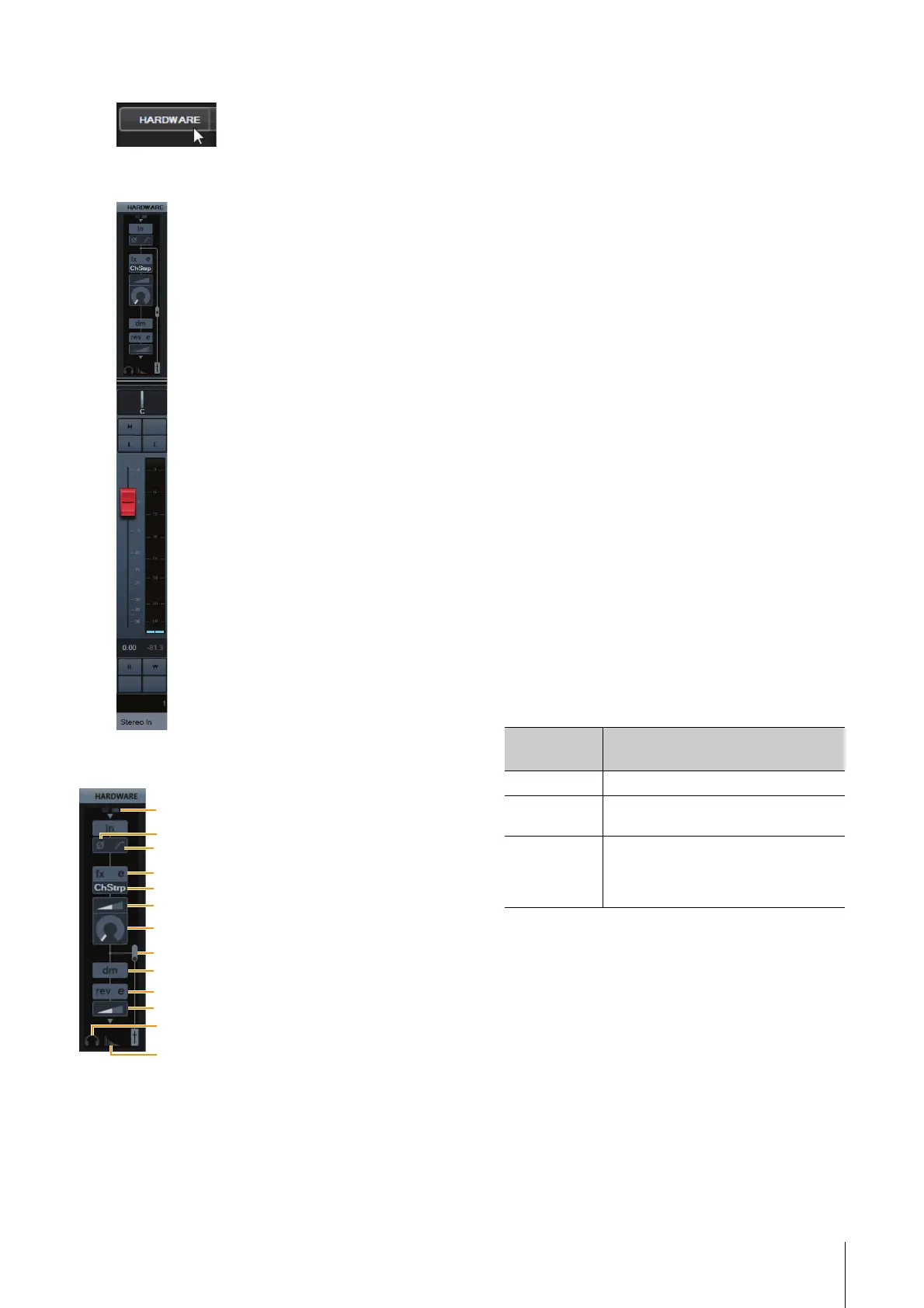
4. Click [HARDWARE].
The Input Settings window appears in the Mixer
window as shown below.
Controls and Functions
1 +48V
Indicates the phantom power on/off status.
2 Phase
Turns on (lit) and off (dark) the phase inversion of the
signal.
3 High Pass Filter
Turns on (lit) and off (dark) the high pass filter (not
available on [LINE INPUT 5/6] ). To select the cutoff
frequency of the high pass filter, use the “Settings
Window” (page 17) in the section “Dedicated
Windows for Cubase Series.”
4 Effect Edit
Opens the selected effect setup window.
5 Effect type
Selects the effect.
The maximum number of Channel Strip and Guitar
Amp Classics iterations which can be used
simultaneously has restrictions. Refer to the
“Limitations on the use of effects” (page 34).
6 DRIVE / Output Level
When Channel Strip is selected, this adjusts the
degree to which the compressor is applied. The higher
the value, the greater the effect.
Range: 0.00 – 10.00
When Guitar Amp Classics is selected, this adjusts the
output level.
Range: 0.00 – 1.00
7 MORPH
Adjusts the Channel Strip Sweet Spot Data. (Refer to
the “MORPH” in the section “Channel Strip” on
page 18). When Guitar Amp Classics is selected,
MORPH is not displayed.
8 Effect Insertion location
Selects the insertion location of an effect.
9 Output Position of the Direct Monitoring
Signal
Indicates the position from which the audio signals for
monitoring will be output when turning on Direct
Monitoring in the device settings on Cubase.
) REV-X Edit
Opens the “REV-X” (page 20) setup window.
! REV-X Send
Adjusts the signal level which is sent to the REV-X.
Range: -∞ dB – +6.00 dB
Insertion
location
Description
Upper (OFF) Turns the effect off.
Middle
(MON.FX)
Applies an effect Strip to only the monitor
signal (sent to the device).
Lower (INS.FX) Applies an effect Strip to both the monitor
signal (sent to the device) and the
recording signal (sent to the DAW
software).



 To Next Page