Software
UR44 Operation Manual 17
@ Headphones Edit
Opens the “Headphones Window” (page 17) in the
section “Dedicated Windows for Cubase Series.”
# Reverb Routing Edit
Opens the “Reverb Routing Window” (page 17) in the
section “Dedicated Windows for Cubase Series.”
Hardware Setup Window
This window is for configuring the general settings
of the device. Click the upper tabs to select the
window. Only the settings on the Reverb Routing
window are saved to the Cubase project file.
How to Open the Window
Follow the steps below to open the window.
[Devices] [Audio Hardware Setup]
Controls and Functions
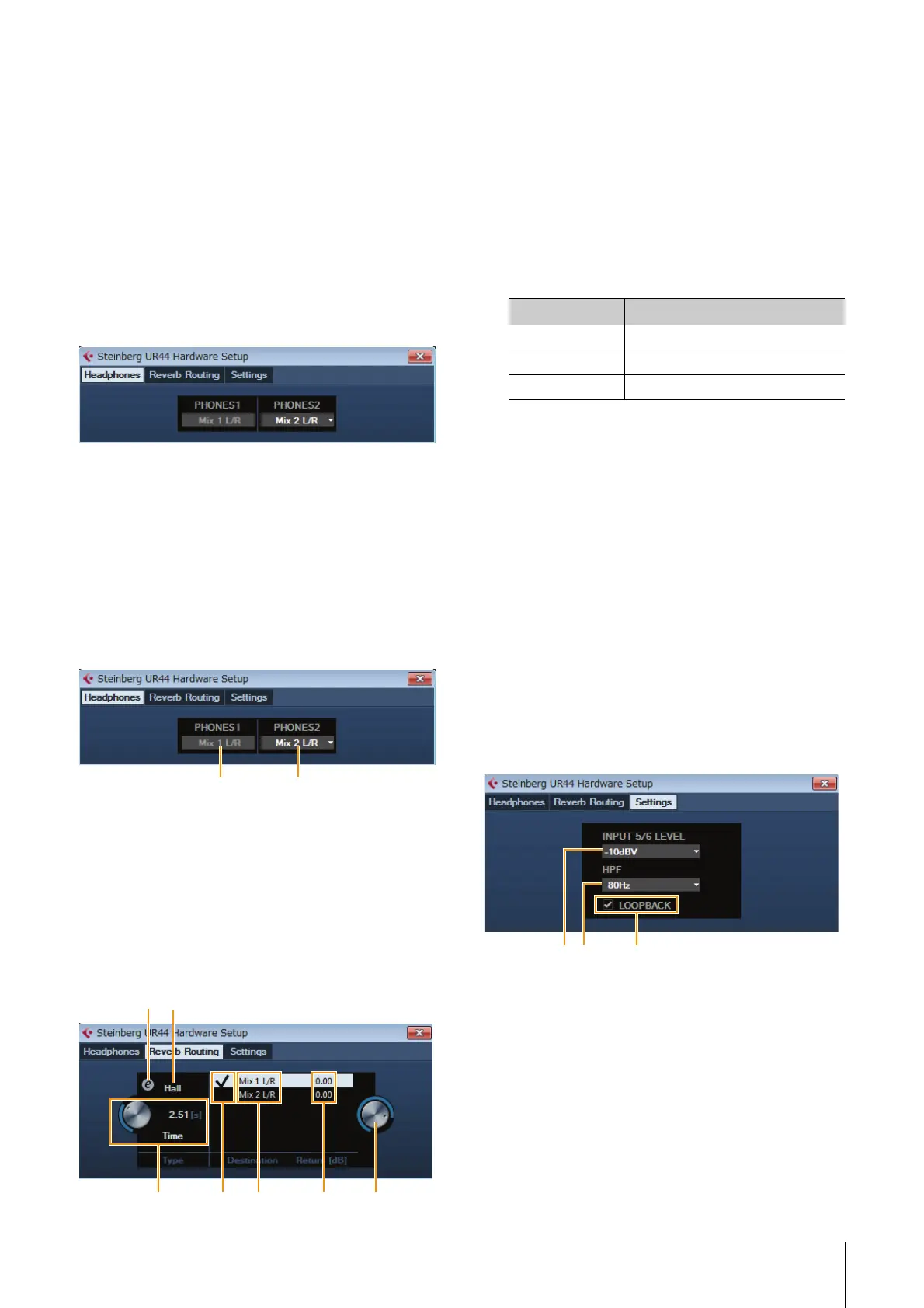
Headphones Window
This window is for selecting the output signal of the
PHONES on the device. (PHONES 2 only)
1 PHONES 1
Indicates the output signal of [PHONES 1].
2 PHONES 2
Selects the output signal of [PHONES 2].
Reverb Routing Window
This window is for configuring the “REV-X” (page 20)
settings.
1 REV-X Edit
Opens the “REV-X” (page 20) setup window.
2 REV-X Type
Selects the REV-X type.
Options: Hall, Room, Plate
3 REV-X Time
Adjusts the reverb time of REV-X. This parameter links
to Room Size. The adjustable range varies depending
on the REV-X type.
4 REV-X Send Source Select
Selects the send source signal which is sent to REV-X.
You can select one signal at a time. The checkmark
indicates the selected signal.
5 REV-X Send Source
Indicates the signal which is sent to REV-X.
6 REV-X Return Level
Indicates the return level of REV-X.
7 REV-X Return Level Knob
Adjusts the return level of the selected (highlighted)
signal.
Range: -∞ dB – +6.00 dB
Settings Window
This window is for configuring the device settings.
1 INPUT 5/6 LEVEL
Selects the input signal of [LINE INPUT 5/6].
Options: +4 dBu – 10 dBV
2 HPF
Selects the cutoff frequency of the high pass filter (not
available on [LINE INPUT 5/6] ).
Options: 120 Hz,100 Hz, 80 Hz, 60 Hz, 40 Hz
3 LOOPBACK
Turns the Loopback function on (lit) and off (dark).
Refer to the “LOOPBACK” in the section “dspMixFx
UR44” (page 14).
REV-X type Range
Hall 0.103 sec – 31.0 sec
Room 0.152 sec – 45.3 sec
Plate 0.176 sec – 52.0 sec
312



 To Next Page