Description of the Device
UR44 Operation Manual 5
Description of the Device
Front Panel
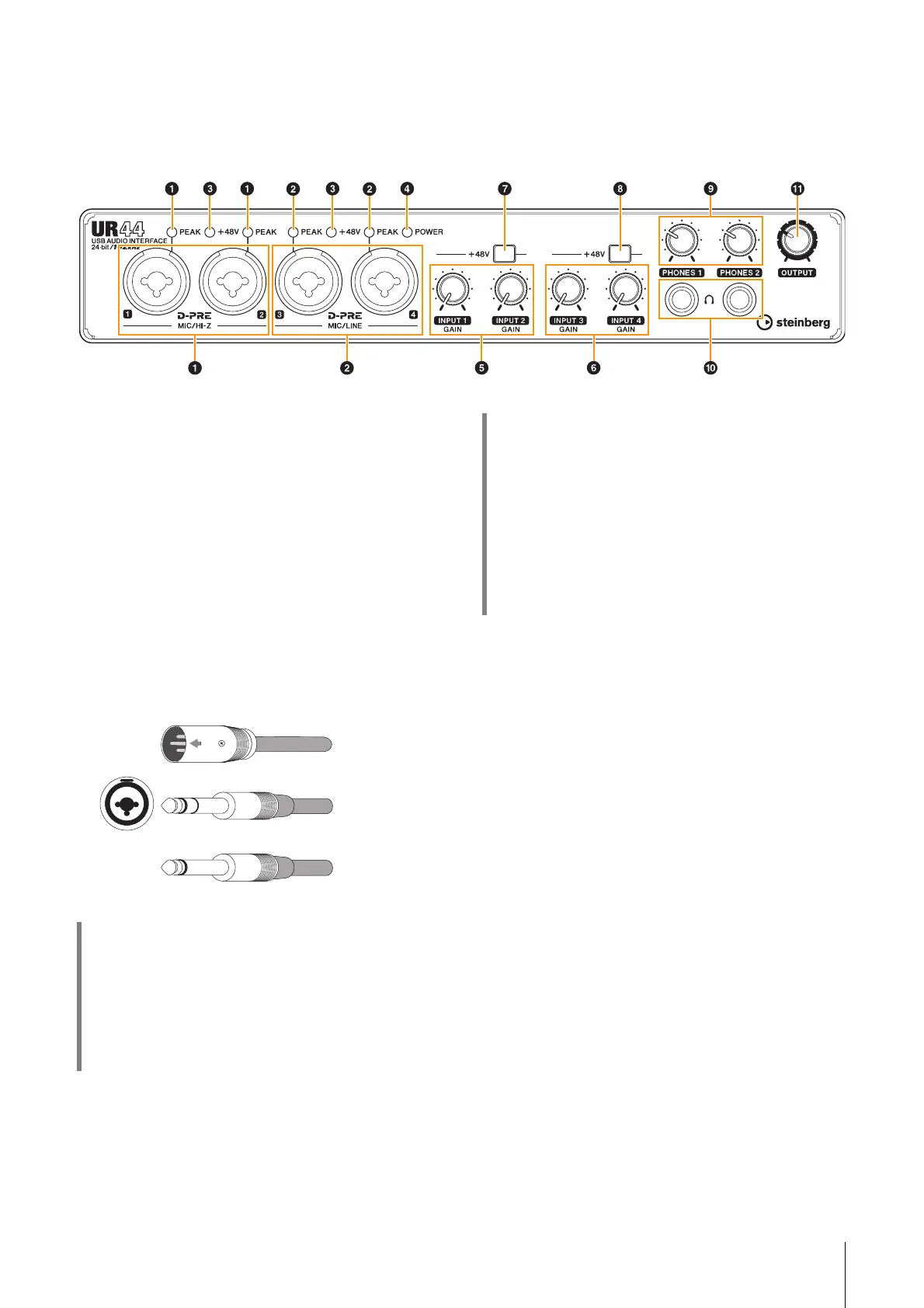
1 [MIC/HI-Z 1/2] jack/[PEAK] indicator
For connection to a microphone, digital instrument,
electric guitar, or electric bass. This jack can be
connected to both XLR-type and phone-type
(unbalanced only) plugs
*1
. The XLR-type is MIC only
and the phone type is HI-Z only. The [PEAK] indicator
lights in red when the signal is -3 dB or greater.
2 [MIC/LINE 3/4] jack/[PEAK] indicator
For connection to a microphone or digital instrument.
This jack can be connected to both XLR-type and
phone-type (balanced/unbalanced) plugs
*1
. The XLR-
type is MIC only and the phone type is LINE only. The
[PEAK] indicator lights in red when the signal is -3 dB
or greater.
*1 Plug types
3 [+48V] indicator
The indicator lights when the [+48V] switch (phantom
power) is turned on.
4 [POWER] indicator
The indicator lights when the power is turned on. The
indicator flashes continuously when the computer or
iPad does not recognize the device.
5 [INPUT 1/2 GAIN] knob
Adjusts the input signal level of the [MIC/HI-Z 1/2]
jack.
6 [INPUT 3/4 GAIN] knob
Adjusts the input signal level of the [MIC/LINE 3/4]
jack.
HINT
Setting optimum recording levels
The [PEAK] indicator lights in response to the level of
input signal. To set optimum recording levels, increase
the input level with the [INPUT GAIN] knob until the
[PEAK] indicator lights in red, then slowly bring the level
down until the indicator lights slightly when the input
level is at maximum.
XLR-type
(balanced)
Phone-type
(balanced)
Phone-type
(unbalanced)
HINT
Proper use of the HI-Z or LINE inputs
HI-Z:
• Guitar and bass with passive pickups (battery-
powered)
LINE:
• Effect device, preamp, direct box
• Guitar and bass with active pickups (not battery-
powered)
• Digital instruments, such as synthesizer



 To Next Page