Basic Operation
UR44 Operation Manual 28
Recording/Playback
1. After turning the [CC MODE] switch on, turn
on the [P] switch on (O).
2. Open Cubasis.
3. Double-tap the Project [Template].
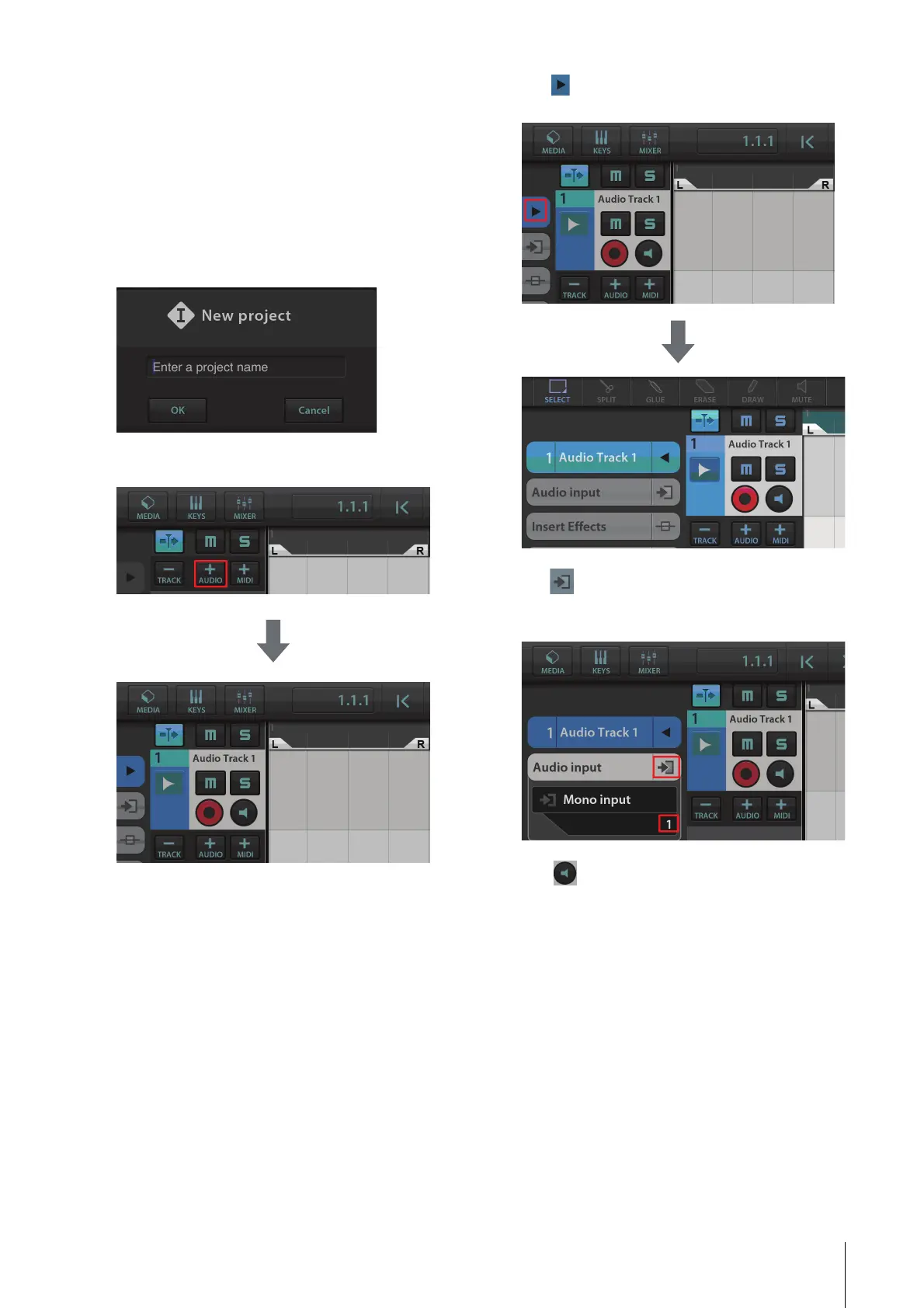
4. Enter a project name and tap [OK] in the
[New project] window.
5. Tap [+AUDIO] to add an AUDIO track.
6. Tap on the far left of your screen to show
the track menu, with [Audio input] at the top.
7. Tap to show the details window and set
the input bus for the track by tapping a
number.
8. Tap to turn monitoring on (lit).
9. Adjust the input signal level of the
microphone with the [INPUT GAIN] knob on
the device.
To achieve optimum recording levels, increase the
input level with the [INPUT GAIN] knob until the
[PEAK] indicator lights in red, then slowly bring the
level down until the indicator lights slightly when the
input level is maximum.
10. While singing into the microphone, adjust
the output signal level of the headphones by
the [PHONES] knob on the device.



 To Next Page