Stellar
®
Heavy-Duty Telescopic Crane Owner’s Manual | Page 7
The parking brake must be released before moving the truck.
Make certain that any air tanks are completely drained before moving
the truck.
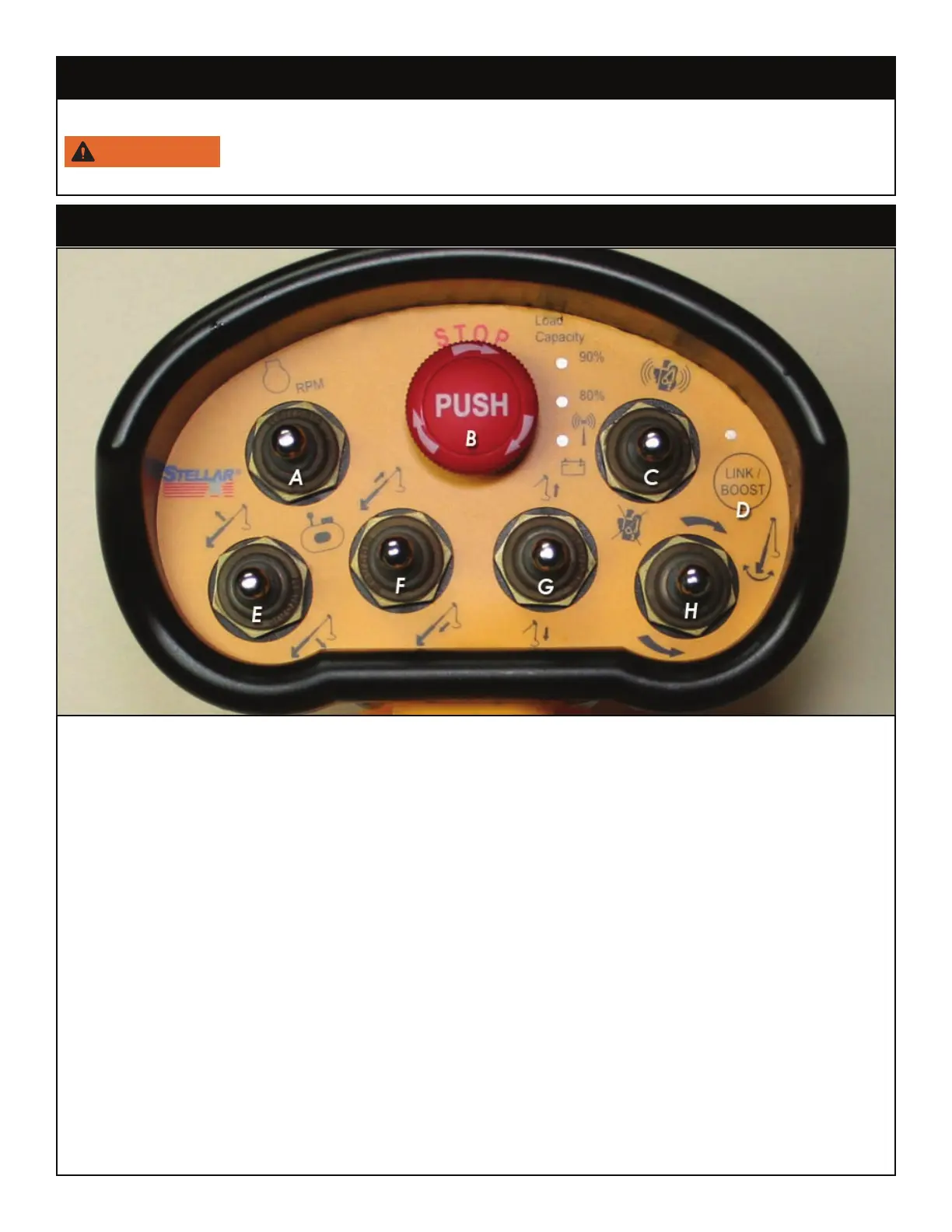
Radio Remote Control Functions
A. Optional Speed Control/Compressor Start/Stop Toggle: Push up to start or stop the optional
speed control. Push down to start or stop the compressor.
B. E-Stop Button: Push to immediately stop all crane functionality. Note: The E-stop button is not
intended to be an on/off switch. This is also the rst item to check if the crane is not responding
to toggle and trigger activation. Make sure the red E-Stop button is in the up or disengaged
position.
C. Engine Start/Stop Toggle: Push to start or stop the engine.
D. Link/Boost Button: Push and hold for 5 seconds to engage boost mode (See the following page
for details on ‘Boost Mode’). If the remote loses connection with the transmitter, use this button
to reconnect.
E. Boom Up/Down Toggle: Push up to raise the boom. Push down to lower the boom.
F. Extension In/Out Toggle: Push up to extend the extension. Push down to retract the extension.
G. Winch Up/Down Toggle: Push up to raise the winch. Push down to lower the winch.
H. Rotate Clockwise/Counterclockwise: Push up to rotate the boom clockwise. Push down to rotat
the boom counterclockwise.
Step 9: Release the parking brake.



 To Next Page