3.2 CongureDAKsonanIPMasterStation
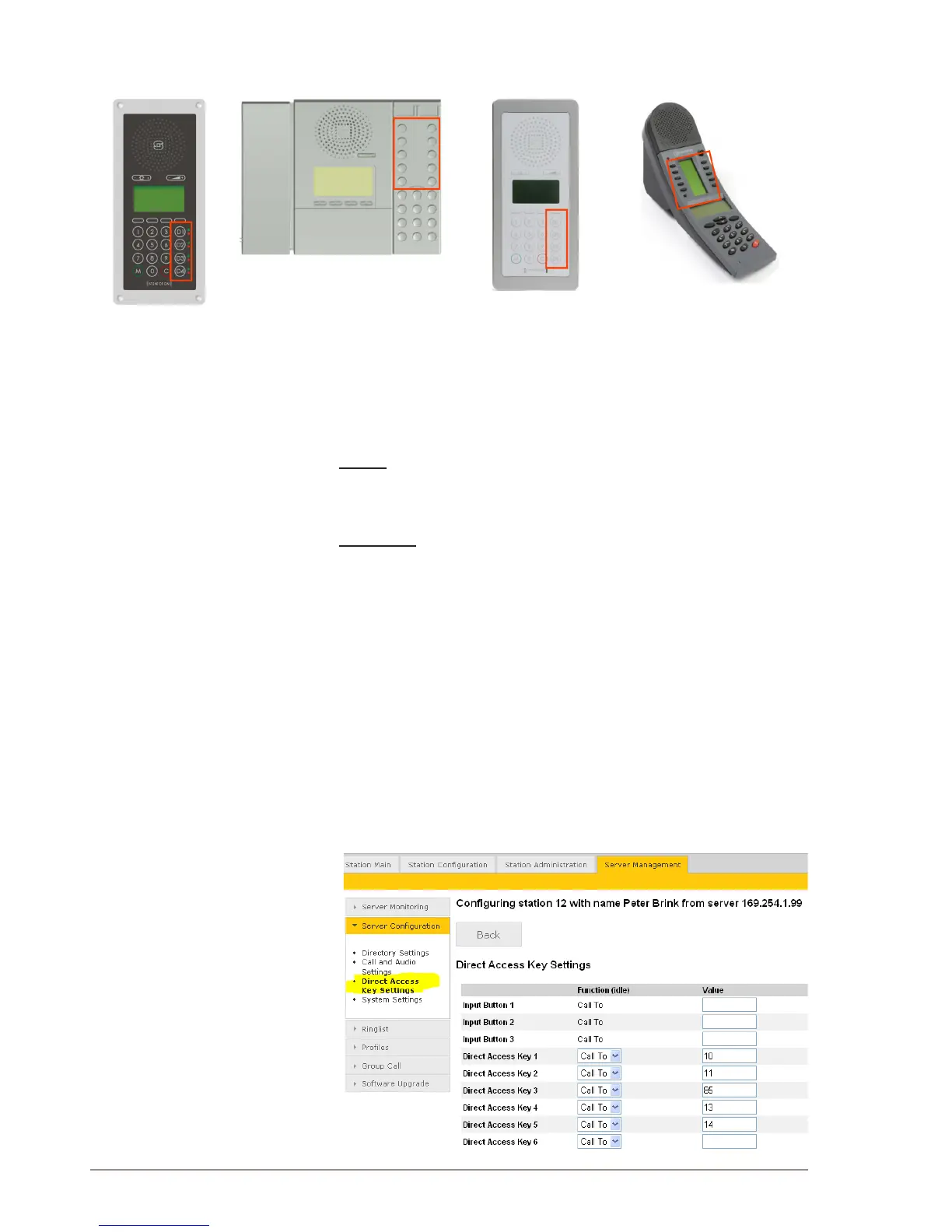
DAKs (Direct Access Keys) are function keys on the IP master stations.
IP Flush Master has 4
DAKs with red and green
LEDs
IP Desktop Master with 10 DAKs
OR Master station with
4 DAKs
IP Dual Display station with
10 DAKs
A DAK supports the following functions:
• Call To
• Select Line
Call To
This parameter sets the directory number to call to when the key is
pressed.
Select Line
Select Line can be used to park an on-going call, and to make a new
call. To receive more than 1 call, Select Line should be assigned to at
least one DAK.
This parameter assigns the key to an external phone line. This requires
that the Pulse system is connected to an external telephone system
via a SIP gateway. You can have multiple lines on an IP master station.
The active line is indicated by a green LED. You can change the line
by pressing the associated DAK. Lines that have an active call are
indicated by a red LED.
The DAK keys can be congured via the Pulse Server:
● Select Server Management > ServerConguration> Direct
Access Key Settings
● Select the station to set single-touch access to your most frequently
used directory numbers and functions.



 To Next Page