● If the stations are using static IP addresses, you need to set the
Gateway address for all stations. Log into the Pulse Server, go
to Main Settings and set the Gateway address to be the Pulse
Server IP Address (unless you have a real gateway). Go to Server
Management > ServerConguration, click Save then Apply. Now
all stations should have a gateway address.
● The network switch may be dropping multicast packets (For
example, Linksys ‘business series’ switches drop all multicast
packets with default conguration). If this is the problem, check the
manual for the network switch.
3.6 CongureRinglist
Log on to the web interface of the station that will be making the call to
congure the ringlist of the stations that should be called.
To congure a ringlist:
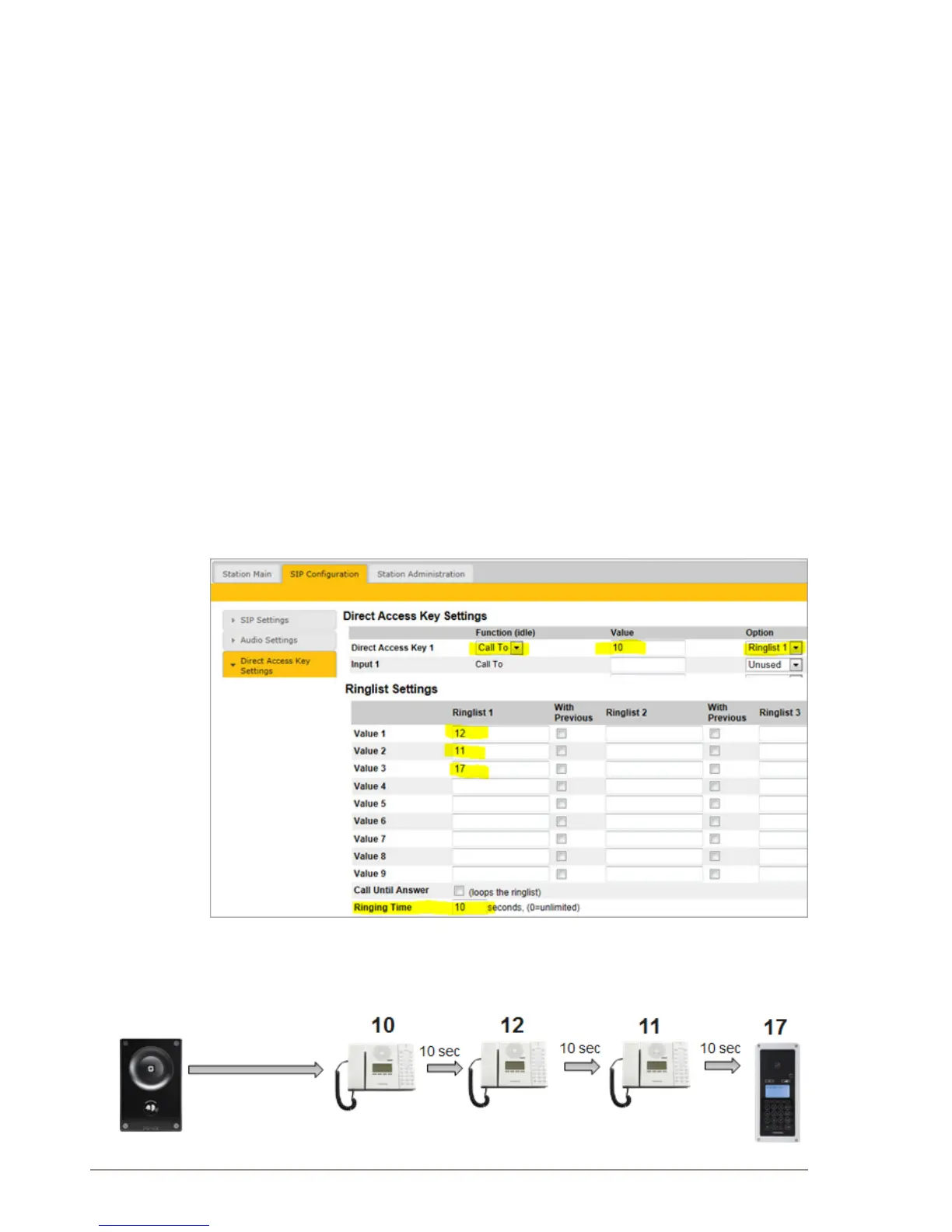
● Select SIPConguration > Direct Access Key Settings
There are variants of ringlists that can be set such as ringing time
intervals, loopback, and ringing together with previous stations.
3.6.1 Ringlist with Ringing Time Intervals
The above example ringlist settings may be illustrated as follows:



 To Next Page