2.1.3 Directory Number & Name
Directory Number is the number used to dial to the intercom station. It
is recommended to use a two-digit number. Name is a logical name you
can assign to the station.
2.1.4 IPAddresses&Conguration
The Pulse Server station must have a static IP address. Other IP
intercom stations may use static addresses or an automatic (DHCP) IP
address assignment.
IP addresses must be unique in your network. These addresses are
normally managed by the IT department. Hence, you should consult
your IT department on the IP addresses to use in the network.
2.2 Connect and Set Up Pulse Server
2.2.1 Connecting Pulse Server to the Network
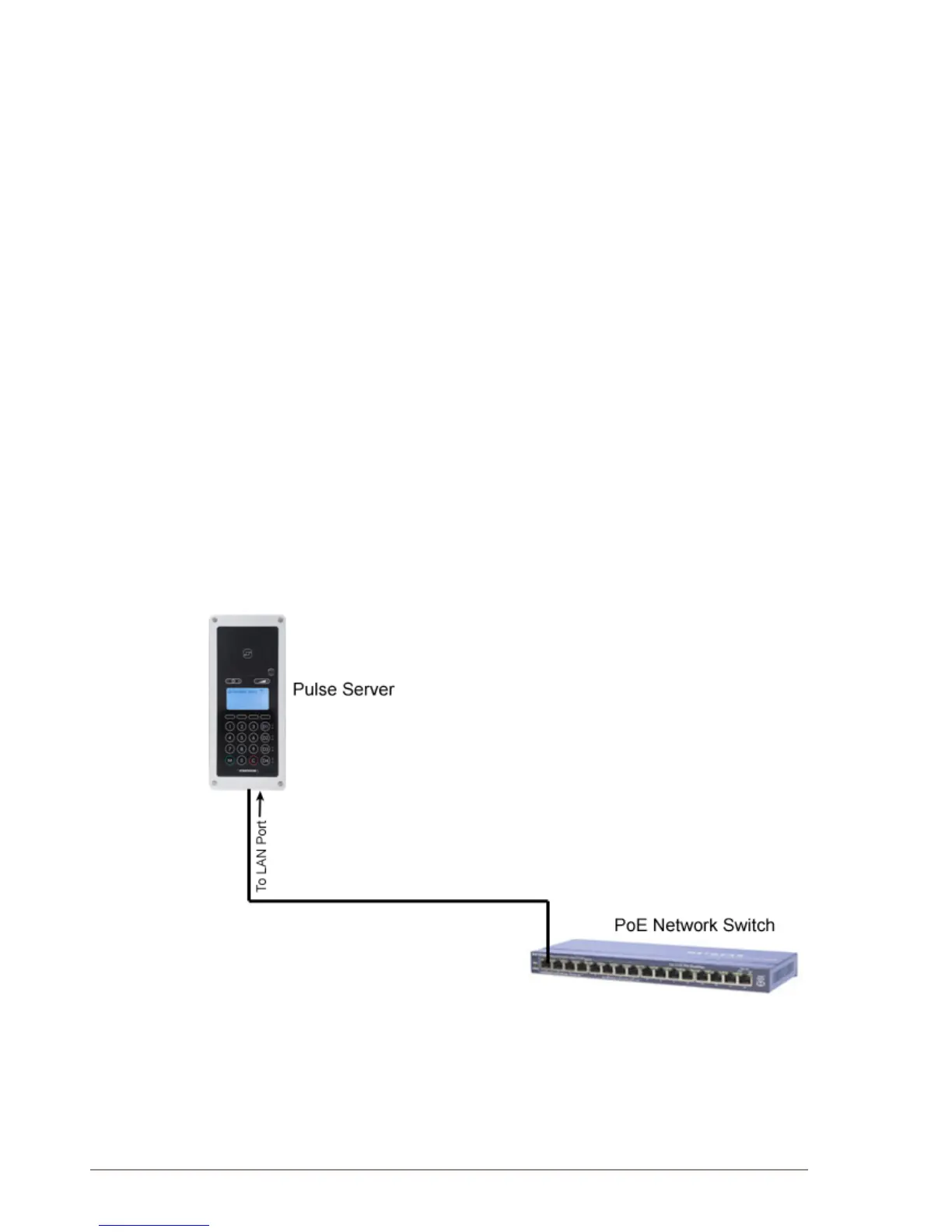
One of the intercom stations must be set as the Pulse Server. The Pulse
Server acts as a server for the other intercom stations in the system.
Any station can be a Pulse Server, but it is recommended to use a
master station.
L There can only be one Pulse Server in the installation.
● Connect the LAN port of the Pulse Server station to a PoE network
switch.
L Do not connect any other stations at this point
All STENTOFON IP intercom stations, with the exception of the Turbine
stations and the Dual Display station, have two RJ45 network ports:
● LAN port is for connecting to the network
● AUX port is for connecting to auxiliary equipment such as a PC.



 To Next Page