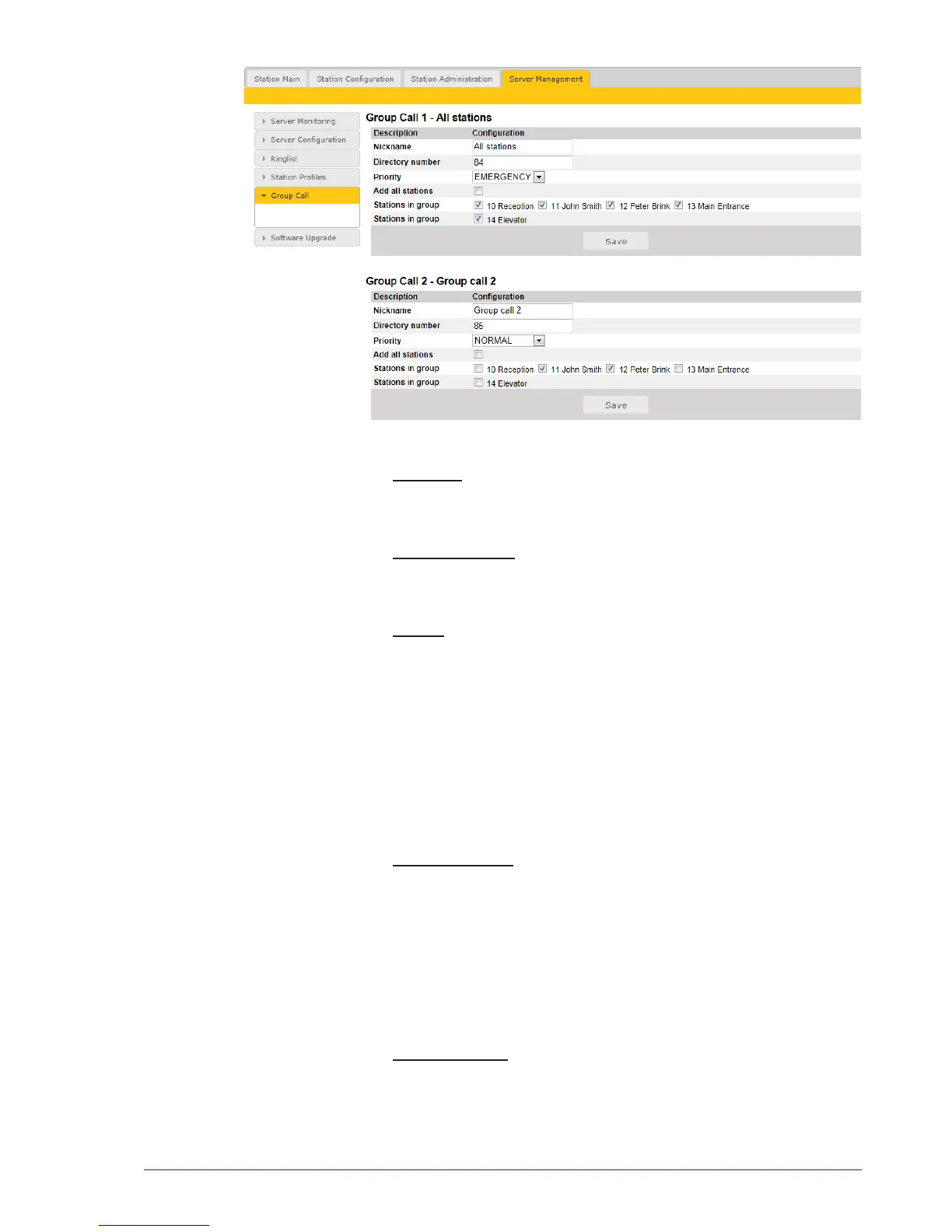
● Select Server Management > Group Call
Change the parameters for each group as required:
Nickname
This is the display text shown in the initiating station when the group call
is activated. Can be any text.
Directory number
The number to dial to activate the group call. If changed, a reboot of the
Pulse Server is required for the changes to take effect.
Priority
Priorities can be set for one group call at a time. A group call with higher
priority will override a lower priority group call.
EMERGENCY: Volume and handset override. The Group Call audio is
mixed with conversation audio
HIGH: The Group Call audio is mixed with conversation audio
NORMAL: The Group Call audio is not played if there is an ongoing
conversation
LOW: The Group Call audio is not played if there is an ongoing
conversation
Stations in group
Select the stations that should receive Group Call audio. You can select
all stations in one operation be checking the Add all stations box.
There is a Save button for each group call.
● Remember to click Save before you make changes to the next group
call.
Troubleshooting
Q: When making a group call, the ding-dong chime is heard in the
stations, but there is no audio.
A: The problem is that the multicast audio does not reach the stations,
which may be due to two things:



 To Next Page