15
Caution:
Make sure to run auto-tune before operating Ramp/Soak
because Ramp functions will interfere with the operation of auto-tune.
Ramp/Soak Set Up
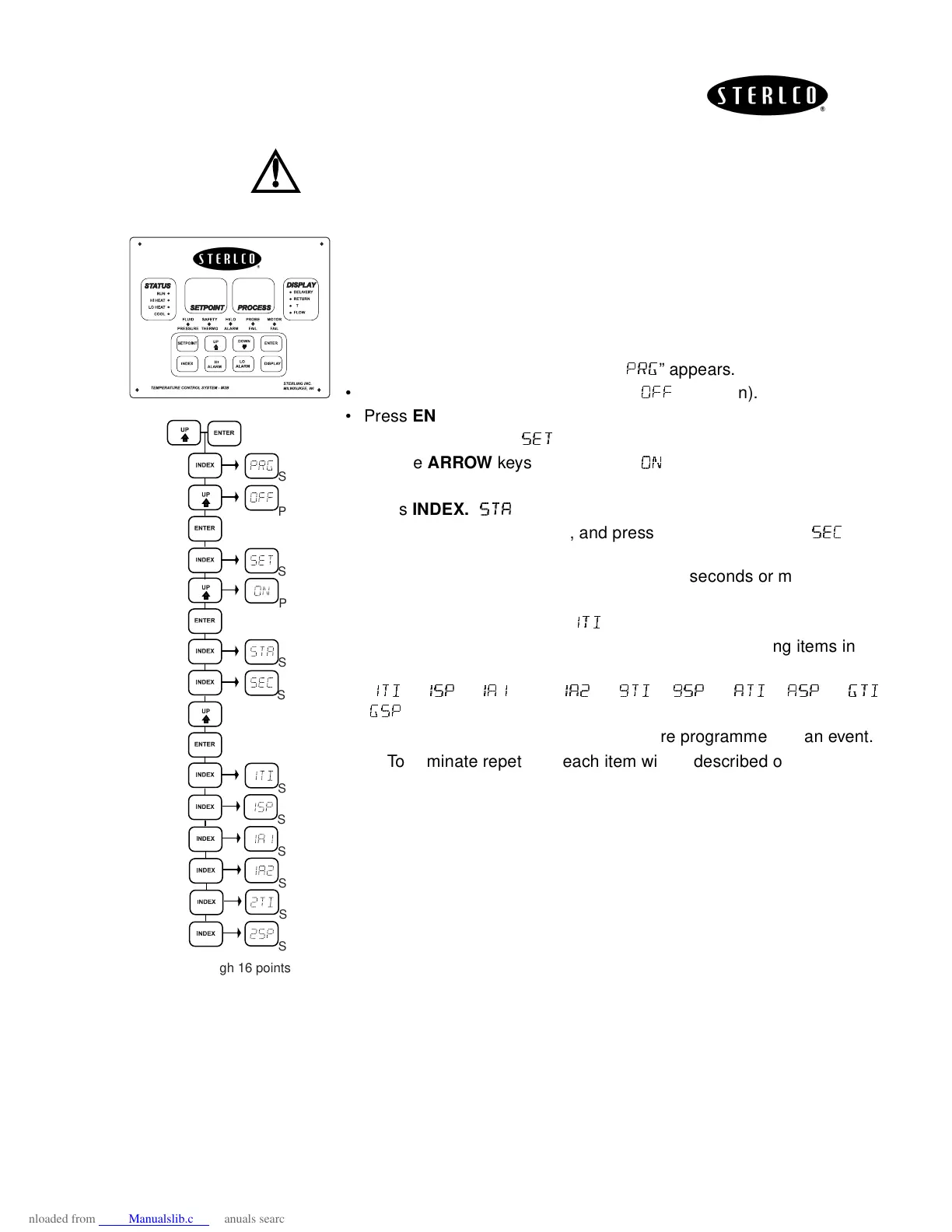
Before programming Ramp/Soak, evaluate your program on paper. To
program Ramp/Soak function, enter the secondary menu (pressing
UP
and
ENTER
keys simultaneously).
• Press
INDEX
key repeatedly until “
!
!!
!
” appears.
• Use the
ARROW
keys to change to “
“(if it is on).
• Press
ENTER.
• Press
INDEX
once, “
” should appear.
• Use the
ARROW
keys to change to “
” (if it is off).
• Press
ENTER.
• Press
INDEX.
“
” should appear.
• Skip this parameter for now, and press
INDEX
once more. “
” will
appear.
• Use the
ARROW
keys to select time base (seconds or minutes).
• Press
ENTER
.
• Press the
INDEX
key until “
"
""
"
#
##
#
” appears.
• From this point, pressing
INDEX
will display the following items in the
following order:
“
"
""
"#
##
#
”, “
"
""
"
”, “
"
""
""
""
"
” and “
"
""
"
”---“
$#
$#$#
$#
”, “
$
$$
$
”---“
#
##
#
”, “
”---“
!
!!
!#
##
#
”,
“
!
!!
!
”
Alarms 1 and 2 display only if they are programmed as an event.
To eliminate repetition, each item will be described once.
S
S
S
S
P
P
S
S
S
S
S
S
Through 16 points
∆


 To Next Page