16
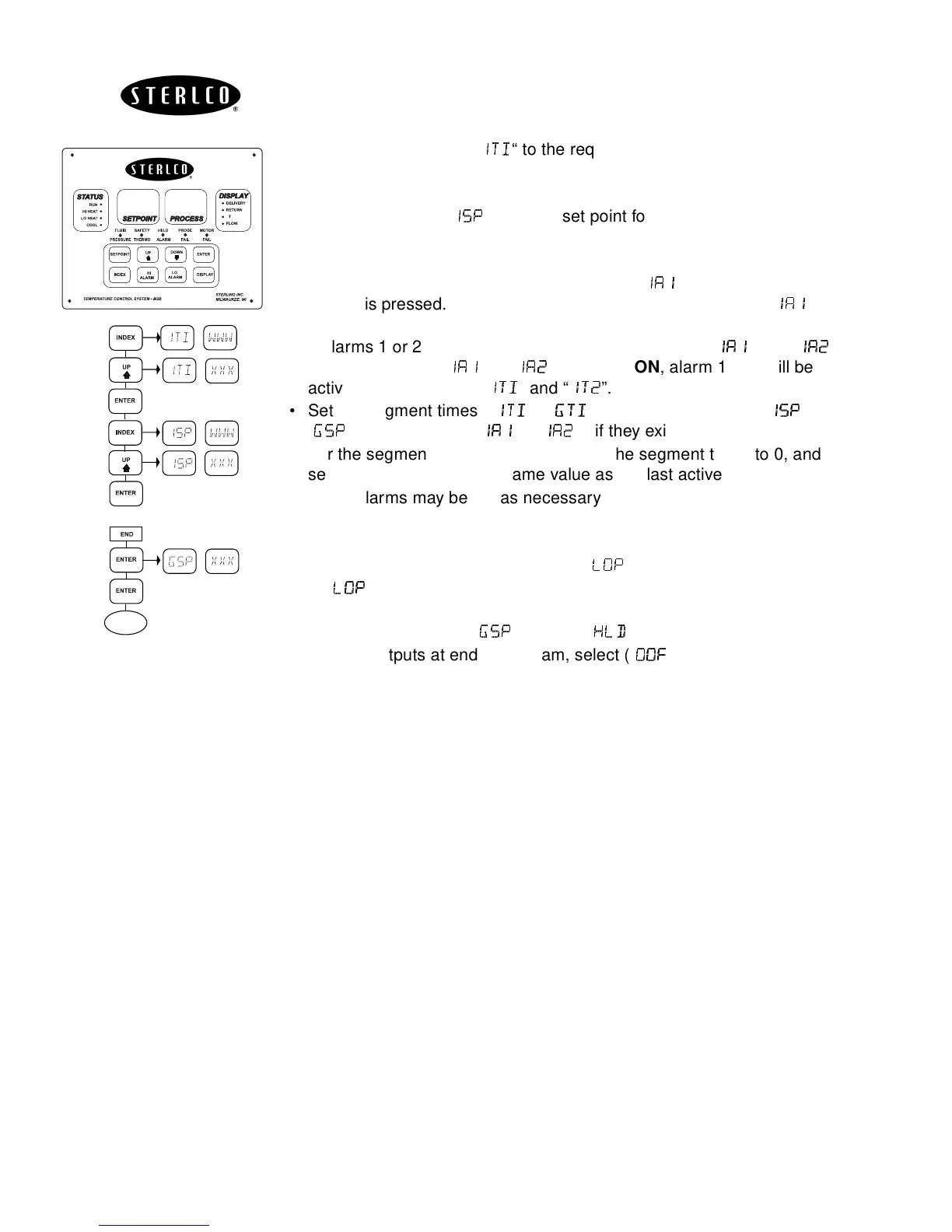
• For the first ramp, set “
"#
"#"#
"#
“ to the required time. This value is in time
units from 0 to 999 (seconds or minutes).
• Press
ENTER
.
• Press
INDEX,
set “
"
""
"
” to target set point for the first ramp. The units
of this value are the same as normal set point (SP1).
• Press
ENTER
.
• If alarm 1 is programmed as an event, then “
""
""""
""
” will appear when
INDEX
is pressed. If alarm 1 is required for this segment, set “
"
""
""
""
"
” for
ON
, if not, set for
OFF
.
• If alarms 1 or 2 are not programmed as an event, the “
""
""""
""
” and “
"
""
"
”
will not appear. If “
"
""
""
""
"
” or “
"
""
"
” are set to
ON
, alarm 1 or 2 will be
active for the period of “
"#
"#"#
"#
” and “
"
""
"
”.
• Set the segment times (“
"
""
"#
##
#
”---”
!
!!
!#
##
#
”), segment set points (“
"
""
"
”---
”
!
!!
!
”), event alarms (“
"
""
""
""
"
”---”
"%
"%"%
"%
”), if they exist.
• For the segments that are not used, set the segment times to 0, and
segment set points to the same value as the last active set point.
• Event alarms may be set as necessary.
•
END
is the last menu item for the Ramp/Soak function.
END
determines
what the controller does when the program has ended.
• To set the program to repeat, select (“
”).
•If (“
”) is selected, it is important to allow the process to return to the
same condition that existed when the program first started.
• To hold last set point (“
!
!!
!
”), select (“
”).
• Turn off outputs at end of program, select (“
&
&&
&
”)
• Press
ENTER
to accept your choice.
∆
S P
S
P
S
P
S
P
Through 16 points
P
RUN
S


 To Next Page