9
1800 898 750
service@wkfe.com.hk
Telephone:
Email:
Sensors
Various sensors are integrated into the vacuum cleaner which provide it with
certain useful traits.
• Level sensors recognise staircases and other dips to ensure that the device
will not fall. These categorise any height difference of more than 10 cm as a
dangerous depression. If such a drop is recognised, the vacuum cleaner turns
around to avoid falling.
• Anti-fall sensors are also located on the main wheels. If a wheel loses contact
with the floor – i.e. moves over a hole – the device reverses to prevent any
incident. If both wheels lose contact with the floor, the device stops
immediately.
• The bumper is located at the front of the device. If the bumper comes into
contact with anything, the device reverses to move around the obstacle.
• Due to the sensitivity of the integrated anti-fall sensors, dark or highly glossy
floor surfaces may cause the device to malfunction.
Don’t use the mop function on carpet or uneven ground.
Using the Mop Function
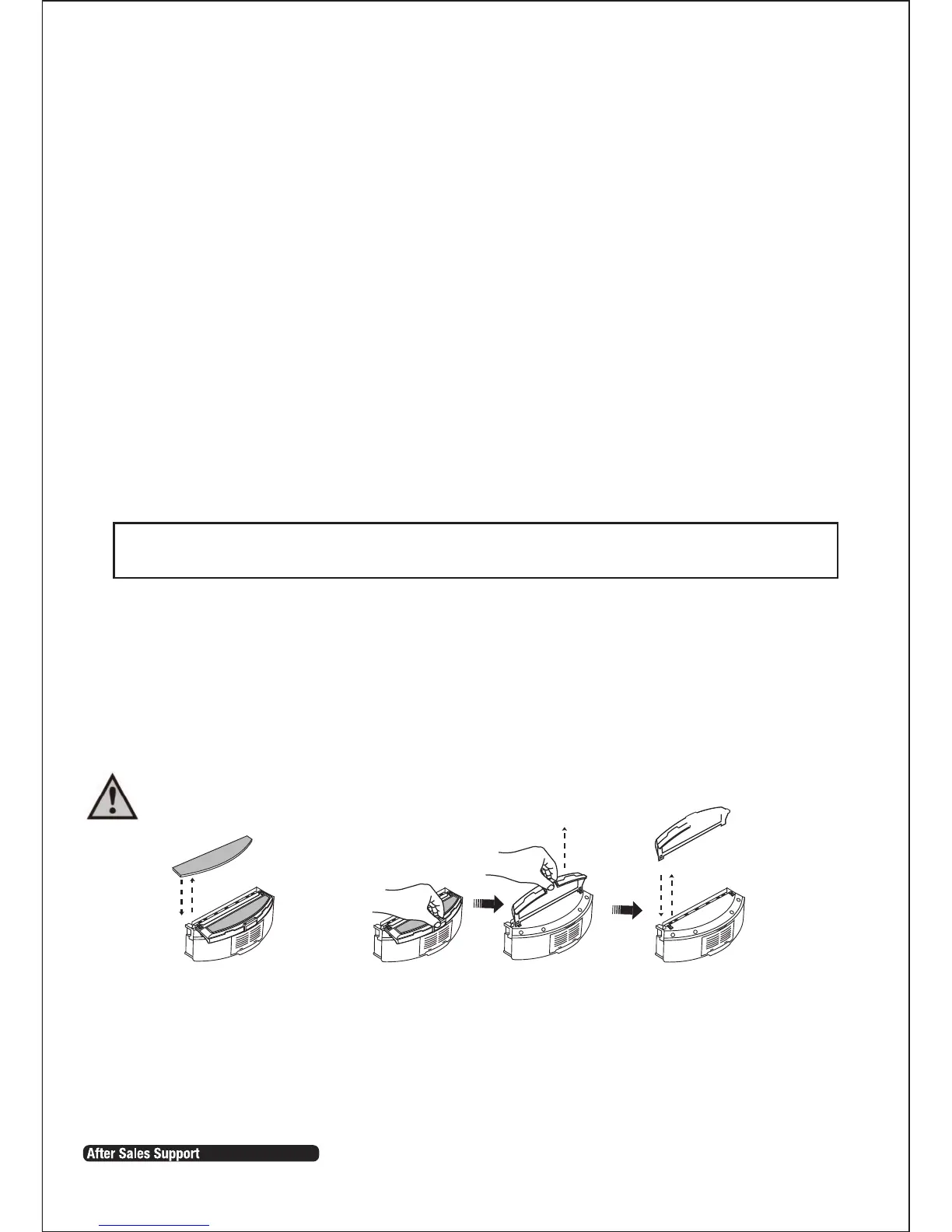
1. The velcro mop base can be attached to the dust filter bracket. There are right & left fasteners on
the bottom of the dust filter bracket.
2. You can then attach one mop pad to the velcro (refer Fig.1).
3. To remove unplug the the right and left fasteners of the velcro mop base on the dust filter bracket
(refer Fig.2).
Fig.1 Fig.2
Please note that this vacuum cleaner is not for use with water.
Getting Started Cont.


 To Next Page