5-30 Audio
. Do not store an iPod
®
in the
vehicle. If an iPod
®
is left in the
vehicle for a long period of time,
it may be deformed, discolored
or damaged by high temperature.
NOTE
. Even if a USB storage device or
iPod
®
is connected, it cannot be played
unless the USB/iPod
®
mode is se-
lected.
. Movies stored on a USB storage
device or an iPod
®
cannot be played
while the storage device or iPod
®
is
connected to the system.
. While an iPod
®
is connected, the
iPod
®
cannot be operated using the
click wheel on the iPod
®
(except some
models).
. When using an iPod
®
by connecting
it to in-vehicle equipment, the order of
the list items displayed on the i n-
vehicle equipment may be different
from that on the iPod
®
. However, this
does not indicate a malfunction.
. An iPod
®
battery that is connected
to in-vehicle equipment will be charged
when the ignition switch is in the “ON”
or “Acc” position. However, activation
of the iPod
®
may be delayed if the
battery charge of the iPod
®
is low.
. If an iPod
®
does not activate after
operation, disconnect the connection
cable from the iPod
®
and reset it. For
the resetting procedure, see the User’s
Guide for the iPod
®
.
. If an iPod
®
and the connection cable
are connected improperly, the iPod
®
cannot be powered on or will not be
recognized by in-vehicle equipment. In
this case, disconnect the connection
cable from the iPod
®
, and then connect
it again.
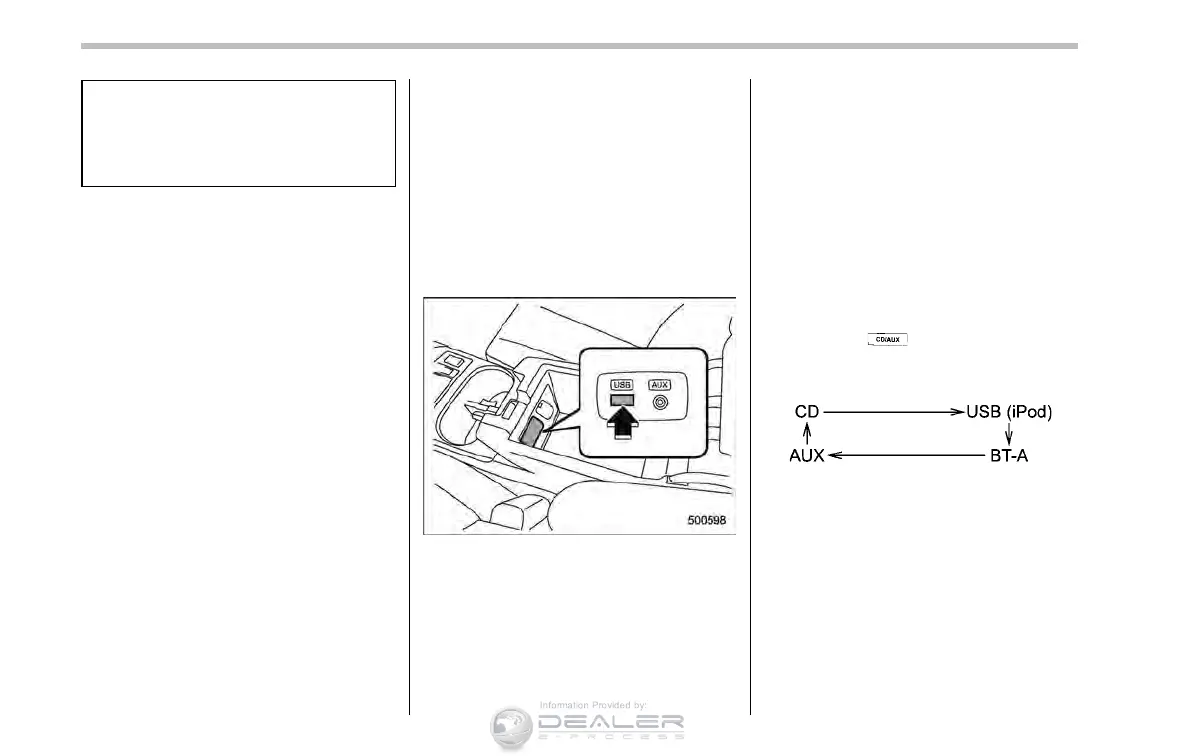
The USB connector is located in the
center console. Use the connector to
connect a USB storage device/iPod
®
.
& How to play back
NOTE
. Depending on the number of files
stored on the iPod
®
and the firmware
version, the iPod
®
may not activate
smoothly after operation or not work
properly.
. Do not disconnect the connector
from the iPod
®
during iPod
®
operation.
! Type A audio
1. Connect a USB storage device/iPod
®
.
2. Press the
button. Each time you
briefly press the button, the mode
changes as follows.
When the USB/iPod
®
mode is selected,
the player will start playback of the USB
storage device/iPod
®
.
! Type B audio
! When a USB storage device/iPod
®
is
not connected
Connect a USB storage device/iPod
®
.
Then the player will start playback of the
USB storage device/iPod
®
.













 To Next Page