5-36 Audio
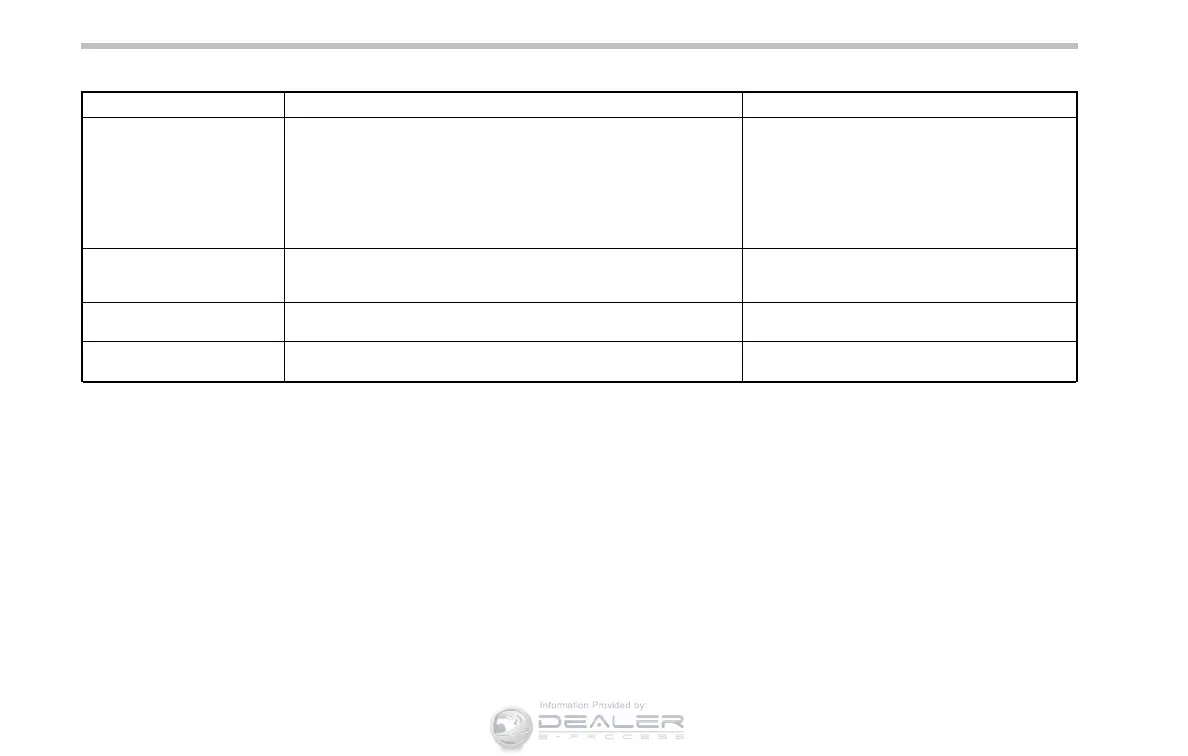
Message Cause Action
“CHECK DEVICE”
. When there is a short in the USB bus
. When an incompatible device (for example a USB mouse) is
connected
. When an incompatible iPod
®
is connected
. When a connected iPod
®
is frozen
. When a transmission malfunction occurs
. When an iPod
®
confirmation malfunction occurs
. When a HUB class USB storage device is connected
Disconnect the USB storage device/iPod
®
and
check it.
“NO DEVICE” (type A audio)
“No USB” (type B audio)
“No iPod” (type B audio)
. No USB storage devices/iPod
®
are connected.
. An incompatible USB storage device/iPod
®
is connected.
Connect a supported USB storage device/iPod
®
.
“NO FILE” (type A audio)
“No song” (type B audio)
There are no playable audio files on the connected USB storage
device.
Connect a USB storage device that has playable
audio files stored on it.
“NO MUSIC” (type A audio)
“No Songs” (type B audio)
There are no playable audio files on the connected iPod
®
.
Connect an iPod
®
that has playable audio files
stored on it.













 To Next Page