28
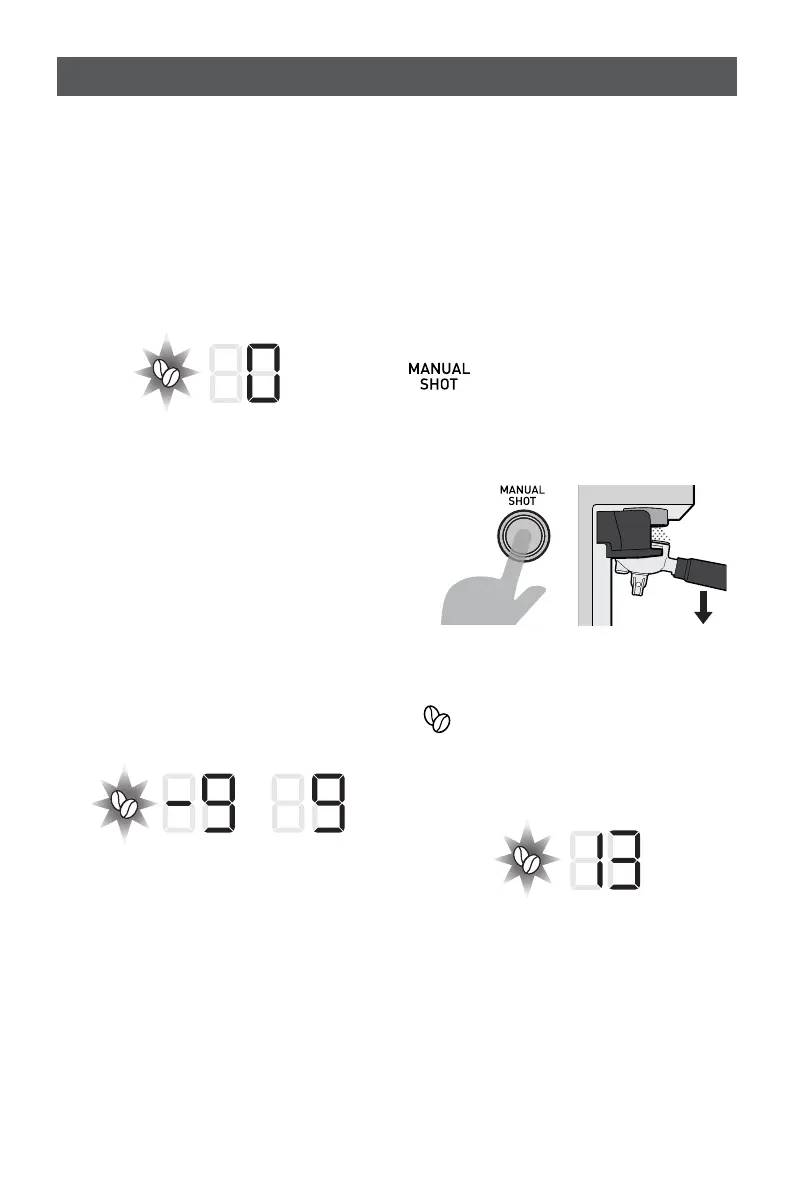
- The machine will beep and the grind
icon will pulse, and one of the following
options will be displayed:
a. If this is the first time The Origins
Espresso Machine is being adjusted
away from factory settings then the
Extraction Timer (9) will display ‘0’.
b. If The Origins Espresso Machine
has previously been adjusted from
factory settings, then that figure will
be displayed instead. The numbers -9
to 9 nominally represent a range of
adjustment possible for the grinder.
Adjusting the number further towards
-9 will decrease the volume of coffee
grounds being dispensed for all grind
settings (0-30), and increasing the
number further towards 9 will increase
the volume of coffee grounds being
dispensed for all grind settings (0-30).
- Once the correct adjustment has been
made press the manual button, The
Origins Espresso Machine will beep once,
and the adjusted timings will be saved.
Customisable – Grinder Recalibration
As the burrs on your grinder wear, the gap
between the burrs will increase slightly,
this will cause the size of your grounds to
increase slightly, which could cause your
espresso to under extract. If this becomes
an issue you may wish to recalibrate your
grinder. To do this:
- Starting from the READY
state, press and hold the
manual brew button for 3
seconds whilst pushing down
on the Group Handle handle
at the same time.
- The machine will beep and
the grind icon will begin to
pulse, and the current Grind
setting position will be shown
on the display.
Fine tuning your espresso
PUSH
HANDLE
DOWN











 To Next Page