SunFounder 3in1 Kit
Table 2: Glyph Code
Numbers Binary Code Hex Code
0 00111111 0x3f
1 00000110 0x06
2 01011011 0x5b
3 01001111 0x4f
4 01100110 0x66
5 01101101 0x6d
6 01111101 0x7d
7 00000111 0x07
8 01111111 0x7f
9 01101111 0x6f
Write these codes into shiftOut() to make the LED Segment Display display the corresponding numbers.
4.5.11 5.11 Install External Libraries
A library is a collection of pre-written code or functions that extend the capabilities of the Arduino IDE. Libraries
provide ready-to-use code for various functionalities, allowing you to save time and effort in coding complex features.
There are two main ways to install libraries:
Many libraries are available directly through the Arduino Library Manager. You can access the Library Manager
by following these steps:
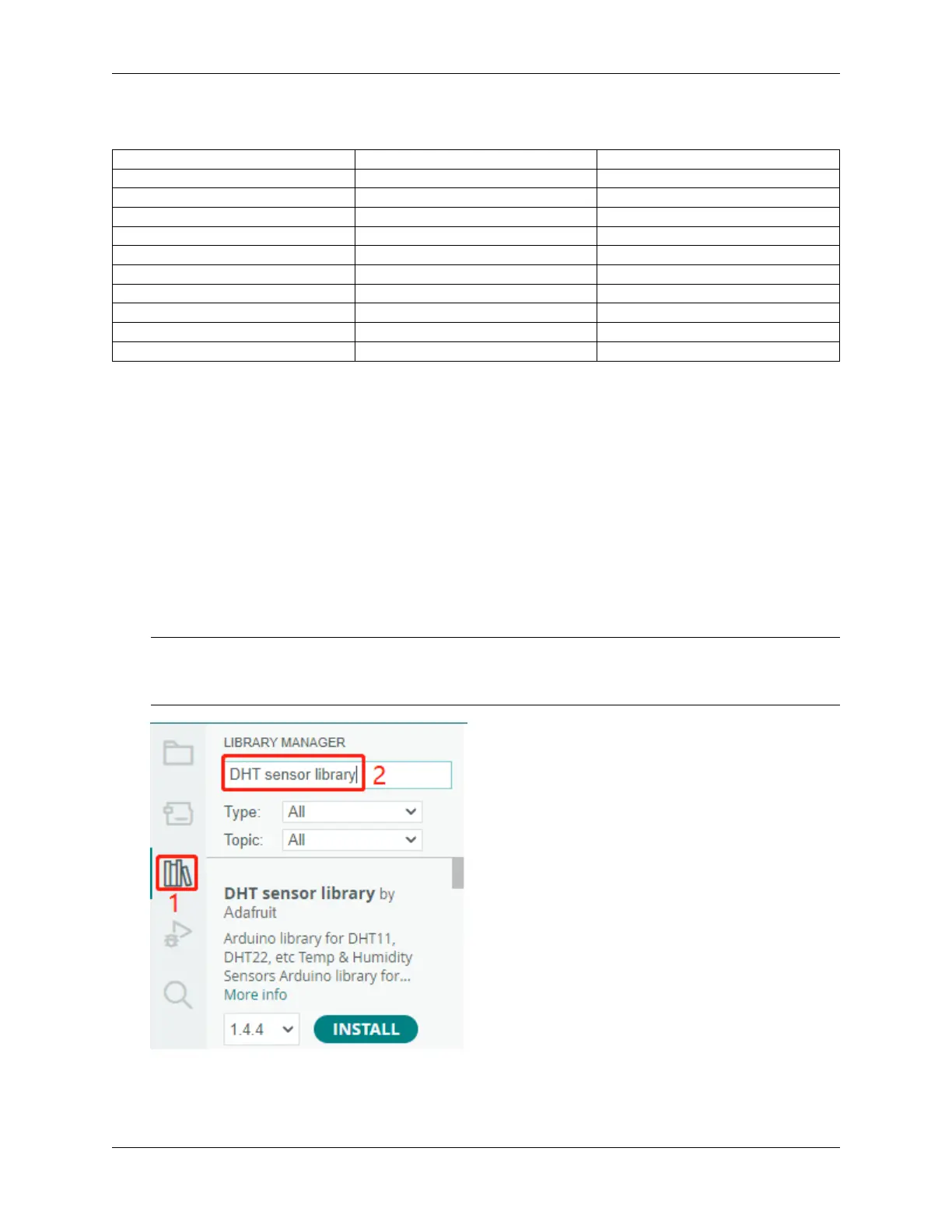
1. In the Library Manager, you can search for the desired library by name or browse through different categories.
Note: In projects where library installation is required, there will be prompts indicating which libraries to install.
Follow the instructions provided, such as “The DHT sensor library is used here, you can install it from the
Library Manager.” Simply install the recommended libraries as prompted.
2. Once you find the library you want to install, click on it and then click the Install button.
168 Chapter 4. Basic Projects



 To Next Page