SWDM240B OPERATION & MAINTENANCE MANUAL
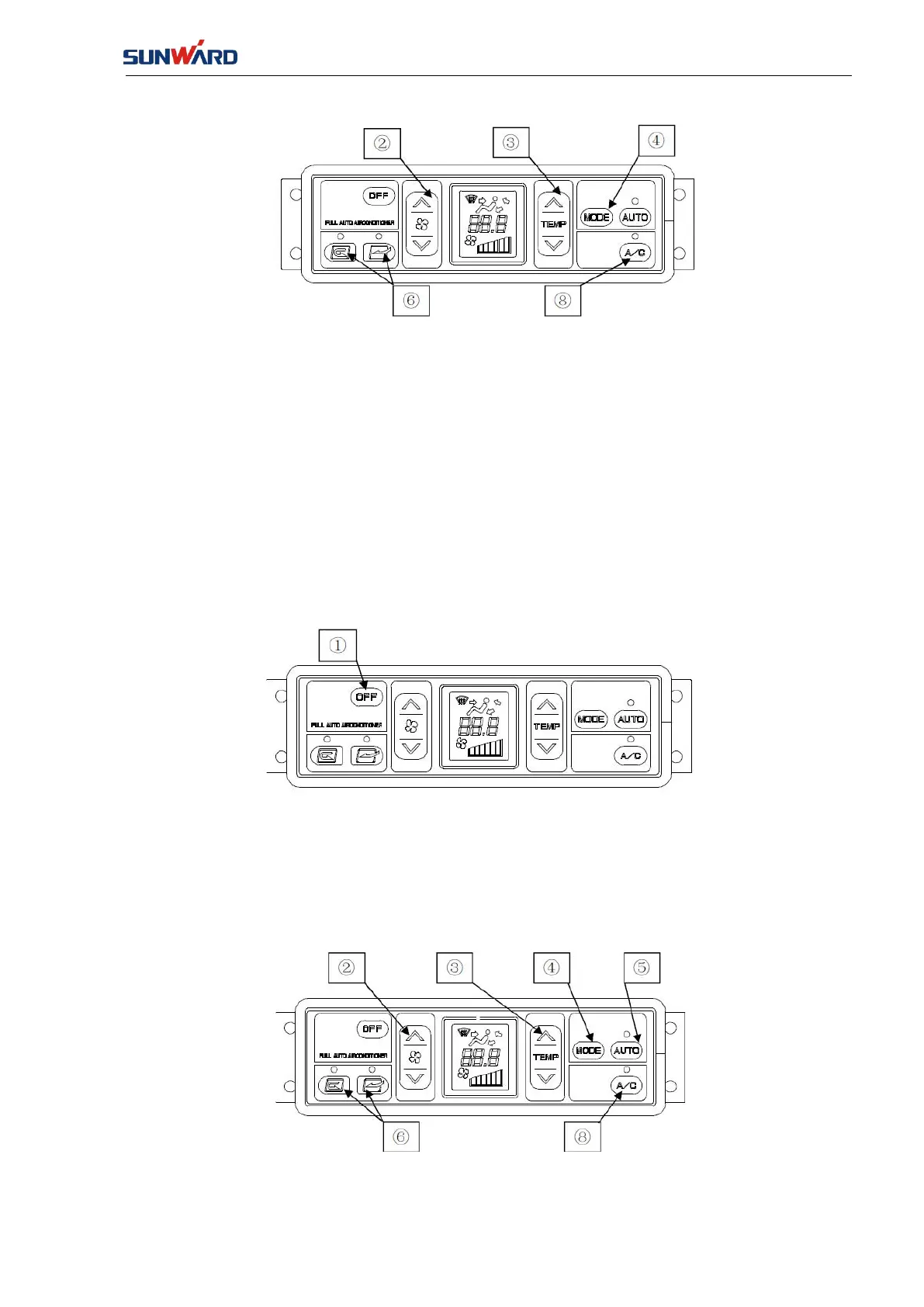
1. Press down the fan regulation switch ② to regulate the air flow rate. In addition, confirm
the set temperature and air flow rate by checking the information shown on the LCD screen.
2. It is possible to check whether the A/C switch ⑧ is switched on by checking the light on it.
3. Set an appropriate temperature by regulating the temperature regulation switch ③.
4. Adjust the blowing mode toggle switch ④ to enable the required air outlets.
5. Select the required internal/external air mode by using the internal/external switching button
⑥.
4. Manual-run Stop
Press down the OFF switch ①
The set temperature and air flow rate indicators on the LCD screen as well as the auto switch
and A/C switch lights are off and the air conditioner is stopped.
5. Running in cool head and warm feet mode (BYLEVEL)
1. Press down the fan switch ② to adjust the air flow rate. The set temperature and air flow
rate are confirmed through the LCD screen.



 To Next Page