- 28 -
3.2.7 EDGING LENS INTERFACE
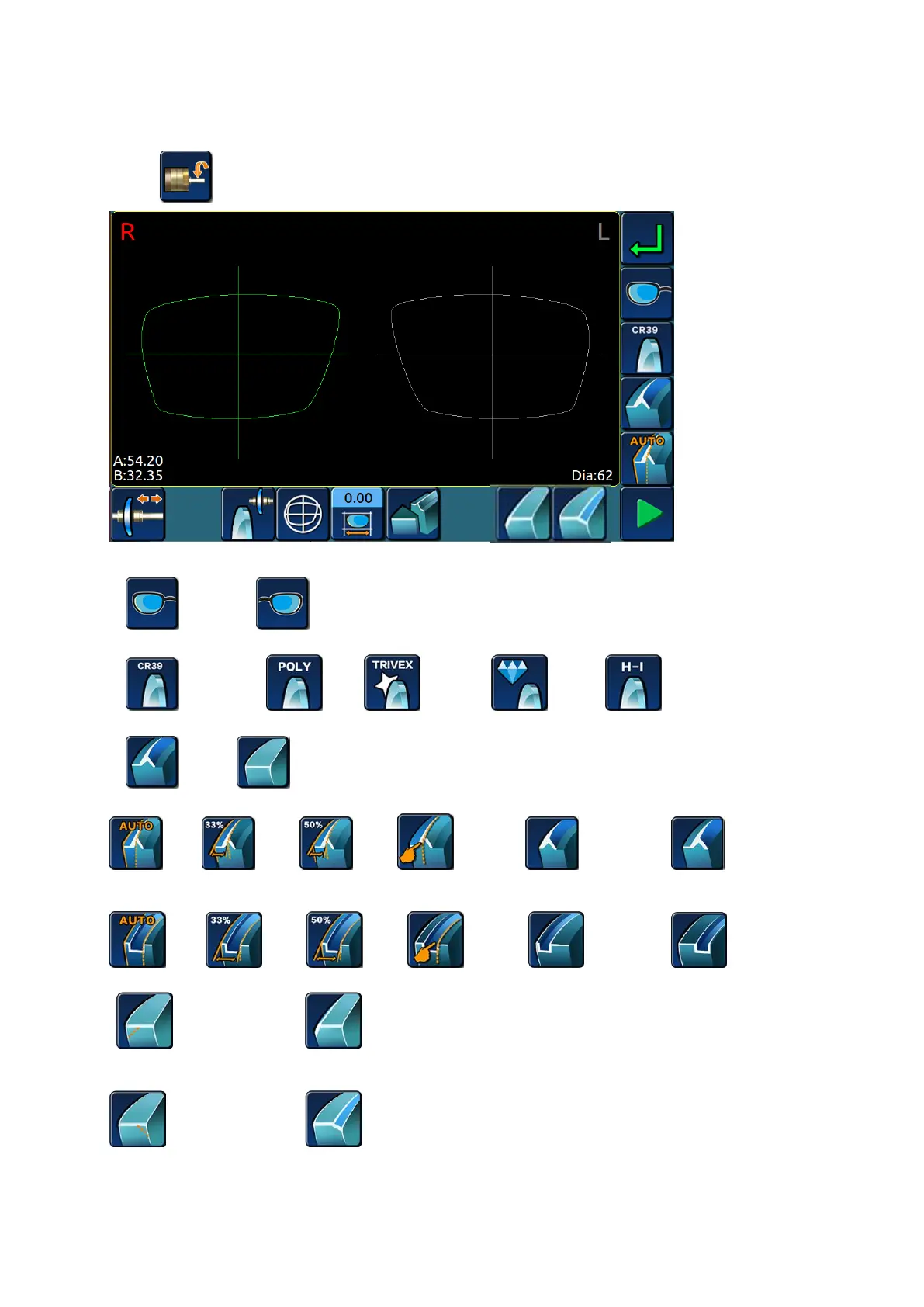
>Press icon, enter the edging lens setting interface.
1. Left and right eye processing options:
>>right eye >>left eye
2. lens material options:
>> Resin lens >>PC >> TRIVEX >> glass >> HR
3. edge shape options:
>>bevel >>flat
4.Sharp edge rate:
>>auto >>33% >>50% >>manual >>front surface >>back surface
5.Grooving rate(only apply to edger with grooving function;):
>>auto >>33% >>50% >>manual >>front surface >>back surface
6.Front side safe chamfering(only apply to edger with safe chamfering function):
>> no safe chamfering >> front side safe chamfering
7. Backside safe chamfering(only apply to edger with safe chamfering function):
>> no safe chamfering >> backside safe chamfering(small)


 To Next Page